
Autoruns is a Microsoft tool for easily editing programs that start automatically during Windows boot.
One of the bad habits of various programs (or rather, their developers) is to think that the computer where they are installed belongs entirely to them. So many of them add “their little things” that load during startup.
Over time, and as you install things, your computer fills up with junk that loads at startup, eventually making the computer unusable. Then, you know the drill, it’s time for a clean install and starting over.
Many of these issues could be resolved by performing maintenance on the applications that load at startup. That’s where Autoruns comes into play.
Autoruns is a simple program, without any frills, whose sole function is to show us everything that will be loaded during Windows startup.
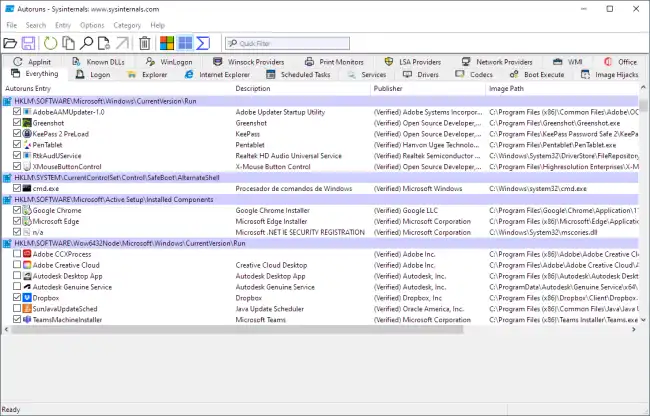
We simply have to run it and wait a few seconds for the list of programs that start automatically on the system to load.
Each item is displayed as a checkbox, which we can check or uncheck. This is very useful, in case we realize at some point that we have disabled something we needed.
Furthermore, it can show other entry points in the system, such as Internet Explorer add-ons, services, scheduled tasks, etc.
We can also search or filter entries. Or right-click to access more functions, such as going to the source that generates the autorun (for example, a shortcut or a registry key), or scanning with an online antivirus.
Another useful feature of Autoruns is the “Hide Signed Microsoft Entries” option. When this option is activated, Autoruns will hide all startup programs digitally signed by Microsoft, allowing us to focus on third-party programs.
In short, it’s a very useful tool. Personally, it’s one of the first programs I install on a computer after a clean install, and I review it periodically.
Performing periodic maintenance allows you to locate points that can slow down Windows startup and decrease the overall performance of the system.
