

Recently, a meme has gone viral on the Internet featuring a table comparing the speeds of different languages, summing all numbers from one to one billion (English, 1,000 million) in a simple loop.
Of course, the thread was filled with people giving their opinions, making their conjectures… although many made no sense at all. And, as usual, some comments were… let’s say “passionate”. Basically, there was more hate than sense.
First of all, let me be clear that my opinion is that these kinds of “my language is better than yours” discussions are quite childish. There are much more important aspects when choosing a language, and focusing on something like “counts to 1 billion faster” is very, very, very limited.
But well, most people love to talk about it and compare languages, making them compete against each other. In fact, let’s admit it, we all do it from time to time.
So, let’s make a little post about it, with a minimum of rigor (to the extent that simply counting to a billion allows).
Benchmark Between Languages
First of all, let’s be clear that making a precise and representative benchmark is quite complicated. It depends on many factors, such as the hardware used, the specific implementation of each language, the optimizations applied, even the moment you catch the processor. Doing benchmarks well is a whole world.
But never mind, that’s not interesting! What we want is to count to a billion! So let’s go, let’s count to a billion in different languages. As a benchmark, it’s still a piece of crap, but… on the other hand, it’s still a test like any other.
So let’s compare,
- C++, compiled with MVSC, in Debug / Release
- C++, compiled with G++, with and without -O3 optimizations
- Go
- Rust, compiled in Debug / Release mode
- JavaScript executed on NodeJS
- JavaScript executed on Chrome
- Python
And here are the results, with the time in seconds (lower is better),
| Language | Time (s) |
|---|---|
| C++ (G++ -O3) | 0 |
| Rust (Release) | 0 |
| C++ (MVSC Release) | 0.1 |
| Go | 0.25 |
| C# (Release) | 0.32 |
| C++ (MVSC Debug) | 0.5 |
| JS (NodeJS) | 0.45 |
| C# (Debug) | 0.65 |
| C++ (G++) | 1.3 |
| JS (Chrome) | 4.35 |
| Rust (Debug) | 6.46 |
| Python | 40.46 |
Obviously, these times only apply to my computer i5 Gen 12, Win10, at 2 AM, while listening to music on Spotify, and are only valid for comparing among themselves.
If you run it on your computer, you will have different results. I see people sharing times among themselves as if everyone had the same computer, saying “well, this ‘such test’ gives me ‘so much’.” And how should I know what computer you have! You’re comparing apples to oranges. You’ll have to run all the tests and compare them among themselves.
In any case, let’s put it in a nice little chart, and it looks like this,
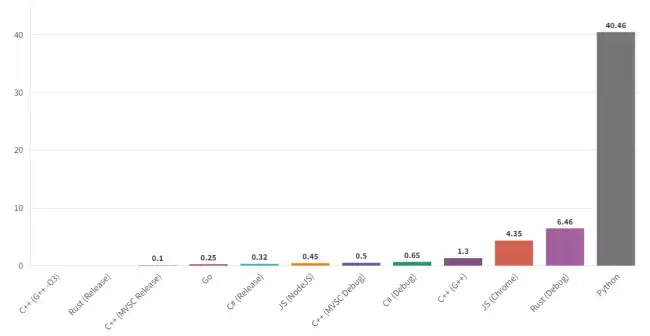
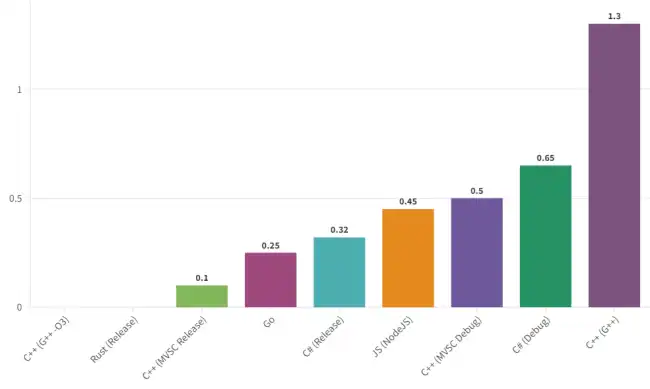
Here with a zoom into the lower part of the table (because Python is such a dunce it messes up the whole chart and doesn’t let you see anything)
Things we’ll see. Python is the slowest, by a wide margin. Oh, what a surprise! We all knew Python was slow, and its purpose is not to be fast.
As for the fastest, C++ and Rust. Logical, because that’s what they’re for. In fact, in optimized mode (Release or -O3) the time is ZERO. Not “more or less small”… it’s ZERO. That’s because the compiler is smart enough to completely eliminate the loop, because it knows its value is N*(N+1)/2.
Are you surprised that the compiler can eliminate the entire loop? Check out this post We Test How Smart the Arduino Compiler Is
This is only possible because this benchmark is excessively simple, and the compiler can eliminate the loop. If the loop weren’t so simple, it couldn’t eliminate it. But well, this illustrates (once again!) how important the role of the compiler and its optimizations is.
Also, pay attention to the difference between compiling with Release, or Debug (optimized - not optimized). Rust without optimization goes to 6 seconds, and C++ in G++ up to 1.3 seconds. So that thing about “my language is very fast.” Well yes… if you compile it well.
Often you see people saying that C++ is very fast and “mocking” JavaScript (for example)… but then they forget the -O3 flag. Well then your C++ code is three times slower than JavaScript!
Let’s continue with C#, the golden boy of this holy house (my website), which scores 0.66 in Debug and 0.32 in Release. Again, the difference between Debug and Release is important, and in general a very good result.
That said, I’m a little disappointed that the .NET compiler wasn’t able to detect that the loop was useless and didn’t eliminate it like Rust and C++ did. Well, that’s how it is, you see? That’s how you accept a result, even when you don’t particularly like it.
On the other hand, I see many people in the comments saying “it’s impossible for C# to beat C++.” Eh, yes, yes it is possible. I’ve seen it myself. Sometimes (not often, but sometimes) C# code wins in speed over C++ code. Don’t believe me? Search for JIT compiler on the internet, and you’ll have reading and entertainment for a while.
JavaScript, in the browser, is obviously a disaster. But in NodeJS it scores 0.45s, a very good result (point for Node). A good example that the language is not the only thing that matters. In fact, the language is the least of it. It’s the environment / compiler / interpreter that has the greatest influence on speed.
Almost always the language is tied to an execution environment and/or framework. But conceptually, they are independent; the language is an abstract concept. That’s why all languages get different times, depending on how you run them. This is one of the reasons why comparing “languages” doesn’t make much sense.
Finally, and to end the lecture, Go scores a very honorable 0.25s. Placing itself as somewhat faster than C#, and somewhat slower than C++ and Rust. Well, there you have it, if you like Go, it didn’t do badly in the comparison.
Conclusion
Conclusioooooon. Well, that’s it, the results are what they are. Some will say, “But my language can be optimized by doing… such and such! and blah blah blah” Yes, of course! All languages can be optimized in this life. But what came out, is what came out, in the “normal execution flow” of the language.
Are you a fanatic of X language and don’t like that it came out slower than C++ / Rust? Well, my friend… tough luck 🤷. Don’t be a fanatic of a language, it doesn’t make sense. And the data is what it is. Don’t like the benchmark results? Perfect, make your own, share it with the community, and that way we can all learn something 😙.
But above all, really, don’t take these things so, so seriously. They are just comparisons between languages. It’s not a member of your family. It’s not someone who ran over your cat 🐈. You’re not a soccer team fan.
Each language has its characteristics. Defending one or the other, or mocking one or the other, doesn’t make much sense. Besides, in the real world things are much more complicated (and on the other hand, more fun) than “count to a billion.”
So be good, learn all the languages you can, and don’t go around arguing with people. Take care and behave well 😘!
Code Used
Here I leave you the code I used, so you can test it on your computer, no tricks.
C#
using System.Diagnostics;

Stopwatch stopwatch = Stopwatch.StartNew();

long suma = 0;
for (int i = 0; i <= 1000000000; i++)
{
    suma += i;
}

stopwatch.Stop();
TimeSpan duration = stopwatch.Elapsed;

Console.WriteLine(suma);
Console.WriteLine("Tiempo transcurrido: " + duration.TotalSeconds + " segundos");
C++
#include <iostream>
#include <chrono>

int main() {
    auto start = std::chrono::high_resolution_clock::now();

    long long suma = 0;
    for (int i = 0; i <= 1000000000; i++) {
        suma += i;
    }

    auto end = std::chrono::high_resolution_clock::now();
    std::chrono::duration<double> duration = end - start;

    std::cout << suma;
    std::cout << "Tiempo transcurrido: " << duration.count() << " segundos" << std::endl;

    return 0;
}
JavaScript
console.time("Tiempo transcurrido");

let suma = 0;
for (let i = 0; i <= 1000000000; i++) {
    suma += i;
}

console.timeEnd("Tiempo transcurrido");
Python
import time

start_time = time.time()

suma = 0;
for i in range(1000000000):
    suma += i

end_time = time.time()
duration = end_time - start_time

print(suma);
print("Tiempo transcurrido: ", duration, "segundos")
Rust
use std::time::Instant;

fn main() {
    let start_time = Instant::now();
    let mut sum: i64 = 0;

    for i in 1..=1_000_000_000 {
        sum += i;
    }

    let elapsed_time = start_time.elapsed();

    println!("La suma total es: {}", sum);
    println!("Tiempo transcurrido: {:?}", elapsed_time);
}
- Debug with cargo run
- Build with cargo run —release
Go
package main

import (
	fmt"
	"time"
)

func main() {
	startTime := time.Now()
	sum := 0

	for i := 1; i <= 1000000000; i++ {
		sum += i
	}

	elapsedTime := time.Since(startTime)

	fmt.Println("La suma total es:", sum)
	fmt.Println("Tiempo transcurrido:", elapsedTime)
}
