
ScreenToGif is an application that allows us to record an area of the screen, our webcam, or even draw on a sketchboard, and export it as an animated GIF.
We can use ScreenToGif, for example, to make animated GIFs to illustrate software and web page tutorials, or even create animated memes from movies or YouTube videos.
There is no doubt that the GIF format is living one of its best moments, a resurgence for a format that was thought to be finished. And if a picture is worth a thousand words, an animated picture must be worth much more.
In many cases, using a GIF format is preferred over a video because the file size is smaller and they can be viewed in applications without depending on codecs, video players, streaming,… which are always susceptible to incompatibilities.
Proof of this is that the main messaging applications and social networks allow sending GIFs, and their users make intensive use of them as part of communication.
But it’s not just about memes. GIFs are also very useful for developing small instructions, tutorials, or manuals that we can easily include on a web page, or distribute via instant messaging or social networks.
This is where ScreenToGif comes into play, allowing easy capture of our screen and export of the animation as a GIF. It also allows using a webcam as a source. Finally, it incorporates a sketchboard for freehand drawing.
How to Use ScreenToGif
ScreenToGif’s capture window is simple and fulfills its function. We can adjust the size to the desired area and the capture speed, which by default is 15 frames per second.
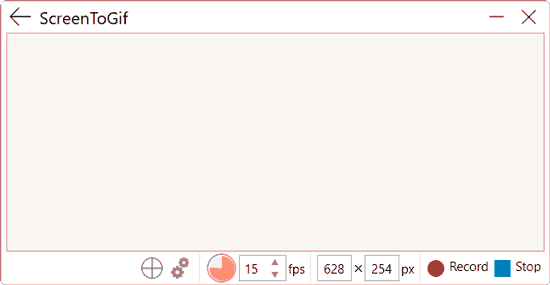
When we want to start recording, we press the record button, or the F7 key (it can be changed in the settings). We can pause and resume the capture by pressing F7 again.
When we finish the capture, we press the finish button or press the F8 key.
Once finished, a complete editor appears that allows us to make adjustments before saving the GIF.
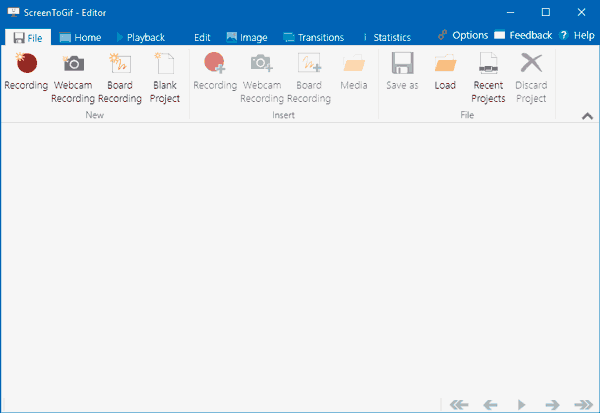
The ScreenToGif editor allows us to delete sections or frames, adjust or crop the size, apply filters, add text, transitions. It is really a very complete editor, with more than enough functions and options.
Finally, we press the Save button, select the destination folder and the filename we want for our animated GIF. That simple!
ScreenToGif is a simple but very practical tool for generating animated GIFs, which we can use to create tutorials or even easily create memes.
It is available in both installer and portable versions, only for the Windows operating system. It is Open Source and, of course, free, although the authors accept donations. You can download it from https://www.screentogif.com.
