

In this post, we are going to implement a circular buffer in Arduino. What is a circular buffer and what is it used for?
Imagine we are going to receive a series of values but, typically to save memory, we don’t want to store all of them. We are only interested in storing the last N received values, maintaining the order of reception.
The first alternative we might think of is to use an array of dimension N, store each received value at position 0, and shift the rest of the values to the right to accommodate the new value.
This first method is inefficient because it requires us to shift N-1 values (when full) every time we receive a new value, resulting in an O(n) algorithm.
In case you’re wondering, things don’t improve by storing at the last position. The moment our buffer fills up, we will still have to shift N-1 values and again we have an O(n) algorithm.
A circular buffer (or ring buffer) is an alternative to achieve an O(1) order in this situation. Again we use an array of length N but, instead of shifting the stored values, we vary the position where we insert the element.
For this, we only need to store and manage the index of the current position. We will also have to deal with the array boundaries in read and write operations, for example, resetting the buffer index to 0 when we exceed the upper limit of the array.
Reading the last M values from a circular buffer is inefficient because the values are not in consecutive memory locations, so we cannot copy them directly.
If this loss of efficiency is a problem and memory is not a critical factor, we could use a buffer of length 2N. By simultaneously writing values at I and I+N, the last M values are always stored between I-M and I+N-M.
Circular buffers are common in communication systems, command storage in a system, and sensor filtering. In a future post, we will see how to use a circular buffer to quickly calculate a moving average filter.
Simple Circular Buffer with Index
Here is a very minimal implementation of a circular buffer. We use the variable ‘circularBufferIndex’ to store the current position, and when adding to the buffer we handle the array boundaries.
const int circularBufferLength = 10;
int circularBuffer[circularBufferLength];
int circularBufferIndex = 0;

void appendToBuffer(int value)
{
  circularBuffer[circularBufferIndex] = value;
  circularBufferIndex++;
  if (circularBufferIndex >= circularBufferLength) circularBufferIndex = 0;
}

void getFromBuffer(int* out, int outLength)
{
  int readIndex = (circularBufferIndex - outLength + circularBufferLength) % circularBufferLength;
  for (int iCount = 0; iCount < outLength; iCount++)
  {
    if (readIndex >= circularBufferLength) readIndex = 0;
    out[iCount] = circularBuffer[readIndex];
    readIndex++;
  }
}

void getFromBufferInvert(int* out, int outLength)
{
  int readIndex = circularBufferIndex - 1;
  for (int iCount = 0; iCount < outLength; iCount++)
  {
    if (readIndex < 0) readIndex = circularBufferLength - 1;
    out[iCount] = circularBuffer[readIndex];
    readIndex--;
  }
}

void printArray(int* x, int length)
{
  for (int iCount = 0; iCount < length; iCount++)
  {
    Serial.print(x[iCount]);
    Serial.print(',');
  }
  Serial.println();
}

void setup()
{
  Serial.begin(115200);

  Serial.println("Store 0 - 12");
  for (int iCount = 0; iCount <= 12; iCount++)
  {
    appendToBuffer(iCount);
    printArray(circularBuffer, circularBufferLength);
  }

  Serial.println("");
  Serial.println("Get last 5");
  int data[5];
  int M = sizeof(data) / sizeof(int);
  getFromBuffer(data, M);
  printArray(data, M);

  Serial.println("");
  Serial.println("Get last 5 invert");
  getFromBufferInvert(data, M);
  printArray(data, M);
}

void loop()
{
}
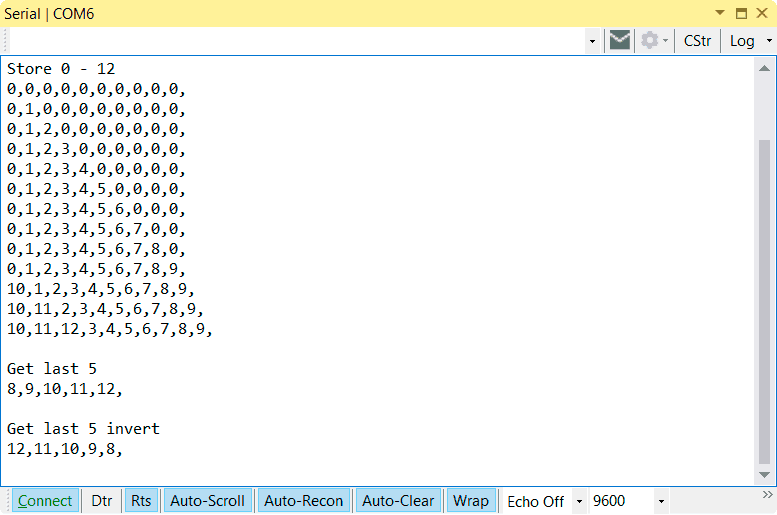
These are the results of running this code. We see that the numbers are stored in the buffer and, when it fills up, they start to be overwritten. This way we can obtain the last N numbers.
Simple Circular Buffer with Pointer
In the previous example, we used the index to access the current position of the buffer because it is suitable for explaining the operation. But, in general, it is normal to use a pointer (in fact, it’s code that is begging for a pointer).
So, just for the sake of it, here is the modified code to use a pointer instead of the index. Basically, the operation is the same as the previous one, and the results you get are exactly the same as those shown above.
const int circularBufferLength = 10;
int circularBuffer[circularBufferLength];
int* circularBufferAccessor = circularBuffer;

void appendToBuffer(int value)
{
  circularBufferAccessor++;
  if (circularBufferAccessor >= circularBuffer + circularBufferLength) circularBufferAccessor = circularBuffer;
  *circularBufferAccessor = value;
}

int getFromBuffer()
{
  int rst = *circularBufferAccessor;
  circularBufferAccessor--;
  if (circularBufferAccessor < circularBuffer) circularBufferAccessor = circularBuffer + circularBufferLength - 1;
  return rst;
}

void getFromBuffer(int* out, int outLength)
{
  int* readAccessor = circularBufferAccessor - outLength + 1;
  if (circularBufferAccessor < circularBuffer) circularBufferAccessor = circularBuffer + circularBufferLength - 1;

  for (int iCount = 0; iCount < outLength; iCount++)
  {
    if (readAccessor >= circularBuffer + circularBufferLength) readAccessor = circularBuffer;
    out[iCount] = *readAccessor;
    readAccessor++;
  }
}

void getFromBufferInvert(int* out, int outLength)
{
  int* readAccessor = circularBufferAccessor;
  for (int iCount = 0; iCount < outLength; iCount++)
  {
    if (readAccessor < circularBuffer) readAccessor = circularBuffer + circularBufferLength - 1;
    out[iCount] = *readAccessor;
    readAccessor--;
  }
}

void printArray(int* x, int length)
{
  for (int iCount = 0; iCount < length; iCount++)
  {
    Serial.print(x[iCount]);
    Serial.print(',');
  }
  Serial.println();
}

void setup()
{
  Serial.begin(115200);

  Serial.println("Store 0 - 12");
  for (int iCount = 0; iCount <= 12; iCount++)
  {
    appendToBuffer(iCount);
    printArray(circularBuffer, circularBufferLength);
  }

  Serial.println("");
  Serial.println("Get last 5");
  int data[5];
  int M = sizeof(data) / sizeof(int);
  getFromBuffer(data, M);
  printArray(data, M);

  Serial.println("");
  Serial.println("Get last 5 invert");
  getFromBufferInvert(data, M);
  printArray(data, M);
}

void loop()
{
}
Circular Buffer in a Library
What if we put it in a library? Of course we can! Here is a library that implements a circular buffer in Arduino. The implementation is somewhat more complex than the one in this post, but in return it is easier to use and more powerful. Enjoy!
Download the Code
All the code from this post is available for download on Github. 
