

One of the new features in Visual Studio 2019 was a new window for creating a new project, with a more modern aesthetic than in previous versions.
The traditional window offered a hierarchical tree with project types, organized by language and function. However, the new view displays a list of projects, where we can search and filter the type of project we want.
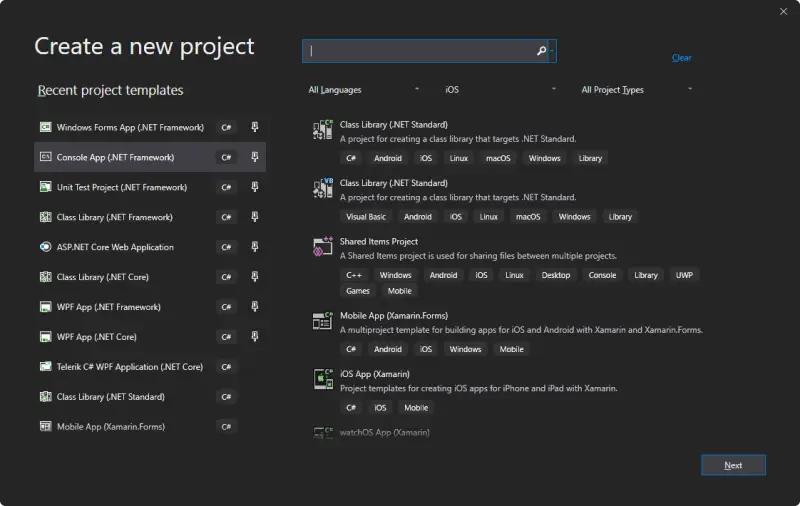
Although the new layout may have improved aesthetically, many of us find that the functionality has worsened compared to previous versions.
In particular, in the new window it is very difficult to find a project of a specific type, even knowing beforehand what type of project we want to create.
The search and filtering fields hardly help, yielding erratic results that sometimes have little or nothing to do with what we are looking for.
Although the new window allows pinning our favorite items, they are of little use when working with many different project types, because we can only pin a limited number of project templates.
Fortunately, it is possible to return to the classic project creation window using the free SwitchProjectDialog extension available at this link.
Simply add the extension to Visual Studio and then go to options to activate the new extension.
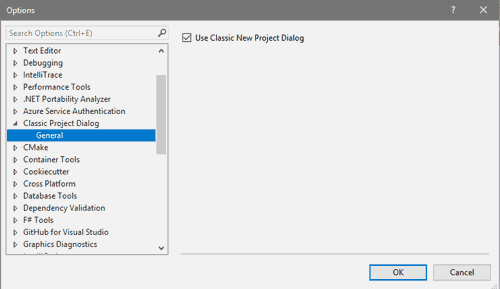
It’s that simple to recover the traditional project creation window, much more organized and functional than the one integrated into Visual Studio 2019.
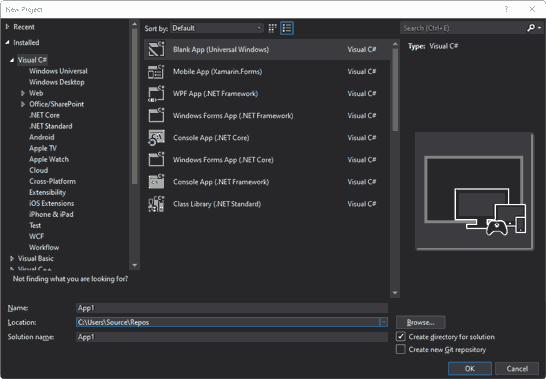
While waiting for Microsoft to reconsider and improve its new project creation window, SwitchProjectDialog is a good solution for restoring the classic project creation window.
