

Axios is a popular Open Source library for JavaScript that allows us to perform operations as an HTTP client, based on the promise model.
Axios stands out for its simplicity and lightness, making it suitable for projects even on low-power processors like the ESP8266 or ESP32.
Furthermore, it provides a unified layer for making Ajax requests, independent of other frameworks we might use in the project. It is compatible with most modern browsers. It is Open Source and its code is available at https://github.com/axios/axios.
How to Install Axios
The installation process is very simple. We can use a package manager like NPM, Bower, or Yarn. For example, in NPM it would be
npm install axios
Or we can add it directly from a CDN as follows:
<script src="https://unpkg.com/axios/dist/axios.min.js"></script>
Basic Axios Example
Let’s see the basic usage aspects with a simple example. First, let’s see how to make a POST request to the URL http://tudireccion.com. The functions ‘OkCallback’ and ‘ErrorCallback’ would be the functions in our code to handle the request result.
Without Axios
let http = new XMLHttpRequest();
http.open("POST", 'http://youraddress.com', true);
http.setRequestHeader('Content-type', 'text/html; charset=UTF-8');
http.onreadystatechange = function() {
    if (http.readyState == 4) {
        if (http.status == 200)
            OkCallback(JSON.parse(http.responseText));
        else
            ErrorCallback(http);
    }
};
http.onerror = OkCallback;
http.send(text);
Using Axios, this same example would look like this.
With Axios
axios({
    url: 'http://youraddress.com',
    method: 'post',
    headers: {'Content-type': 'text/html; charset=UTF-8'},
    data: text
}).then(OkCallback, ErrorCallback)
Consume a REST API with Axios
Let’s see how to use Axios to access a REST API in a simple way. We will use our example REST API in Node and Express, which we set up in this post.
We are going to create a simple page with a few basic buttons to demonstrate the use of Axios.
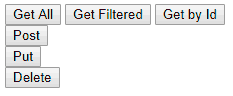
To do this, we create a file called ‘index.html’ with the following content.
<!DOCTYPE html>
<html>
    <head>
        <meta charset="utf-8">
        <meta http-equiv="X-UA-Compatible" content="IE=edge">
        <meta name="viewport" content="width=device-width, initial-scale=1">
        <title>Axios consuming API REST Demo</title>
    </head>
    <body>
        <div>
            <div>
                <button onclick="getAllRequest()">Get All</button>
                <button onclick="getFilteredRequest()">Get Filtered</button>
                <button onclick="getByIdRequest()">Get by Id</button>
            </div>
            <div>
                <button onclick="postRequest()">Create</button>
            </div>
            <div>
                <button onclick="patchRequest()">Update</button>
            </div>
            <div>
                <button onclick="putRequest()">Replace</button>
            </div>
            <div>
                <button onclick="deleteRequest()">Delete</button>
            </div>
        </div>

        <script src="https://unpkg.com/axios/dist/axios.min.js"></script>
        <script src="main.js"></script>
    </body>
</html>
On the other hand, we create a file called ‘main.js’, with the following content, which uses Axios to define functions that call each of the actions of the example REST API.
function getAllRequest()
{
  axios.get('http://localhost:8080/item')
    .then(function (response) {
    console.log(response);
    })
    .catch(function (error) {
    console.log(error);
    })
    .then(function () {
    });
}

function getFilteredRequest()
{
  axios.get('http://localhost:8080/item', {
    params: {
      filter : 'myFilter'
    }
    })
    .then(function (response) {
    console.log(response);
    })
    .catch(function (error) {
    console.log(error);
    })
    .then(function () {
    });
}

function getByIdRequest()
{
  id = 10;
  axios.get('http://localhost:8080/item/' + id)
    .then(function (response) {
    console.log(response);
    })
    .catch(function (error) {
    console.log(error);
    })
    .then(function () {
    });
}

function postRequest()
{
  axios.post('http://localhost:8080/item', {
    data: 'NewItem'
    })
    .then(function (response) {
    console.log(response);
    })
    .catch(function (error) {
    console.log(error);
    })
    .then(function () {
    });
}

function putRequest()
{
  id = 10;
  axios.put('http://localhost:8080/item/' + id, {
    data: 'NewItem'
    })
    .then(function (response) {
    console.log(response);
    })
    .catch(function (error) {
    console.log(error);
    })
    .then(function () {
    });
}

function patchRequest()
{
  id = 10;
  axios.patch('http://localhost:8080/item/' + id, {
    data: 'NewItem'
    })
    .then(function (response) {
    console.log(response);
    })
    .catch(function (error) {
    console.log(error);
    })
    .then(function () {
    });
}

function deleteRequest()
{
  id = 10;
  axios.delete('http://localhost:8080/item/' + id)
    .then(function (response) {
    console.log(response);
    })
    .catch(function (error) {
    console.log(error);
    })
    .then(function () {
    });
}
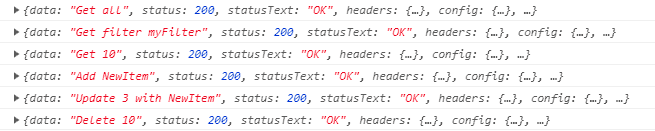
Now, if we click on each of the buttons, we can check in the browser console that the actions are called correctly.
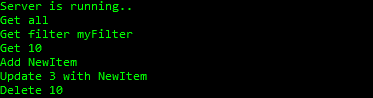
On the other hand, in the NodeJs console we verify that, indeed, the actions are being invoked.
That’s it for this simple example on how to consume a REST API thanks to Axios, a very interesting library that you should add to your toolkit.
Download the Code
All the code from this post is available for download on Github [ ]((https://github.com/luisllamasbinaburo/Axios-consuming-API-REST)
