
Electron.Net is an interesting library that allows us to generate cross-platform applications based on ASP .Net Core and Electron.
The possibility of using the versatility of HTML as a Front End, along with the power of ASP .NET Core as a backend, to create cross-platform desktop applications, is a dream for many .NET developers.
While we wait for Microsoft to make us happy with this integration, Electron.NET proposes an alternative, acting as a wrapper around the popular Electron solution.
Electron.NET automates the process of creating a desktop application in Electron. It also provides a certain API that serves as a gateway between .NET and Electron, providing methods to interact between them, such as creating windows, accessing devices.
Although Electron.NET is a great tool, it also has certain disadvantages. For example, although it has debugging tools, it is not nearly as comfortable as with a normal application.
Electron.NET is an Open Source project, and its code is available at https://github.com/ElectronNET/Electron.NET. The documentation is somewhat scarce, and we must infer its use from the repositories, which are not particularly up-to-date.
It is available as a Nuget package, so adding it to our ASP .NET Core project is as simple as doing
Install-Package ElectronNET.API
Next, we modify our AppBuilder to include the ’.UseElectron(args)’ method, resulting in the following form,
public static IHostBuilder CreateHostBuilder(string[] args) =>
  Host.CreateDefaultBuilder(args)
    .ConfigureWebHostDefaults(webBuilder =>
    {
      webBuilder.UseStartup<Startup>();
      webBuilder.UseElectron(args);
    });
On the other hand, in the application configuration we must add ‘Task.Run(async () => await Electron.WindowManager.CreateWindowAsync());’, so it would look like this,
public void Configure(IApplicationBuilder app, IWebHostEnvironment env)
{
  if (env.IsDevelopment())
  {
    app.UseDeveloperExceptionPage();
  }
  else
  {
    app.UseExceptionHandler("/Home/Error");
    // The default HSTS value is 30 days. You may want to change this for production scenarios, see https://aka.ms/aspnetcore-hsts.
    app.UseHsts();
  }
  app.UseHttpsRedirection();
  app.UseStaticFiles();

  app.UseRouting();

  app.UseAuthorization();

  app.UseEndpoints(endpoints =>
  {
    endpoints.MapControllerRoute(
      name: "default",
      pattern: "{controller=Home}/{action=Index}/{id?}");
  });

  // Open the Electron-Window here
  Task.Run(async () => await Electron.WindowManager.CreateWindowAsync());
}
To start the application we will use the provided CLI, ElectronNET.CLI, which we must ensure is installed globally. To do this we must do,
dotnet tool install ElectronNET.CLI -g
If we already have ElectronNET.CLI installed, to initialize the project we write the following command, inside our ASP .NET Core application directory
electronize init
This will create an ‘electronnet.manifest.json’ file in the project root. Next, to start the application we do,
electronize start
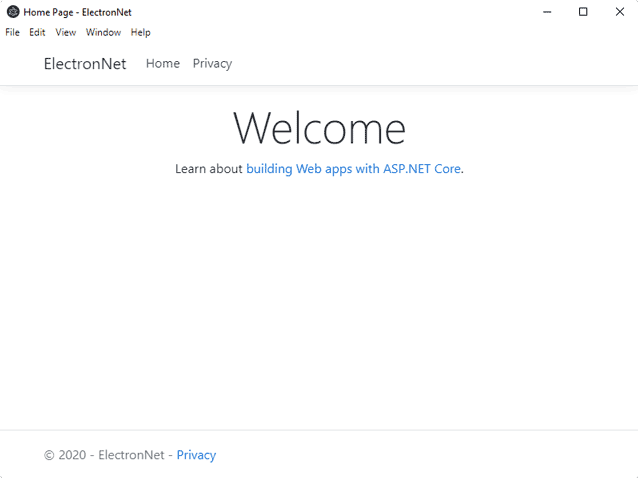
The compilation takes quite a while, especially the first time we run the application. In the end, if everything went correctly, we will see our Electron application running,
Finally, we have various options to create the production (Release/Build) version of the project. For example, we would do
electronize build /target win
There are various build options for different targets. You can consult the project’s website where the parameters to use for different operating systems are detailed.
