

NodeNetwork is an open-source library for C# that facilitates the creation of node editors in WPF (Windows Presentation Foundation) applications.
Based on ReactiveUI, NodeNetwork provides a robust and flexible solution for designing interactive and reactive user interfaces that require visual manipulation of nodes and connections.
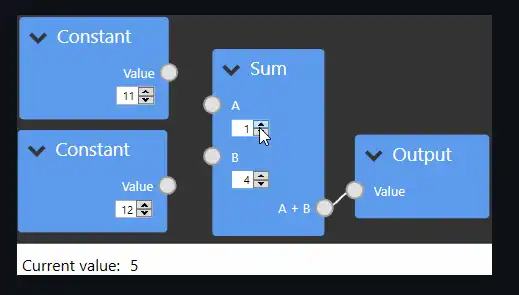
Features of NodeNetwork,
- Node Editor: Allows you to create visual interfaces where users can add, connect, and manipulate nodes.
- Based on ReactiveUI: Uses ReactiveUI to provide a reactive and fluid user experience.
- Flexible and Extensible: Offers a modular structure that facilitates the customization and extension of components.
- Advanced Interactivity: Supports operations like dragging and dropping nodes, connecting nodes via links, and updating the interface in real-time.
For more details, documentation, and additional examples, visit the NodeNetwork repository on GitHub and explore how this library can enhance interaction in your WPF applications.
Installing NodeNetwork
To start using NodeNetwork in your WPF project, you first need to add the corresponding package via NuGet. You can do this through the Package Manager Console in Visual Studio or using the .NET CLI. Here is the command to install NodeNetwork:
Install-Package NodeNetwork
Using NodeNetwork
To use NodeNetwork in a WPF application, you need to set up the working environment and add the necessary controls. Here is an example of basic configuration in XAML and C#:
Configuration in XAML
In your XAML file, add a NodeNetworkView control that will serve as the main area for the node editor:
<Window x:Class="NodeNetworkExample.MainWindow"
        xmlns="http://schemas.microsoft.com/winfx/2006/xaml/presentation"
        xmlns:x="http://schemas.microsoft.com/winfx/2006/xaml"
        xmlns:nodenetwork="clr-namespace:NodeNetwork.Controls;assembly=NodeNetwork"
        Title="NodeNetwork Example" Height="450" Width="800">
    <Grid>
        <nodenetwork:NodeNetworkView Name="nodeNetworkView" />
    </Grid>
</Window>
Configuration in C#
In the code-behind file, you can initialize and configure the NodeNetworkView. Here is an example of how to do it:
using System.Windows;
using NodeNetwork.Controls;
using NodeNetwork.ViewModels;
using NodeNetwork.Models;

namespace NodeNetworkExample
{
    public partial class MainWindow : Window
    {
        public MainWindow()
        {
            InitializeComponent();
            InitializeNodeNetwork();
        }

        private void InitializeNodeNetwork()
        {
            // Create a new node network model
            var nodeNetwork = new NodeNetworkViewModel();

            // Configure the NodeNetworkView to use the model
            nodeNetworkView.DataContext = nodeNetwork;

            // Create and add nodes
            var node1 = new NodeViewModel("Node 1");
            var node2 = new NodeViewModel("Node 2");

            nodeNetwork.Nodes.Add(node1);
            nodeNetwork.Nodes.Add(node2);

            // Connect nodes
            nodeNetwork.Connections.Add(new ConnectionViewModel(node1, node2));
        }
    }
}
Creating Nodes and Connections
NodeNetwork allows you to create nodes and connections between them programmatically. Here is an example of how to create nodes and establish connections:
using NodeNetwork.ViewModels;
using NodeNetwork.Models;

private void CreateNodesAndConnections()
{
    // Create nodes
    var nodeA = new NodeViewModel("Node A");
    var nodeB = new NodeViewModel("Node B");

    // Add nodes to the network
    nodeNetwork.Nodes.Add(nodeA);
    nodeNetwork.Nodes.Add(nodeB);

    // Create a connection between nodes
    var connection = new ConnectionViewModel(nodeA, nodeB);
    nodeNetwork.Connections.Add(connection);
}
Customizing the Interface
NodeNetwork provides options to customize the appearance and behavior of nodes and connections. You can create your own styles and templates for nodes and connections in XAML.
Here is an example of how to customize the appearance of nodes in XAML:
<Style TargetType="{x:Type nodenetwork:NodeControl}">
    <Setter Property="Template">
        <Setter.Value>
            <ControlTemplate TargetType="{x:Type nodenetwork:NodeControl}">
                <Border Background="LightBlue" BorderBrush="Black" BorderThickness="1">
                    <TextBlock Text="{Binding Title}" Padding="5" />
                </Border>
            </ControlTemplate>
        </Setter.Value>
    </Setter>
</Style>
You can also customize the appearance of connections:
<Style TargetType="{x:Type nodenetwork:ConnectionControl}">
    <Setter Property="Template">
        <Setter.Value>
            <ControlTemplate TargetType="{x:Type nodenetwork:ConnectionControl}">
                <Line Stroke="Black" StrokeThickness="2" />
            </ControlTemplate>
        </Setter.Value>
    </Setter>
</Style>
