
CSharpRepl is a tool that allows us to run C# code interactively in a REPL console (Read-Eval-Print Loop).
CSharpRepl provides an interactive console where you can write and execute snippets of C# code in real time (that is… you know the Python or Nodejs interpreter? Well, it’s something like that for C#).
This tool is very useful for performing quick tests, experimenting with new ideas, and debugging code without needing to compile and run a full application.
Main features,
- Interactivity: Allows running C# code in real time, facilitating testing and experimentation.
- Immediate Evaluation: Immediately evaluates and displays the results of the executed code.
- Debugging: Useful for debugging code snippets without needing to compile the entire application.
- API Exploration: Facilitates exploring new APIs and libraries quickly and efficiently.
Something that, in my opinion, Microsoft itself should provide. But hey, since they’re not… the community to the rescue!
For more information and details on how to use CSharpRepl, visit the repository on GitHub. Here you will find additional documentation, usage examples, and updates about this tool.
Installation and Configuration
You can install CSharpRepl globally on your system using the .NET CLI:
dotnet tool install —global CSharpRepl
- Verify Installation
Once installed, verify the installation by running the following command in your terminal:
csharprepl
You should see an interactive CSharpRepl console ready to accept commands.

Integrate with Windows Terminal
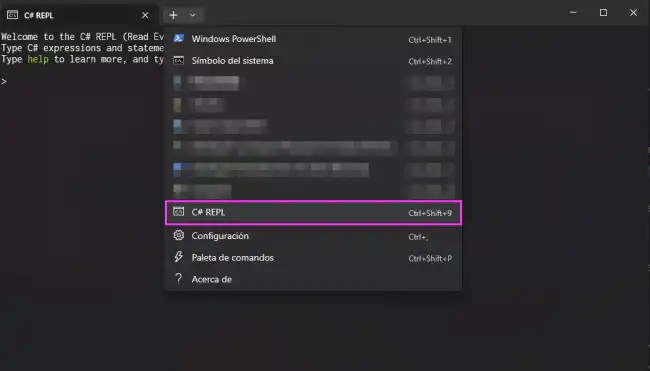
In general, the preferred way to use C# Repl is from Windows Terminal, like any other command interpreter. To do this, you need to add it to the configuration file. Go to “Options” and at the bottom left, click “Open Json File”.
There, in the profiles\list collection, add this:
“profiles”: { “list”: [ { “commandline”: “csharprepl”, “guid”: “{70e71a3e-0518-52f7-81fe-565defc69fe7}”, “name”: “Csharp REPL” } ] }
Now, from Windows Terminal, C# Repl appears in the dropdown options.
How to Use CSharpRepl
Run C# Code
In the CSharpRepl console, you can write any C# code snippet and get immediate results. Here are some basic examples:
Print a Message
Console.WriteLine("Hello, CSharpRepl!");
Declare and Use Variables
int x = 10;
int y = 20;
Console.WriteLine(x + y);
Define and Call Methods
int Add(int a, int b)
{
   return a + b;
}

Console.WriteLine(Add(5, 7));
Advanced Usage
CSharpRepl also allows the use of more advanced C# features, such as creating classes, using LINQ, and working with external libraries.
Create a Class
class Person
{
   public string Name { get; set; }
   public int Age { get; set; }
}

var person = new Person { Name = "John", Age = 30 };
Console.WriteLine($"Name: {person.Name}, Age: {person.Age}");
Use LINQ
var numbers = new List<int> { 1, 2, 3, 4, 5 };
var evens = numbers.Where(n => n % 2 == 0);
foreach (var even in evens)
{
   Console.WriteLine(even);
}
Load and Use External Libraries
You can load assemblies and use external libraries directly in the REPL console. For example, to use a JSON library:
#r "path/to/Newtonsoft.Json.dll"
using Newtonsoft.Json;

var json = JsonConvert.SerializeObject(new { Name = "John", Age = 30 });
Console.WriteLine(json);
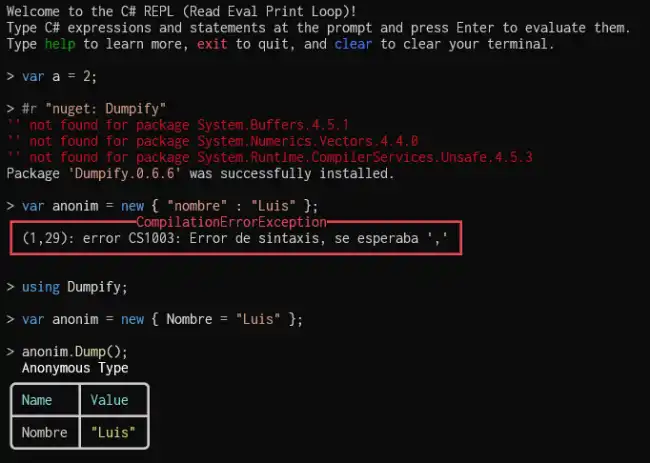
Or NuGet packages
#r "nuget: Dumpify"
using Newtonsoft.Json;

var json = JsonConvert.SerializeObject(new { Name = "John", Age = 30 });
Console.WriteLine(json);
Run CSX Files
We can also create .csx files with a series of instructions or a script to run sequentially. For example,
var a = 2 + 2;
Console.WriteLine(a);
Now to run it we simply do:
csharprepl your_file.csx
and C# Repl will execute all the lines one by one.
