
XLocalizer is an open-source library for localizing and globalizing .NET applications.
It provides a simple and effective way to translate content in ASP.NET Core and Blazor applications, integrating with .NET’s localization mechanisms.
Localizing (translating) an application is a fundamental aspect of reaching a global audience. However, it’s always a real pain complex and tedious process. That’s why XLocalizer emerged, a library to simplify the translation and localization of ASP.NET Core applications.
XLocalizer integrates easily into an existing ASP.NET Core application. Once configured, you can use existing localization resources or create new ones.
Resources are stored in resource files (.resx) and can be easily edited using standard development tools like Visual Studio.
Features of XLocalizer,
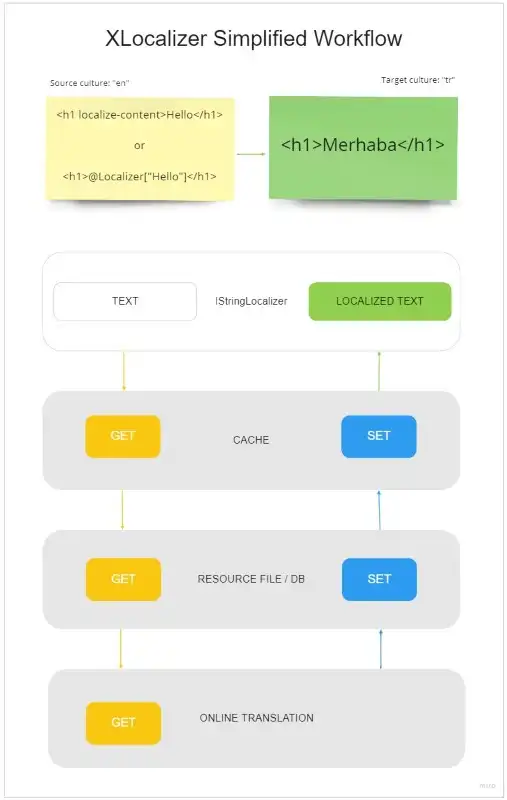
- Auto Translation: Uses machine translation services like Google Translate and Microsoft Translator.
- ASP.NET Core and Blazor Integration: Native support for popular .NET frameworks.
- Resource Management: Facilitates the creation and management of resource files for multiple languages.
- Customization: Allows customization of localization resource keys and values.
- Caching: Implements caching mechanisms to improve localization performance.
For more information, detailed documentation, and access to the source code, visit the project repository on GitHub - XLocalizer.
Installing XLocalizer
To install XLocalizer in your project, you can use the corresponding NuGet package. Open the terminal or Visual Studio Package Manager Console and run the following command:
dotnet add package XLocalizer dotnet add package XLocalizer.Xml dotnet add package XLocalizer.Routing
Basic Configuration
Configuration in ASP.NET Core
To configure XLocalizer in an ASP.NET Core application, you first need to add the localization services in Startup.cs.
services.Configure<RequestLocalizationOptions>(ops =>
{
	var cultures = new CultureInfo[] { new CultureInfo("en"), new CultureInfo("es") };
	ops.SupportedCultures = cultures;
	ops.SupportedUICultures = cultures;
	ops.DefaultRequestCulture = new Microsoft.AspNetCore.Localization.RequestCulture("en");
});

services.AddHttpClient<ITranslator, MyMemoryTranslateService>();
services.AddSingleton<IXResourceProvider, XmlResourceProvider>();

services.AddControllers();
services.AddRazorPages()
	.AddXLocalizer<LocSource, MyMemoryTranslateService>(ops =>
	{
		ops.ResourcesPath = "LocalizationResources";
		ops.AutoAddKeys = true;
		ops.AutoTranslate = true;
		ops.UseExpressMemoryCache = true;
	});
Usage in Blazor Views
You can use XLocalizer in your Razor views to translate content dynamically. Here is an example of how to use XLocalizer in a Razor view:
@page "/"

<h1>@_loc["Hello, world!"]</h1>

@_loc["Welcome to your new app."]

<SurveyPrompt Title="How is Blazor working for you?" />

<XLocalizerPrompt />
XLocalizer is a very powerful library with many configuration options. Fortunately, it provides a very comprehensive repo with examples for different technologies GitHub - LazZiya/XLocalizer.Samples: Sample projects to demonstrate XLocalizer functionalities.
