

The thumbs.db file is a hidden file in Windows systems since the XP version, which contains thumbnails of the images contained in a folder. This file serves as a system cache, speeding up the process of displaying thumbnails, as they don’t have to be generated every time we visit the folder.
However, despite being a Windows-specific file, ironically this file sometimes prevents us from deleting or moving a folder, because it cannot delete the thumbs.db file (that’s just how Windows is!).
This problem occurs in Windows XP, 7, and 8, and happens because Windows accesses this file while we are trying to move or delete the folder. It can usually be solved simply by closing the folder or restarting the computer. However, in other cases, it becomes really difficult to delete these folders, especially when they are saved on the user’s desktop.
To solve this annoyance, we can follow the following steps to temporarily disable the generation of thumbs.db files:
- Press the Windows key
- Type “Folder Options”
- In the window, select the “View” tab, and check the option “Always show icons, never thumbnails”
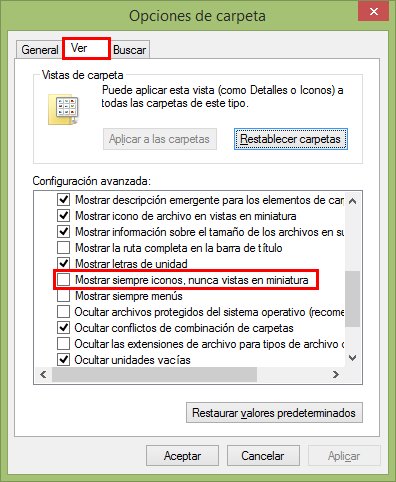
With this, we have temporarily disabled Windows thumbnails. No folder will show image previews, only an icon.
Now we delete the existing thumbnails in the system. To do this:
- Press the Windows key
- Type “Disk Cleanup”
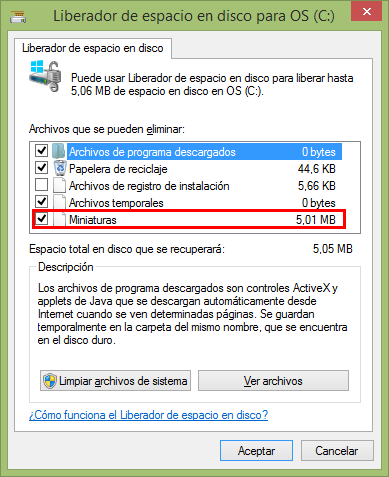
Finally, we can now move or delete the folders. Later, we can re-enable thumbnail display by unchecking the previous option in the Folder Options window.
