
A very common question when you start talking about containers is what is the difference between containers and virtual machines (like VirtualBox or VMware) because they “seem” to do the same thing.
Although Docker and virtual machines (VMs) have similar goals (isolating applications and their dependencies), the difference lies in the architecture.
- A virtual machine emulates a complete computer, including the hardware and a full Operating System (Windows, Linux) for itself. They are heavy (GBs) and slow.
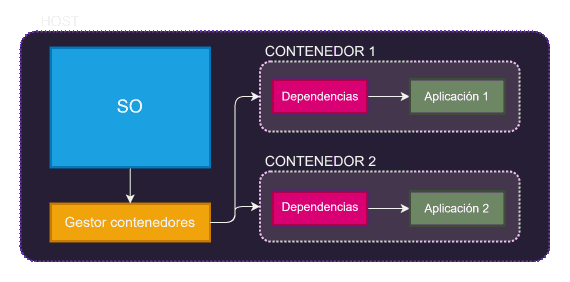
- A Docker container shares the kernel of your host operating system but isolates the processes. They are lightweight (MBs) and start instantly.
To see it better, let’s look at this diagram 👇
Virtualization vs Containerization
To understand Docker, we first need to understand how we used to solve this before: using Virtual Machines (VMs).
Traditionally, if we wanted to isolate applications, we used virtualization. Tools like VirtualBox or VMware allow us to run a complete guest operating system on top of our host operating system.
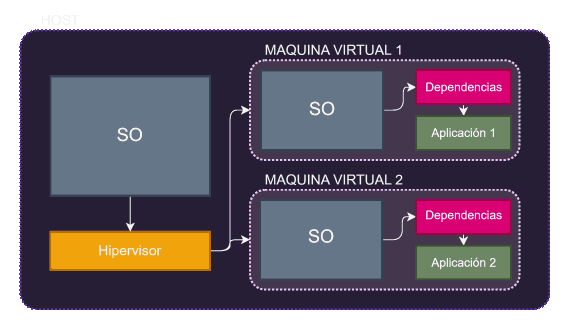
The problem is evident: It’s very heavy. Each isolated application needs to boot an entire Operating System just for itself. That consumes a lot of RAM, a lot of CPU, and takes minutes to start.
This is where containers change the game. Unlike a virtual machine, containers do not include a guest operating system.
Instead, containers share the kernel of the host operating system, but run in isolated user spaces.
Advantages of Docker over VMs
- Lower resource consumption: Containers share the host’s kernel, reducing CPU, memory, and storage usage.
- Greater speed: Containers start in seconds, while VMs can take minutes.
- Ease of use: Docker simplifies creating, distributing, and running applications.
