

EarTrumpet is an open-source volume control application for Windows, developed by File-New-Project.
Its main goal is to provide users with a more powerful and adaptable interface for managing audio devices and applications in the Windows operating system.
I don’t know about you, but I’m fed up with Windows automatically changing the volume of my speakers, headphones, and microphones 😠.
I don’t know if it’s when you switch sources, restart the computer, or whenever it feels like it. But every now and then it decides to lower the volume of something, and you go crazy until you find which volume setting is wrong.
That’s how I found EarTrumpet, which is a complete replacement for the Windows volume bar, showing you the volume of all your sources.
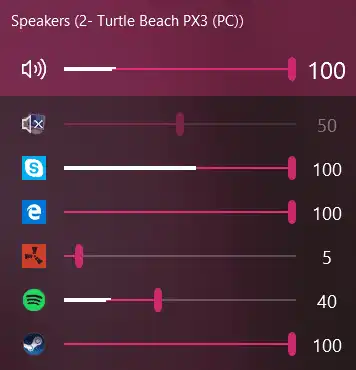
To use EarTrumpet, we simply have to click on its volume icon in the system tray. This will open the main EarTrumpet window, where you can see and adjust the volume levels of applications and devices.
EarTrumpet’s user interface is quite good. We can see the volume of the current device, or expand to see all devices. That list can get quite long, so they should rethink that a bit. But, aside from that little flaw, the UI is perfect.
To avoid having two volume icons, you can hide the Windows one. Right-click on the taskbar / Taskbar settings / Turn system icons on or off, and there you turn off the Windows volume icon.
One of the most notable features of EarTrumpet is its ability to control the volume of each application independently. This means we can adjust the volume of one application without affecting the others. This is especially useful in multitasking environments or when using multiple audio applications simultaneously.
Furthermore, EarTrumpet offers improved handling of Bluetooth devices. We can quickly switch between paired devices and adjust their volume levels without having to navigate through complex menus in Windows.
We also have a window with the program’s options, which aren’t too many. But we can assign customizable keyboard shortcuts to perform actions like changing the default playback device or adjusting the volume.
EarTrumpet is available for free on the Microsoft Store, making it easy to install on any compatible Windows system. Once installed, it’s integrated into the system and ready for immediate use.
More information on the project’s website on Github EarTrumpet GitHub.
