

We’re back with the section on the ESP8266 and ESP32, seeing how to integrate the VueJS framework into a web client served from the ESP8266.
We will refer to the ESP8266, but the same code is compatible with the ESP32, adjusting the library names. At the end, you have the code for both the ESP8266 and the ESP32.
In the previous post, we saw a fairly complete example of how to set up a web interface to control inputs, outputs, and execute actions on the ESP8266.
We already mentioned that, so far, we have used vanilla Javascript, without any library, to perform all actions on the client. Which, in general, is a very good practice and much better than using the old and obsolete jQuery (don’t let me see you using it, okay?).
But modern programming tends to be declarative, rather than imperative. That is, defining associations between the UI and the program logic, rather than “going and doing actions”. For that, there are many frameworks, like Angular or Vue.
In this post, we are going to start with this declarative approach to client programming, using the VueJS framework. It’s a very popular framework for Web development, lightweight but powerful, and fits perfectly on the ESP8266.
And we are going to start with a basic example, our VueJS “hello world” that we already saw in this post, but running from the ESP8266. That is, in this post we basically aim to get it set up and working.
Don’t worry, at this point it shouldn’t be particularly difficult for you.
Starting off, our main program is as simple as can be.
#include <ESP8266WiFi.h>
#include <ESPAsyncWebServer.h>
#include <FS.h>

#include "config.h"  // Replace with your network data
#include "Server.hpp"
#include "ESP8266_Utils.hpp"

void setup(void)
{
  Serial.begin(115200);
  SPIFFS.begin();

  ConnectWiFi_STA();

  InitServer();
}

void loop(void)
{
}
Our ‘Server.hpp’ file, also very simple.
AsyncWebServer server(80);

void InitServer()
{
  server.serveStatic("/", SPIFFS, "/").setDefaultFile("index.html");

  server.onNotFound([](AsyncWebServerRequest *request) {
    request->send(400, "text/plain", "Not found");
  });

  server.begin();
    Serial.println("HTTP server started");
}
On the client side,
The ‘index.html’ file contains the bare minimum to ensure our Vue App works. Just to highlight that we include the VueJS library, either from the ESP8266 memory, or (the commented line) from a CDN.
<!doctype html>
<html lang="">

<head>
  <title>ESP8266 VueJS</title>
  <meta charset="utf-8">
  <meta http-equiv="x-ua-compatible" content="ie=edge">
  <title></title>
  <meta name="description" content="">
  <meta name="viewport" content="width=device-width, initial-scale=1">
</head>

<body>
  <div id="app">
    <ol>
      <!-- We use the component defined in Vue.JS -->
      <todo-item v-for="item in myList" v-bind:todo="item" v-bind:key="item.id"></todo-item>
    </ol>
  </div>

  <!-- From CDN -->
  <!--<script src="https://cdn.jsdelivr.net/npm/[email protected]/dist/vue.min.js"></script>-->
  <!-- From ESP8266 -->
  <script type="text/javascript" src="vendor/vue.min.js"></script>

  <!-- Load the file that contains our App in Vue.JS -->
  <script type="text/javascript" src="js/app.js"></script>
</body>

</html>
The ‘app.js’ file that contains the mini VueJS application, with a list of “to-do items”.
// Component definition
Vue.component('todo-item', {
  props: ['todo'],
  template: '<li> {{ todo.text }} \
            <input type="checkbox" id="checkbox" v-model="todo.value"> \
            <span v-if="todo.value">{{ todo.hidden }}</span> \
            </li>'
})

// Definition of our example app
var app = new Vue({
  el: '#app',
  data: {
    myList: [
      { id: 0, text: 'Item1', hidden: 'Hidden1' },
      { id: 1, text: 'Item2', hidden: 'Hidden2' },
      { id: 2, text: 'Item3', hidden: 'Hidden3' }
    ]
  }
})
Result
We upload everything to the ESP8266 and go to the web page. If everything went correctly, we will see a list of three “tasks”, with a checkbox. And if we click on the checkbox, the “hidden” field of the corresponding line will appear.
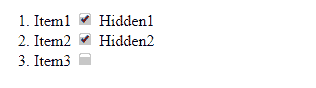
So far, that easy. We have simply loaded a VueJS “hello world” mini application and verified that, of course, it works without problems when served from the ESP8266.
Unfortunately, our page is again as ugly as can be. But, this is where Vuetify comes into play, a framework that brings Material Design aesthetics to VueJS applications.
We will see Vuetify on the ESP8266 in the next post and, of course, in the following ones we will finish remaking the web interface from the previous post to be declarative (in our case, a.k.a. VueJS). There’s plenty of section left! See you next time.
Download the Code
All the code from this post is available for download on Github.

Version for ESP8266: https://github.com/luisllamasbinaburo/ESP8266-Examples
Version for ESP32: https://github.com/luisllamasbinaburo/ESP32-Examples
