

Error handling is a fundamental part of software development that allows us to detect, manage, and correct unexpected or exceptional situations during the execution of a program.
An error, which we will also call EXCEPTION, is an abnormal or unexpected condition that interrupts the normal flow of a program’s execution.
Error handling is part of the flow control structures because it modifies the normal procedure of the program. Whether intentionally or not.
An EXCEPTION can occur for various reasons. For example,
- Syntax error (i.e., you messed up in a part of the code)
- Accessing invalid memory (like an undeclared variable, or going beyond the length of a collection)
- Accessing an unavailable resource (a file, a database, a web request…)
- Voluntarily thrown
- Many other causes…
Whatever the reason, the important thing is that an error has occurred. Then the program issues a warning that an anomaly has occurred. We generally call this warning an EXCEPTION.

When an exception occurs, two things can happen,
- You can catch it, and try to contain the error
- If you don’t catch it, it propagates to the calling function
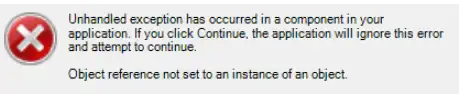
If the exception keeps “going up” through all the calls until it reaches the main function, an error will pop up for the user. In this case, it’s normal for the program to freeze and stop working (in fact, it usually closes abruptly, “boom mode”).
Throwing and Catching Exceptions
In most programming languages, exceptions are thrown when an error occurs using the throw instruction (or similar).
throw new Exception("This is a manually thrown exception!");
These exceptions can be caught and handled by other parts of the code using try-catch or try-catch-finally blocks.
try
{
    // Code that may throw an exception 💣
}
catch (Exception ex)
{
    // Handling the exception, only jumps if an error occurs 💥
}
finally
{
    // Optional final block, always executes, whether an error occurs 💥 or not 👍
}
Try Block: The try block contains the code you want to execute that could throw an exception.
This code runs normally, but if an exception occurs inside thetryblock, program control is immediately transferred to thecatchblock (the remaining code in the try block would not be executed).Catch Block: The catch block runs only if an exception occurs inside the try block.
Here you specify how to handle the exception (like displaying an error message, logging the exception, or performing recovery actions).Finally Block (optional): The finally block always executes, whether an exception occurs in the try block or not. It is used to specify code that must run after the try block execution, regardless of whether an exception occurred or not.
This is useful for resource cleanup (like closing files or database connections, which must be done regardless of whether an error occurs).
Exception Examples in Different Languages
Let’s see how to use a try-catch block to catch exceptions and handle them in a controlled manner in different languages, and how to throw an Exception manually with throw (or similar).
For the example, we’ll simply use division by zero, which is a disallowed operation that generates an error. It’s a very simple way to force an exception for the example.
In C#, Exceptions are used with the Exception object. They are caught with a try-catch-finally block.
// Example in C#
try
{
    // Code that may throw an exception
    int result = 10 / 0; // Division by zero 💥
}
catch (Exception ex)
{
    // Handling the exception
    Console.WriteLine("Error: " + ex.Message);
}
While throwing an exception manually would be done like this.
throw new Exception("This is a manually thrown exception!");
In C++, creating a try-catch block is identical. In this case, Exceptions are part of the std namespace.
// Example in C++
try
{
    // Code that may throw an exception
    int result = 10 / 0; // Division by zero 💥
}
catch (const std::exception& ex)
{
    // Handling the exception
    std::cout << "Error: " << ex.what() << std::endl;
}
While this is how you would throw an Exception manually.
throw std::runtime_error("This is a manually thrown exception!");
JavaScript also uses the same try-catch syntax for error catching.
// Example in JavaScript
try {
    // Code that may throw an exception
    let result = 10 / 0; // Division by zero 💥
} catch (error) {
    // Handling the exception
    console.log("Error: " + error.message);
}
Throwing Exceptions manually is also similar. In this case, the Exception is called Error.
throw new Error("This is a manually thrown exception!");
Finally, Python as always has its own syntax, and performs the block with try-except
# Example in Python
try:
    # Code that may throw an exception
    result = 10 / 0  # Division by zero 💥
except ZeroDivisionError as ex:
    # Handling the exception
    print("Error:", ex)
While throwing a manual Exception is done with raise.
raise Exception("This is a manually thrown exception!")
As usual, apart from small syntax differences, most programming languages include Exception handling, with more similarities than differences.
Best Practices Tips
You should not overuse the try-catch block. Its use should be limited to truly exceptional or unpredictable situations, and not as a mechanism to control the normal flow of the program.
If an error is foreseeable in a process, we should first check for the possible causes of errors. The try-catch block is reserved only for things we cannot check.
For example, imagine you want to access a file. Reading a file is a process that is always susceptible to generating Exceptions, because it is an operating system resource that we do not control.
try
{
    string content = File.ReadAllText(file);
    Console.WriteLine("File content: " + content);
}
catch (Exception ex)
{
    Console.WriteLine("Error during file reading: " + ex.Message);
}
One possible cause is that the file does not exist. That is not an Exception, it is a clear, evident, and known reason why we cannot read it. Therefore, the clean approach is to perform that check beforehand.
if (File.Exists(file))
{
    try
    {
        string content = File.ReadAllText(file);
        Console.WriteLine("File content: " + content);
    }
    catch (Exception ex)
    {
        Console.WriteLine("Error during file reading: " + ex.Message);
    }
}
else
{
    Console.WriteLine("The file does not exist.");
}
We only leave the try-catch for reading the file. That can be susceptible to giving an error, even if the file exists. This is an unforeseeable or unpredictable situation, and this is where it makes sense to wrap it in a try-catch.
This is the case, first of all, for cleanliness. But, on the other hand, because try-catch has a significant impact on program performance. So we should only use it for what it is, handling unforeseen errors, and not for everything.
