

Today we bring you an essential application for the toolbox of any Windows user. Fastcopy, a free, Open Source program that will help us quickly copy or move large amounts of files.
Fastcopy offers a large number of advantages compared to Windows’ standard copy function. These improvements are especially noticeable when we have to copy a large amount of information from one device to another.
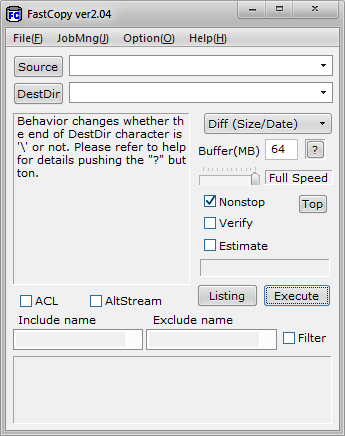
First, Fastcopy is substantially faster. The copy speed approaches the real limit, set by the speed of the devices (logically, this would be the maximum possible speed). This is a great improvement over Windows’ copy function.
On the other hand, it allows adjusting the speed at any time during the copy process, decreasing or increasing it according to load needs. We can even completely pause a copy task, in case it is reducing system performance too much, and resume it later.
Furthermore, Fastcopy adds the possibility to resume a task in case a failure has occurred during the copy process, for example, because a USB device was accidentally disconnected or a network drive became temporarily unavailable.
On the other hand, it provides a queue of pending tasks. Copying files from multiple locations is prohibitive in Windows, because the process slows down exponentially with each new simultaneous process. Fastcopy automatically adds jobs to its task list and executes them sequentially as they finish.
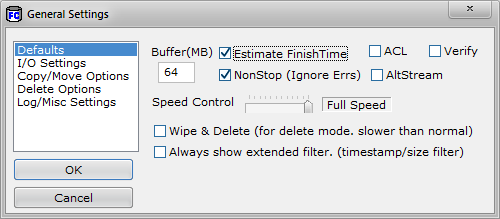
Finally, the estimate of the remaining time is much better than that provided by Windows’ copy function, which has never been known for being particularly accurate. The option to show the remaining time is disabled by default, but can be selected in the program’s options.
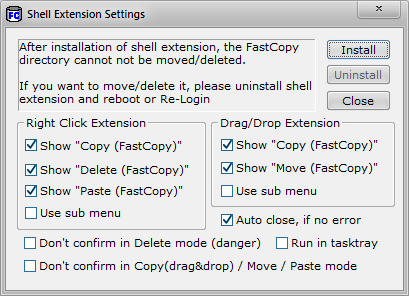
Fastcopy integrates with the Windows context menu, so it can be started by right-clicking on any file or folder. The integration options with the system can be controlled from the options menu.
Fastcopy is available for free download at this link. I recommend you try it, it’s an interesting and useful application that will surely end up being part of your essential tools.
