
FileTypesMan is a free tool for Windows that allows you to view and edit file type information in the operating system.
As we install programs in Windows, they associate the actions they can perform on the different file types in the operating system.
In principle, this is a good feature. Unfortunately, not all developers are equally clean when introducing these associations, and they add “extra things” that we don’t need.
Whatever the case, the truth is that as we use Windows and install programs, file associations become filled with more and more functions and options we don’t want, or even conflicts between them.
FileTypesMan is a simple program that allows us to edit and clean up the associations we have for each file extension.
It is part of the Nirsoft solutions, which are known for providing a lot of extra functionality for Windows. Many of which, in my opinion, should be offered by the operating system itself.
How to use FileTypesMan
To use FileTypesMan we must download the installer from the project’s website https://www.nirsoft.net/utils/file_types_manager.html
The interface is very simple (and somewhat outdated, if I may say so). Similar to what we find in all Nirsoft applications.
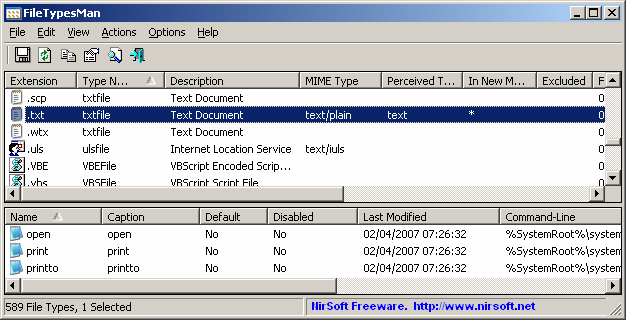
We simply have a list of the operating system’s file types and their associated information.
By selecting a file type, we get its details, including the description, extension, available actions, associated program, among others.
Logically, we can modify all this information, including icon assignment, description, and the default action.
It is also possible to create new actions, or even create new custom file types, assigning an extension and a default action.
Furthermore, we can sort and filter by different fields, or export all the information in various formats, such as generating an HTML report.
FileTypesMan is a very useful tool, which we obviously won’t use every day, but it is very useful for performing maintenance and cleaning tasks on the operating system.
