
FreeFileSync is a free and open-source tool for synchronizing and backing up files on Windows, macOS, and Linux.
By file synchronization, we mean the ability to keep two folders “identical”, without the need to completely overwrite the folder’s contents.
File synchronization is a very interesting and useful task that we often forget exists. It can save us from copying many files, which is especially important when working with large folders or over a network.
To achieve this, FreeFileSync offers different comparison options, from the most basic ones like comparing by file date or size, to the most powerful (but slower) comparison by file content.
The application is very easy to use and provides a wide variety of options and advanced utilities to adapt the synchronization to our project’s needs.
How to Use FreeFileSync
To download FreeFileSync, we need to go to the official download page at https://freefilesync.org/download.php and select the appropriate version for our operating system. Once the file is downloaded, we run it to start the installation.
In the user interface, we can select the folders or files we want to sync, choose a destination folder, and the synchronization options.
FreeFileSync provides several advanced options for synchronization, including the ability to exclude certain files or folders, compare files by date and size, or delete files that do not exist in the source folder.
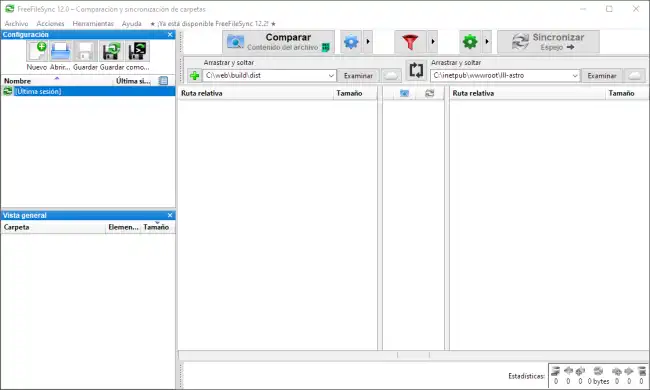
Once the synchronization is configured, we simply click the “Compare” button at the top of the user interface. FreeFileSync will compare the files in the selected folders and show us the files that need to be synchronized.
We can review the changes and, once verified that everything is correct, click the “Synchronize” button to actually execute the synchronization.
FreeFileSync allows us to save synchronization settings by creating profiles. This way we can retrieve the configuration in the future without having to set it up manually again.
It also provides a series of additional features, such as the ability to automatically schedule a task to run at regular intervals, or even the possibility to export a profile as a command-line executable.
FreeFileSync is one of those interesting tools that can be useful in many situations. I personally use it a lot, and without a doubt, it is one of my favorite all-around tools.
It is cross-platform, with compatibility for Windows, Linux, and macOS. FreeFileSync is Open Source, and all the program’s code and documentation are available on the project’s website at https://freefilesync.org/
