
Front Matter CMS is a Visual Studio Code extension that allows us to turn it into a headless and very lightweight CMS (Content Management System).
Compared to traditional CMS like WordPress, there is a marked trend towards using static site generators for sites where the dynamic component is not so necessary.
Using a generator has advantages in terms of site speed and security, but it also means losing content management features that are comfortable to use.
This is where Front Matter CMS comes into play, as a very lightweight content management tool that integrates with Visual Studio Code and provides us with certain tools to manage our content.
These features include:
- Support for the Markdown file format.
- The ability to add YAML metadata to each Markdown file.
- Full Git version control functionality.
- Advanced search and filtering to easily find content.
- Integration with other popular CMS, such as Jekyll and Hugo.
Furthermore, being integrated with Visual Studio Code, this CMS makes it very easy to use it alongside Git, to maintain version control over all our content with practically no effort.
It is available as an extension in the Visual Studio Code marketplace. So, to install it, we simply need to search for “Front Matter CMS” and click “Install”.
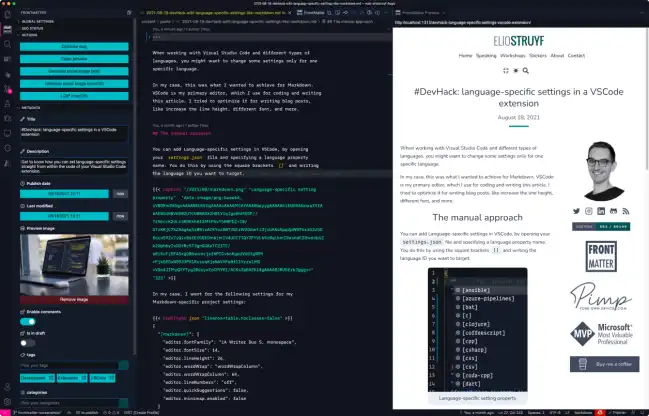
Next, we will be asked to add the working folder where we have our content, and configure a series of options. Once finished, Front Matter CMS will read our content and we can start using it.
The extension adds a main Dashboard window, where we can view, browse, or search through all the content we have published. We can also filter by categories or taxonomies.
Additionally, when editing a markdown file within our content folder, a panel will appear in the sidebar allowing us to edit metadata such as title, description, or featured image.
Finally, Front Matter also allows us to perform a small SEO analysis of our content by checking, for example, that the title or description length is not excessive.
Front Matter CMS is an interesting option for developers, who are used to using VS Code, and want to keep their workflow in one place.
It is Open Source, and all the code and documentation are available on the project page https://frontmatter.codes/
