

Hosts File Editor is an Open Source desktop application that allows you to easily edit the hosts file on Windows operating systems.
The Hosts file is used to map domain names to IP addresses. For example, we can redirect a URL like www.luisllamas.es to an IP on our local network.
This is very useful during web development stages, because we can host our application on a test server, or even locally, and redirect calls to the “real” URL to our application under development.
Editing the Hosts file “by hand” is not complicated. But if we have to do it frequently, it’s not very practical, because we need to open the editor with administrator permissions, go to the path where it’s saved, modify it, etc.
This is where Hosts File Editor comes into play. It’s a very simple and lightweight tool, but very useful for those of us who need to edit the hosts file frequently.
How to Use Hosts File Editor
Hosts File Editor has a very simple and intuitive graphical user interface. We simply have a list in table format, showing the information contained in our Hosts file.
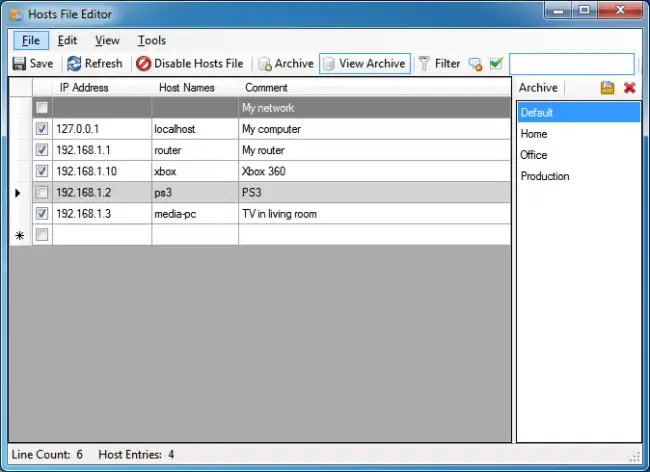
The most useful feature is that we can activate or deactivate a remapping in the Hosts file simply by “clicking” the checkbox on each of the rows.
This will comment or uncomment the equivalent line in the Hosts file.
Hosts File Editor also allows filtering and searching information by different criteria, such as domain name or IP address. This allows quickly finding the necessary information and facilitates editing the file.
Furthermore, we can create backups of the hosts file before making any changes, ensuring we have a backup and allowing us to make changes with the security of not “messing up”.
It supports both IPv4 and IPv6 addresses. It also allows us to add a comment to each of the mappings, for example, to identify the function of each one.
Hosts File Editor is a simple but very useful tool for web developers on the Windows operating system. It is available both as an installable application and as a portable version.
It is Open Source, and all the project documentation and code is available on the project website https://hostsfileeditor.com/
