

If you are a user of Windows Remote Desktop, you may have recently encountered an authentication error due to CredSSP.
When trying to connect to a remote server that usually worked, without changing permissions or credentials, we now get the error:
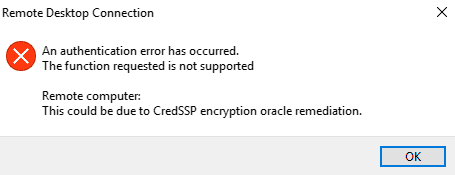
An authentication error has occurred. The function requests is not supported. This could be due to CredSSP encryption oracle remediation
Well, it seems that due to the discovery of a vulnerability in the security of remote desktop encryption, the default behavior of remote desktop connections has been modified.
Since May 2018, the CredSSP (Credential Security Support Provider protocol) validation has been modified and, furthermore, the default behavior has been changed from “vulnerable” to “mitigated”.
The permanent solution is to update to the latest version both the server and the client of remote desktop on both machines. But what if we cannot access the server to update it?
Well, we have a temporary solution which involves disabling the security policy. We can do this by running gpedit.msc and in Computer Configuration > Administrative Templates > System > Credentials Delegation, we change the value to “vulnerable”.
Or, more easily, through the command console with the following command.
REG ADD HKLM\Software\Microsoft\Windows\CurrentVersion\Policies\System\CredSSP\Parameters\ /v AllowEncryptionOracle /t REG_DWORD /d 2
Now we will be able to connect via remote desktop. It is recommended that you update both the server and the client, fix the connection problems, and then return the security policy to its default state.
