

Let’s get down to business and make Our first program in JavaScript!. You’ll see that one of the best things about JavaScript is that getting started is very easy and simple.
For this, what we need is:
- Our code
- Something to run our code
- A program to write our code
Let’s look at each of them below 👇.
Our First Code
The Hello World is a small program commonly used as a basic example. It’s not going to be a big deal, just display a message (but this way we start getting the hang of it).
Our code is simply the following.
console.log("Hello from LuisLlamas.es");
- console.log is a JavaScript function used to send messages to the browser’s console.
- The string Hola desde LuisLlamas.es is the argument passed to the
console.logfunction. - The string is enclosed in double quotes to indicate it is a text string.
Don’t worry about each thing for now. We’ll see them little by little (that’s what you have this awesome course for 😜).
Running JavaScript
Now we need something to take our code and run it. We call this a runtime environment.
One of the good things about JavaScript is how easy it is to start. In fact, you don’t need to install anything extra. Simply your web browser (Chrome, Firefox, Safari) has an interpreter where you can run small code snippets.
To test it,
Open your web browser and access the browser console by pressing Ctrl + Shift + I (or Cmd + Option + I on macOS).
Now go to the Console tab and there you can type your code directly:
console.log("Hello from LuisLlamas.es");
When you press Enter you will see the command executes, and the message is displayed.
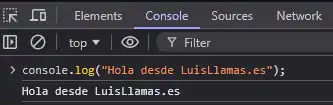
Congratulations, you have run your first JavaScript code! 🎉🥳.
Of course, this is great for a quick test, and it’s very useful on many occasions. But in general, we are not going to run our code here (it wouldn’t be very practical 😅)
In the next article, we will see “Where the heck can I run my JavaScript code” read more
Installing a Code Editor
When we get into more complicated projects (this was a simple one) we will also need a program to write our code.
As I said, a good thing about JavaScript is that everything is very easy. In fact, any simple text editor would work for us.
But normally we use an IDE (Integrated Development Environment). Which is a text editor, but with additional functions specific for programmers.
The most common one is Visual Studio Code, which is a lightweight and highly customizable editor. If you don’t know what that is yet, or don’t have it installed, check out this post
If you want to learn more, check out the Introduction to Programming Course
