
OllamaSharp is a library for .NET that allows us to use LLMs like LLaMA3 easily from a C# application.
LLaMA 3 is the latest version of the language model developed by Meta, designed to intelligently understand and generate text.
In theory, LLaMA 3 rivals or surpasses leading systems like ChatGPT, Copilot, or Gemini. I won’t go so far as to say it surpasses them (at least not in Spanish), but the truth is it gives very good results. It’s right up there.
On the other hand, Ollama is an open-source tool that simplifies running large language models (LLMs) locally. These models include LLaMA 3.
Finally, we can use Ollama from a C# application very easily with OllamaSharp. OllamaSharp is a C# binding for the Ollama API, designed to facilitate interaction with Ollama using .NET languages.
With Ollama + LLaMA 3 and OllamaSharp, we can use LLaMA 3 in our applications with just a few lines of code, with support for various functionalities like Completion or Streams. In short, it’s fantastic. Let’s see how 👇
How to Install Ollama and LLaMA3
First, we need to install Ollama on our computer. Simply go to the project page https://github.com/ollama/ollama, and download the appropriate installer for your operating system.
Once installed, from a console application run
ollama run llama3
This will download the Llama 3 8B model to your computer. There are two versions: 8B and 70B tokens respectively. The first takes up about 5GB and the second about 40GB.
If your graphics card can load the file into memory, the model will run very fast, on the order of 500 words/second. If you have to run it on the CPU, it will be extremely slow, about 2-5 words per second.
A 3060 GPU can run the 5GB one without a problem. The 40GB one… well, you’ll need a beast of a machine to run it. But hey, if you have such a powerful machine, you can install the 70B version.
ollama run llama3:70B
Now you can type your prompt directly in the command console and verify that everything works.

Bonus pack: If you want, you can install a Web interface to interact more easily with your Llama 3 Chat Bot. Several are available; I like this one https://github.com/ivanfioravanti/chatbot-ollama, based on the chatbot-ui project by Mckay Wrigley.
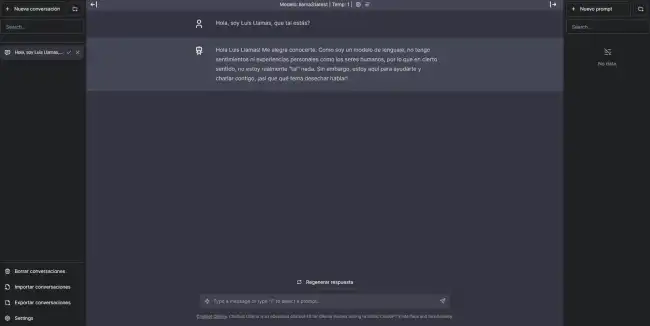
To install it, create a folder anywhere on your computer, and in this folder do the following.
git clone https://github.com/ivanfioravanti/chatbot-ollama.git npm ci npm run dev
And now you have a web ChatBot connected to your LLaMA3 model running in Ollama.
How to Use OllamaSharp
Now we can create a C# application that connects to LLaMA3. Ollama will handle managing the models and data needed to run the queries, while OllamaSharp will provide the integration with your application.
We can add the library to a .NET project easily, via the corresponding NuGet package.
Install-Package OllamaSharp
Here are some examples of how to use OllamaSharp, extracted from the library’s documentation.
using OllamaSharp;

var uri = new Uri("http://localhost:11434");
var ollama = new OllamaApiClient(uri);
ollama.SelectedModel = "llama3";
var prompt = "Hello, I'm Luis, how are you???";

ConversationContext? context = null;
context = await ollama.StreamCompletion(prompt, context, stream => Console.Write(stream.Response));

Console.ReadLine();
OllamaSharp is Open Source, and all the code and documentation is available in the project repository at https://github.com/awaescher/OllamaSharp
