

We continue with the posts dedicated to MQTT by looking at MQTT Explorer, a generic client that allows us to analyze the packets sent on our MQTT network.
In previous posts, we have seen What is MQTT and its importance in IoT, What are Topics and how to use them, and learned how to install Mosquitto, one of the most popular MQTT brokers.
The next step to start working and experimenting is to add a client to our MQTT system, and program our own clients that send and receive messages.
While not mandatory, it is more than convenient to have a generic client that allows us to monitor the operation of our MQTT network.
This way we can see the messages being exchanged on the network, which is a great help when testing and checking for faults in the system.
There are many generic clients that help us with this functionality, but one of the best is MQTT Explorer, an Open Source development by Thomas Nordquist.
First of all, MQTT Explorer stands out for its interface, well-designed and very easy to use. Messages and topics are displayed in a tree format, and it is possible to expand each one and see its details.
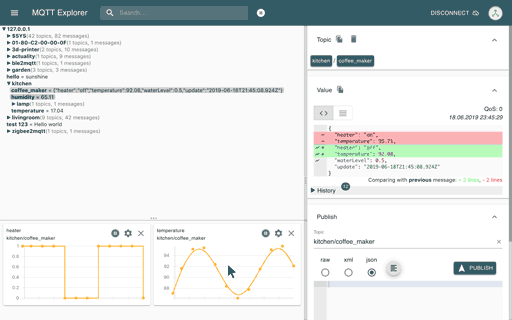
Similarly, the large number of features it incorporates is important. With MQTT Explorer we can visualize both topics and messages, search, filter, publish messages, and even graph the received values.
On the other hand, MQTT Explorer’s performance is highly optimized, allowing it to handle hundreds of thousands of messages per minute. More than enough for any development network.
In short, a very useful tool that should be part of your usual toolkit during the development of MQTT-based applications.
MQTT Explorer is cross-platform and is available for Windows, Linux, and Mac on the project’s website http://mqtt-explorer.com/.
Furthermore, as we said, it is Open Source and all the code is available at https://github.com/thomasnordquist/MQTT-Explorer
