

Mvvm Light is a lightweight framework for implementing the MVVM design pattern in .NET Framework applications, quite popular in WPF development.
Implementing MVVM (Model View ViewModel) in WPF without a framework forces us to implement a lot of tools ourselves. There are multiple frameworks available to make our lives easier.
Among the different alternatives, MVVM Light, as its name suggests, stands out for being a lightweight, simple framework with a gentle learning curve.
Although it lacks some features of more powerful frameworks, MVVM Light is minimally intrusive and yet provides most of the common tools in an MVVM pattern. In this post, we will take a quick look at its main features.
Installation
MVVM Light installation is available through a Visual Studio Extension (2013, 2015, and 2017). This extension adds templates for creating an application Scaffold with MVVM Light, and a few snippets to facilitate programming.
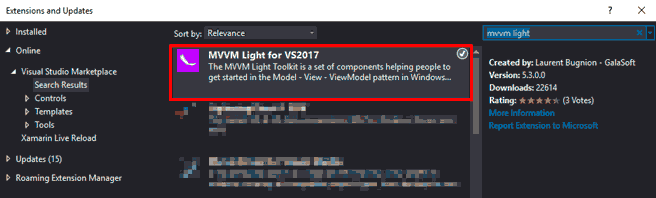
It is also possible to add MVVM Light to an existing solution via the NuGet package manager.

MVVM Light Components
As we said, MVVM Light provides most of the common tools in an MVVM pattern. Let’s look at some of these features.
RelayCommand
MVVM Light provides the ICommand implementation in its RelayCommand object, both with and without parameters, and with the ability to enable/disable the command via a function (canExecute)
public class RelayCommand<T> : ICommand
{
  public RelayCommand(Action<T> execute);

  public RelayCommand(Action<T> execute, Func<T, bool> canExecute);
}
Here is an example of use, where we define the command as a property of our ViewModel.
public RelayCommand<T> MyCommand { get; set; }
In the ViewModel constructor, we instantiate the commands.
MyCommand = new RelayCommand(myAccion);
Which points to a function that executes the command.
myAccion(T);
Event to command
We also have the usual ‘Event to command’, which allows routing an event to a command. Its usage would be as follows.
<i:interaction.triggers>
  <i:eventtrigger eventname=""TextChanged"">
    <mvvm:eventtocommand command=""{Binding" searchcommand,="" mode="OneWay}"">
  </mvvm:eventtocommand></i:eventtrigger>
</i:interaction.triggers>
INotifyPropertyChanged
Of course, MVVM Light provides its implementation of INotifyPropertyChanged, which informs the UI of changes in the bound property.
public virtual void RaisePropertyChanged<T>([CallerMemberName] string propertyName = null, T oldValue = default(T), T newValue = default(T), bool broadcast = false);
IoC and Locator
MVVM Light also provides a simple implementation of an Inversion of Control (IoC) container, called SimpleIoC. For this, it is common to generate our Locator, which registers the classes used.
public class ViewModelLocator
    {
        static ViewModelLocator()
        {
            ServiceLocator.SetLocatorProvider(() => SimpleIoc.Default);

      SimpleIoc.Default.Register<MainViewModel>();
        }

        public MainViewModel Main
        {
            get
            {
                return ServiceLocator.Current.GetInstance<MainViewModel>();
            }
        }
    }
We will generally declare the Locator as a static resource in App.xaml as follows
<Application.Resources>
  <vm:ViewModelLocator x:Key="Locator" d:IsDataSource="True" />
</Application.Resources>
Finally, in the views, we can associate the DataContext to the different ViewModels as follows.
DataContext="{Binding Main, Source={StaticResource Locator}}">
Messenger
MVVM Light also implements a Messenger service that implements the PubSub pattern, allowing us to send messages between objects while keeping the coupling between classes weak.
For example, an object that wants to send a message would use the following method.
public void SenderMethod()
{
  MessengerInstance.Send<NotificationMessage<string>>(new NotificationMessage<string>("Generic Value", "notification message"));
}
To receive it, one or more objects could subscribe to the messages, defining a callback function.
public RecievedMethod()
{
  MessengerInstance.Register<NotificationMessage<string>>(this, NotifyMe);
}

public void NotifyMe(NotificationMessage notificationMessage)
{
  string notification = notificationMessage.Notification;
  string genericValue = notificationMessage.Content;
  //do your work
}
DispatcherHelper
Finally, MVVM Light provides the DispatcherHelper class, which facilitates the use of tasks on the main UI Thread.
This is initialized at the beginning of the application.
DispatcherHelper.Initialize();
And can be used to invoke actions in the UI process as follows.
DispatcherHelper.UIDispatcher.BeginInvoke(DispatcherPriority.Normal, (Action)(()=> { }));
As we can see, MVVM Light is a simple framework, but it provides the basic components necessary to implement MVVM. It is Open Source and available at https://github.com/lbugnion/mvvmlight
