

Obsidian is a free application that allows you to take notes using Markdown format and has gained great popularity recently.
Having a tool for taking notes is very important to improve your organization and productivity, both for personal and professional use.
Thus, there are a ton of applications intended for this. Over time, we have Trello, Evernote, or Notion as popular tools at different times to organize your notes.
Here we have already seen Joplin, which is a very similar application even aesthetically to Obsidian, but Open Source.
Now the trendy application in the field is Obsidian. It bases its operation on the concept of interconnected notes. The idea is that you can create notes on any topic, and then connect them to each other to create a network of information.
Notes are taken in Markdown format, which as we know is a lightweight markup language that allows for quick and easy formatting.
One of Obsidian’s strong points is that it works directly with Markdown files. What you modify, you are modifying directly in your Markdown notes.
This is a great advantage, for example, compared to Joplin, which allows importing and exporting Markdown files, but stores them internally in its database. Which is a hassle, I’m not going to be importing and exporting my notes all day.
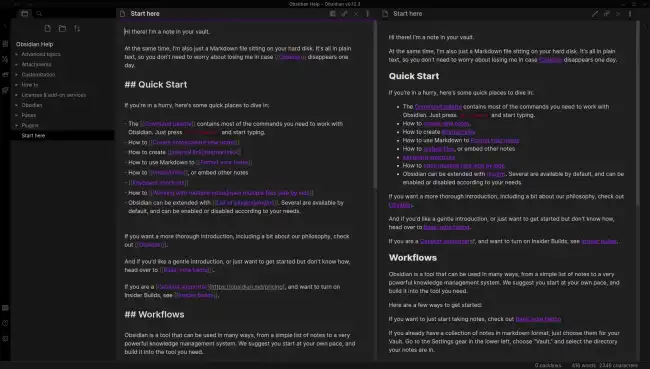
We can have several Vaults or workspaces. A Vault is nothing more than a folder on our computer, where we save the Markdown files, along with a folder that Obsidian uses to store its configuration.
Aesthetically, Obsidian is very similar to other similar applications, including Joplin or even Visual Studio Code itself. Basically, on the left we have a collapsible tree of folders, where we save our Markdown files.
The rest of the screen is occupied by a viewer/editor for the open Markdown file. In editor mode, we can also choose to see the “normal” mode or the source mode (which personally is the one I usually have active).
Obsidian has tabs to open several notes, the option to pin some of them or mark them as favorites. Of course, we can also drag them to view them side by side, either horizontally or vertically.
One of the things I like the most is the management of attachments and links between notes. If we modify a file, for example by moving it to another location, Obsidian will correctly update the links.
As expected, it also allows us to search and filter our notes very quickly and efficiently. This allows us to find the information we need in a matter of seconds.
Obsidian is compatible with frontmatter in our Markdown notes. Furthermore, we have the usual command palette, accessible via the Ctrl + P keyboard shortcut, which allows us to execute tools that are not accessible from the graphical interface.
Of course, it has a tagging system. We simply have to put #tag in our Markdown file to add the tag to our note, like a hashtag on a social network.
However, in my opinion, the tagging system is one of the most improvable points of Obsidian. The available options fall very short. I would prefer a specific bar to add tags, and more tools to manage existing tags.
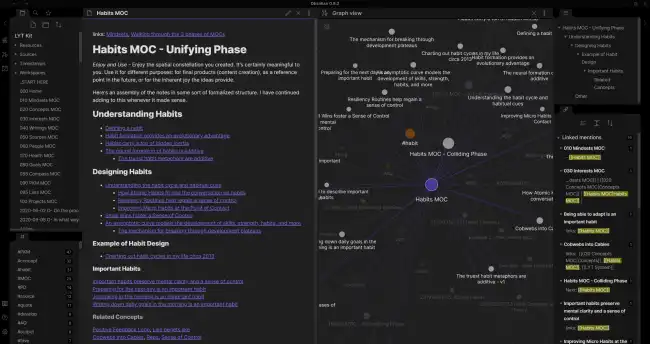
On the other hand, we have a graph of interconnected nodes that shows all our notes, like a constellation. Apart from being very eye-catching and looking great on screen, I frankly find it not very useful.
It also has the concept of ‘Canvas’ as an infinite panel where we can add our notes, along with geometric shapes (rectangles, circles, lines) and text. This seems much more useful to me.
What is useful is the huge community of plugins that Obsidian has. Some of them are essential and provide a ton of functionality. If you are interested in the topic, I will recommend the ones I find most interesting in other posts.
Regarding note synchronization between devices, as usual, it is a paid option. Which is logical, as it requires someone to pay for the server. But, well, since all the notes are in a folder, I won’t be the one to tell you (wink wink 😉) that with a Github repo you have the synchronization issue more than solved.
In short, Obsidian is the most popular note-taking application at the moment. And the truth is that, without being anything truly revolutionary, it is generally quite good.
Having the notes saved in a folder (instead of an internal data system), along with synchronization via Git, and the plugins, make it an option very much worth considering.
The biggest drawback by far is that it is not an Open Source application. With all the problems that entails, and the risk that one day they decide to offer it for free for personal use.
If we overlook this, Obsidian is a very good tool. It currently enjoys great popularity and a very active community. It fulfills its purpose and is really quite useful for organizing our notes and tasks.
