Let’s continue working with the STM32, a low-cost ARM Arduino alternative. In this post, we will look at its pinout scheme, and in upcoming posts, we will see how to program it in different ways.
It’s been almost three years since we looked at the STM32 and its features. Despite being a really interesting processor, for various reasons it has not had the impact it probably should have had.
With the emergence of new ARM alternatives, like the omnipresent ESP8266 and ESP32, the STM32 has fallen further into oblivion. However, the STM32 remains a very interesting processor due to its features and low price. This situation could improve with the appearance of the GD32 processor, a new processor based on the STM32.
The STM32-based board that has gained the most popularity in the Maker community is, by far, the STM32F103C8T6 model on a development board that has been named Blue Pill, due to the color of the PCB.
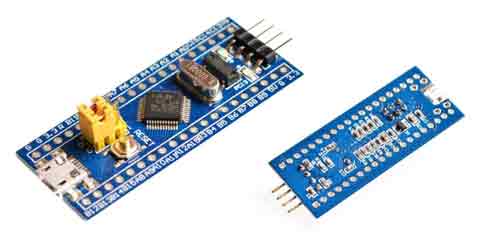
As a curiosity, the same model is also sold on a red PCB. And it has been named (guess what) Red Pill by the community.
The size of the STM32 Blue Pill is 5.3cm x 2.2cm, with two rows of 20 pins (a bit longer than an Arduino Nano). Currently, we can purchase a Blue Pill for about 1.5€. It’s cheaper than an Arduino Nano!
Remember that the STM32F103 is a 32-bit ARM processor running at 72MHz, with 26 I/Os mostly 5V tolerant, interrupts on all I/Os, 10 analog inputs with 2 12-bit ADCs, 7 timers, 2x I2C, 3x UART, 2x SPI. In short, a real powerhouse.
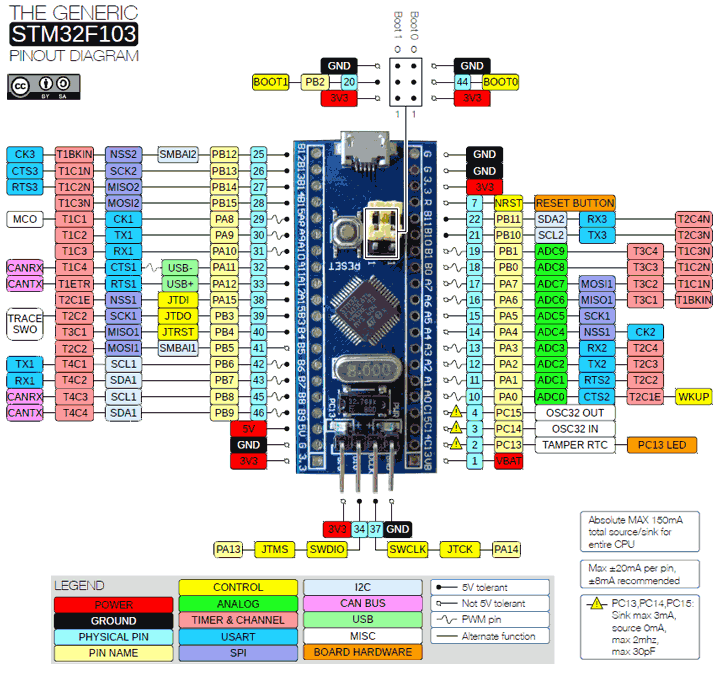
To start working with the STM32 Blue Pill, the first thing we need is the pinout scheme, which we have below.
In the upcoming posts of the STM32 series, we will start programming this device, so if you have one forgotten in a drawer somewhere, start dusting it off!