

Verdaccio is a lightweight, private, and self-hostable NPM registry designed to facilitate package development in controlled environments.

It is a very useful tool for teams that develop internal libraries and want to share them among themselves, without exposing them to the public NPM registry.
Verdaccio acts as a smart proxy that stores downloaded dependencies, in addition to adding our own private packages.
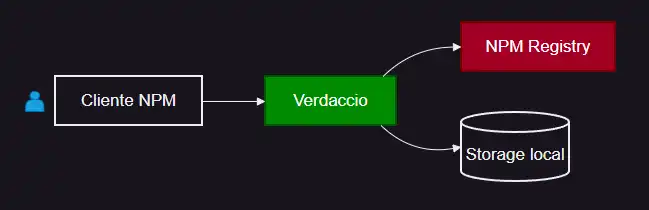
Furthermore, it gives us greater control over our developments by reducing dependency on NPM repositories (for example, due to an internet outage).
In summary
- You need to publish internal packages without exposing them to the NPM registry
- You want to speed up installations by caching dependencies
- You work in environments with limited internet connectivity
Installation and configuration
To install Verdaccio simply run
npm install -g verdaccio
Now we can run it
verdaccio
We will see in the console the startup information of Verdaccio, such as the configuration folder, etc.
By default, Verdaccio listens on http://localhost:4873. You can open the URL from your browser, and you will see the UI of the application’s control panel.
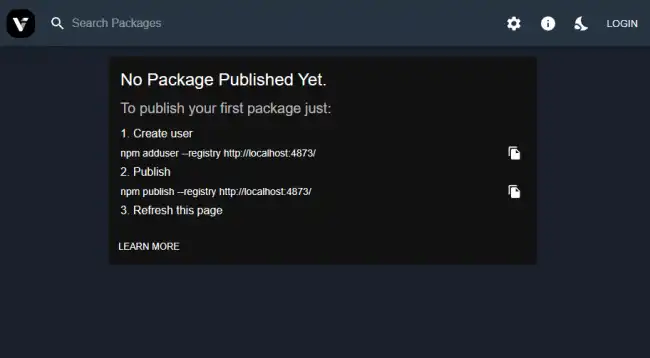
If you need to run Verdaccio continuously (generally, yes), you can use solutions like PM2, Forever, or run it in Docker format
Basic configuration config.yaml
Verdaccio’s main configuration file is located at
- Windows: C:\Users\Luis\AppData\Roaming\verdaccio\config.yaml
- Linux: ~/.config/verdaccio/config.yaml
Here you have a lot of parameters. But a (very) summarized version looks something like this,
storage: ./storage       # Storage path
plugins: ./plugins       # Plugins directory

auth:
  htpasswd:
    file: ./htpasswd     # Basic authentication

uplinks:
  npmjs:
    url: https://registry.npmjs.org/

packages:
  '@myorg/*':
    access: $authenticated
    publish: $authenticated

  '**':
    access: $all
    proxy: npmjs
Key sections:
storage: Directory for private packages.uplinks: Configuration of remote registries (e.g., npmjs).packages: Permissions by package pattern.
Usage with NPM
Now let’s see how to configure NPM to use Verdaccio as a Proxy. To do this, we run:
npm set registry http://localhost:4873
You can restore the npm registry to the default by running:
npm set registry https://registry.npmjs.org/
With this, we have configured NPM to look in the Verdaccio server. Now when NPM accesses a package, it will first request the information from Verdaccio.
npm install lodash # First looks in Verdaccio, then in npmjs
Verdaccio will search its cache and its private repositories. And, if it doesn’t find a package, it will make a request to the NPM repositories.
Alternatively, you can also create a .npmrc file in your project and override the registry by adding this line
registry=http://localhost:4873
Publish a private package
To add a private package to our Verdaccio repository we do the following
Log in (create user if it’s the first time):
npm adduser --registry http://localhost:4873
Publish the package
npm publish --registry http://localhost:4873
