

The IF-ELSE conditional is an evolution of the simple IF, which allows us to add code to execute when the condition is false.
Colloquially, the IF-ELSE conditional means,
If this happens 🡆 do this
If not 🡆 do this other thing
Which, put in code format, would look something like this,
if(condition)
{
	// actions to execute if condition is true
}
else
{
	// actions to execute if condition is false
}
And in flowchart form, it would look something like this
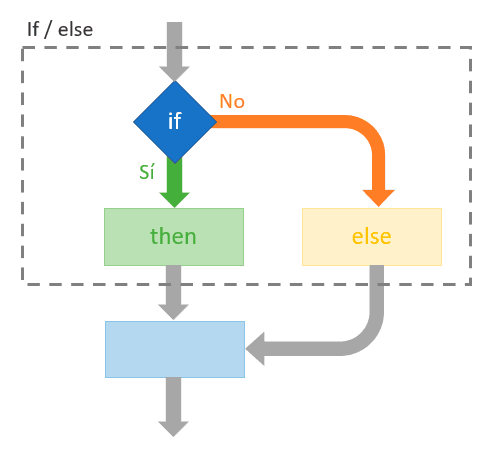
Examples of IF-ELSE conditionals in different languages
Let’s see an example of a IF-ELSE conditional. In this example, let’s assume we have to evaluate an exam grade.
- If it’s greater than 5, the student has passed 🟢
- If it’s less than 5, the student has failed 🔴
In the case of C++, C#, Java, Kotlin or JavaScript, this IF-ELSE conditional looks like this,
if (exam_grade >= 5)
{
	// show message 'Congratulations! You have passed' 🟢
}
else
{
	// show message 'Sorry, you have failed' 🔴
}
In PHP an IF conditional is identical, with the peculiarity that variables are preceded by ’$’
if ($exam_grade >= 5)
{
    // show message 'Congratulations! You have passed' 🟢
}
else
{
   // show message 'Sorry, you have failed' 🔴
}
On the other hand, Python has the following form
if exam_grade >= 5:
    # show message 'Congratulations! You have passed' 🟢
else:
	# show message 'Sorry, you have failed' 🔴
And in VB, which has a slightly longer syntax because it aspires to have a natural language
If exam_grade >= 5 Then
	' show message 'Congratulations! You have passed' 🟢
Else
	' show message 'Sorry, you have failed' 🔴
End If
To give a somewhat “weirder” example, in SQL a conditional has the following form
CASE
	WHEN @exam_grade >= 5 THEN 'Congratulations! You have passed 🟢'
	ELSE 'Sorry, you have failed 🔴'
END AS message;
That is, basically the structure of an IF conditional is identical in most languages, beyond some syntax peculiarities of each of them.
Internal Operation Advanced
Internally, the program’s control flow is similar to that of the IF block. The control flow encounters a conditional jump, which evaluates a certain condition.
If the condition is true, the flow continues with the instructions in the IF body. If it is false, it jumps to the ELSE body.
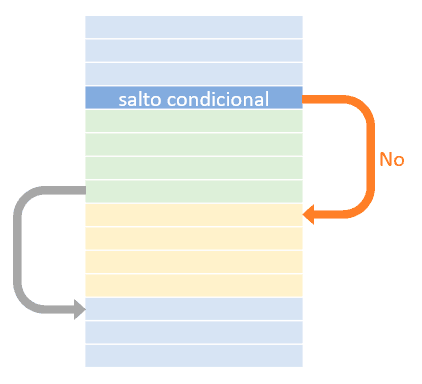
In the case of the IF body, at its end there is a GO-TO jump to the end of the ELSE body. In the end, both reach the same execution point.
In this way, we have created a code branch, where one set of instructions or another is executed based on the conditional jump. Finally, they join together and the program continues.
