

The dependencies between libraries refer to the relationship that exists between different libraries or packages used in a program.
When a module A depends on another module B, it means that module A uses module B (therefore, module A needs module B to function).

In principle, including a dependency between libraries is not a bad thing. It’s done every day, and it would be almost impossible to create a program without dividing it into modules.
However, it also has its negative side. If you don’t manage dependencies correctly, your program can become a hell 🔥🔥🔥.
Why are we making a post just to explain dependencies? Actually, it’s quite easy to understand.
Because it’s one of the biggest problems you will have in development. It has always been like this (and I don’t think it’s going to be fixed). So it deserves that we pause and talk about it.
Let’s see a simple example
Let’s see it with a very simplified example with only four dependencies. But keep in mind that in a normal project it’s common to have hundreds of dependencies.
Initial situation, “my application”
Suppose you are making your application called “my application”. Among many things, your application manages Notes and Attachments.
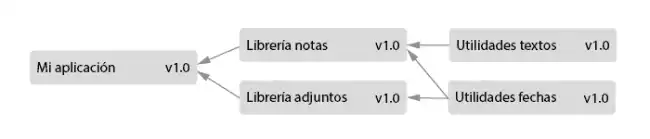
For this, you, or a coworker, have made two libraries “Notes Library” and “Attachments Library”.
These in turn depend on two other libraries with useful functions for managing Texts and Dates (let’s assume they are Open Source, and maintained by the community).
So far, so good. Perfect!
Update 1
Now, suppose the “Text Utilities” library is updated to v2.0. Great! It surely has very interesting and useful functions. Functions that you might not even need… but hey, they are there.

So this means you should update your “Notes Library” and your application to v2.0.
Update 2
Some time passes, and the “Date Utilities” library is updated to v2.0. This one is even worse because both “Notes Library” and “Attachments Library” depend on it.

So you have to update both, and with them your application. Which, poor thing, is already at version v3.0… or worse, v4.0, if your libraries haven’t been updated at the same time.
The dependency problem
I think the problem is already visible. Every time a dependency is updated, the entire “chain” of libraries that build up to your application must also increase in version (which is damn horrible).
Of course, you could say “well, then I don’t update, I stay with the old version”. Yeah, but how long will it be until one of the libraries you use, and also uses that library, does update? And then you’ll be indirectly using two different versions and probably… kaboom! 💥
With “this” depending on “this” and “that” on “the other”, it easily becomes a mess 🐔. In the end, if you don’t manage dependencies correctly you can end up with a huge problem.
Remember that the example we saw was very simple with only four dependencies, in two levels. But in a project you could easily go to hundreds or thousands of dependencies and dozens of levels.
Dependencies are evil
So what do we do. Do we avoid dependencies between libraries? No, not that much. In fact, I’ve already said that it’s practically impossible to make a program without having dependencies.
But what you must always keep in mind is that:
- The fewer dependencies, the better
- You must have them under control
- When updating, it can be a headache
To avoid these problems, many tools have been created. Some of which are package managers, versioning systems, and even source code control.
