

Today we are going to see how to create a RAMDisk in Windows to create a very fast virtual “hard drive” that resides in RAM.
A RAMDisk is a portion of the system’s RAM memory that is used as a virtual hard drive. The use of RAMDisk is very common in operating systems like Linux. But, in Windows, it is a functionality that is usually much less known.
Using a RAMDisk can be useful to increase system performance when using applications that require fast data access, since RAM memory is much faster than a physical hard drive.
There are several alternatives for creating a RAMDisk in Windows. My favorite is to use the Open Source program IMDisk.
How to use IMDisk
To use ImDisk, we first need to download and install the program. Once installed, we open ImDisk and click the “Create new RAMDisk” button. A window will open where we can configure the RAMDisk size and the assigned drive letter.
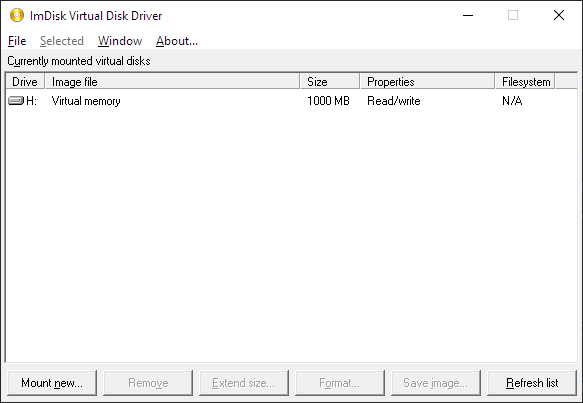
Once we have configured the size and drive letter of the ramdisk, we click “Create”. The RAMDisk will be created and displayed in the system’s disk list.
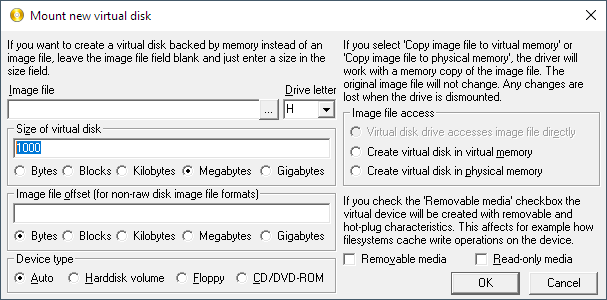
The new RAMDisk will be created unformatted. So, before using it, we will need to format it. From this point on, we can access the RAMDisk as if it were any other system drive and use it to store and run applications or files.
Alternatively, we can create a virtual drive via the command console, for example like this,
imdisk -u -s 1000M -m h:
Where
- -s 1000M indicates the capacity of the RAMDisk, in this case 1000MB
- -m h: indicates the letter where we want to mount the RAMDISk, in this case h:
Finally, to unmount it we would use the following command,
imdisk -d -m h:
Benchmark
The RAMDisk is supposed to be much faster than a conventional disk drive. Let’s check if this is true.
Here are the results for a conventional magnetic hard drive. 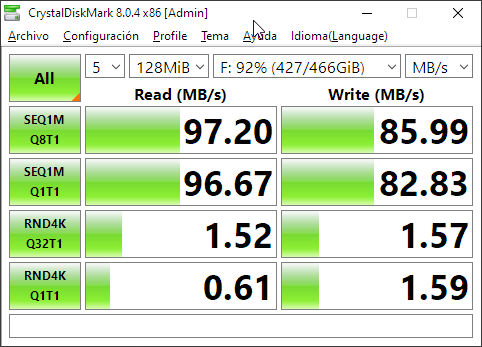
For an SSD hard drive. 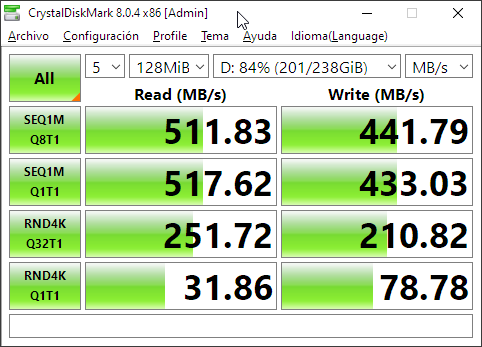
And for an M2 hard drive. 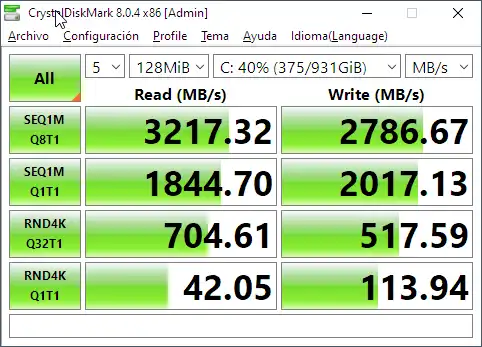
Now let’s see the results of our RAMDisk 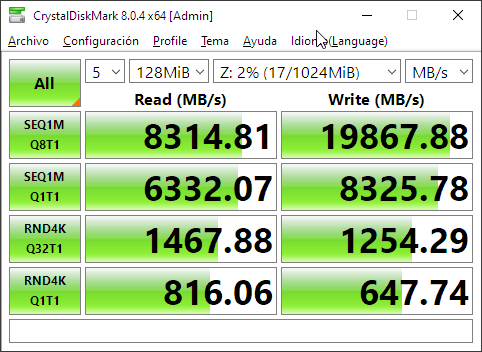
As we can see, it is much faster than an HDD or SSD hard drive, and even faster than a modern M2 hard drive.
Final Comments
The RAMDisk will only be available while the system is running. Once the system is shut down, all data stored on the ramdisk will be lost.
There are ways to make it persistent, which save the information when the computer is turned off. Although I generally don’t use them, when I make a RAMDisk I usually want to take advantage of its temporary nature.
On the other hand, the size of the RAMDisk will depend on the amount of RAM memory available in the system. Don’t go overboard assigning a huge size to a drive, as it could negatively affect system performance.
The general purpose of a RAMDisk is to create a small unit (100-1000MB), of a temporary nature, which we use occasionally because we have to perform many tasks on a set of files.
For example, I sometimes use it in development tasks, when you have to perform very heavy and repetitive tasks on a set of files.
It is also useful for creating temporary storage, where we need to save files. For example, for cache.
That’s it for today’s tip. Used well, a RAMDisk is a very useful tool. See you next time!
