Raspberry Pi is not a single product, but a family of computers and development boards with different sizes, power levels, and formats.
Choosing one model or another depends a lot on what we want to do. It is not the same to set up a small home server, learn Linux with a desktop, make a low-power IoT project, or integrate a board inside a product.
The point of this article is not to memorize all the specifications (which also change with revisions and variants), but to understand the main families and know which model makes sense in each case.
Most Common Current Models
If you are going to buy a Raspberry Pi today, the normal thing is to look first at Raspberry Pi 5 for desktop use, home server, Docker, home automation, or general Linux learning.
Raspberry Pi 4 is still a perfectly valid option if you find it at a good price or if you need compatibility with accessories, cases, or existing projects. Not everything has to be “the latest” (although we already know we like that very much).
The Raspberry Pi Zero family has less power, but it is very interesting when we need a small, inexpensive, low-power device. In particular, Zero 2 W is much more capable than the first Zero boards and is very useful for embedded projects.
Compute Modules are designed for integration into products or custom boards. They are very interesting, but they are not usually the first option for learning Linux.
Finally, Raspberry Pi Pico is not a Linux computer. It is a microcontroller board, conceptually closer to Arduino or ESP32 than to a “normal” Raspberry Pi.
Which Model to Choose
If you want a quick answer, we can summarize it like this:
| Use | Recommended model | Comment |
|---|---|---|
| Learn Linux and use a desktop | Raspberry Pi 5 | The most comfortable and powerful option |
| Home server, Docker, home automation | Raspberry Pi 5 or Raspberry Pi 4 | Pi 5 gives more headroom, Pi 4 uses less power and still performs well |
| Small or embedded project | Raspberry Pi Zero 2 W | Much more capable than Zero W, while keeping the small size |
| Keyboard-computer ready to use | Raspberry Pi 500 / 500+ | Very convenient for education and light desktop use |
| Product or custom board | Compute Module 4 / 5 | Requires a carrier board |
| Electronics without Linux | Raspberry Pi Pico / Pico 2 | Microcontroller, does not run Raspberry Pi OS |
To start this course, my practical recommendation would be a Raspberry Pi 5 with enough RAM and a good power supply. If you already have a Raspberry Pi 4, there is no need to run out and replace it.
Raspberry Pi Families
Right now we can group the models into several families:
- Raspberry Pi Model B: the main boards, such as Raspberry Pi 3, 4, and 5.
- Raspberry Pi Zero: small, cheap, low-power boards.
- Raspberry Pi 400 / 500: computers integrated inside a keyboard.
- Compute Module: modules for industrial integration or custom products.
- Raspberry Pi Pico: microcontrollers, not Linux mini computers.
Each family responds to a different need. In practice, for a Raspberry Pi / Linux course, we are mainly interested in Model B, Zero 2 W, and, to a lesser extent, 400/500 models.
Raspberry Pi Family
The “main” family is the one we normally imagine when we talk about Raspberry Pi. These are Model B boards, with USB, Ethernet, HDMI, power, GPIO, and a microSD card for the operating system.
In the early years, the most representative models were Raspberry Pi 1, 2, and 3. Later came Raspberry Pi 4 and Raspberry Pi 5, with a major jump in power, memory, connectivity, and storage capability.
Raspberry Pi 1 Model
Model 1 has a Broadcom BCM2835 SoC, a VideoCore IV graphics chip, and a single-core ARM11 ARM1176JZF-S processor at 700MHz, although it could be overclocked up to 1000 MHz.
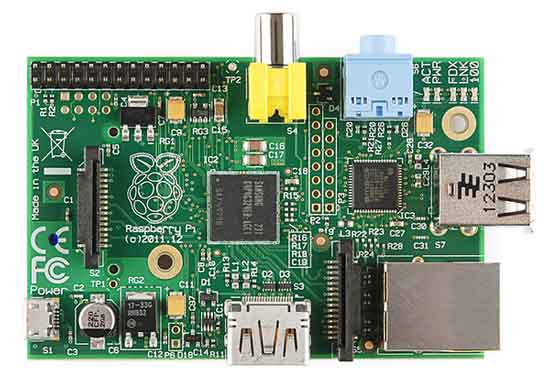
Model A has 256Mb of SDRAM, 1 USB port, and lacks Ethernet connectivity. Model B has 512Mb, 2 USB ports, and added an Ethernet port. The B+ model increases the USB ports to 4 and changes the SD card to a micro SD.
All model 1 versions contain RCA, HDMI, and DSI video outputs for an LCD panel. For audio outputs, they have a 3.5mm jack connector and output via HDMI.
As electronic devices, one of the most interesting and differentiating aspects of Raspberry Pi, all models have 8 x GPIO, SPI, I2C, and UART.
Raspberry Pi 2 Model
The Raspberry Pi 2 B was an updated version of the Raspberry Pi B whose main change was a much higher computing power. It mounts a Broadcom BCM2836 SoC, a quad-core ARM Cortex A7 processor at 900 MHz and 1Gb of SDRAM. The VideoCore IV graphics chip is retained.
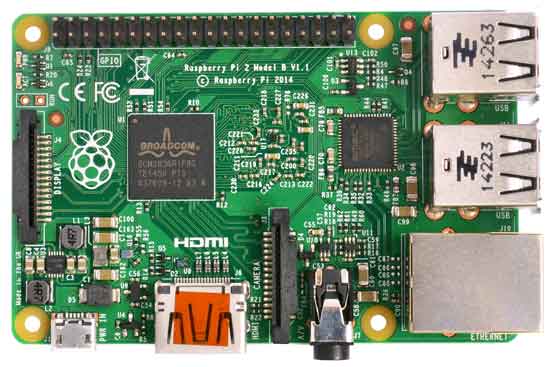
The Raspberry Pi 2 has 4 USB ports, a 10/100 Mb Ethernet port. The memory card is Micro SD. The number of GPIO pins is increased to 17, retaining the SPI, I2C, and UART functions.
Raspberry Pi 3 Model
Raspberry Pi 3 B was mainly about a connectivity upgrade, since the main novelty was the inclusion of Bluetooth 4.1 and WiFi 802.11n.
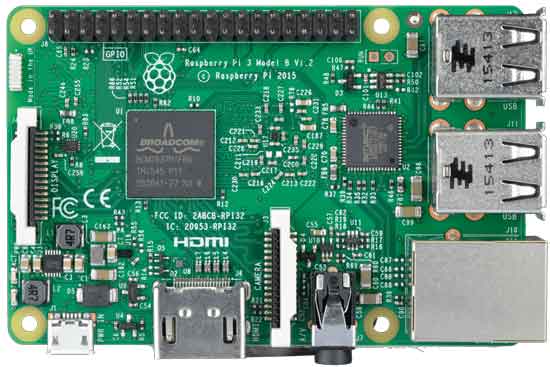
The power is increased with a Broadcom BCM2837 SoC and a 64-bit quad-core ARMv8 processor at 1.2GHz. The VideoCore IV graphics chip, 1Gb of SDRAM, Ethernet port, 4 USB ports, and 17 GPIO with SPI, I2C, and UART functions are retained.
Raspberry Pi 4 Model
Raspberry Pi 4 was a major leap over Raspberry Pi 3. It improved general performance a lot, added USB 3.0, real Gigabit Ethernet, dual micro-HDMI output, and variants with more RAM.
This made Raspberry Pi 4 start to feel much more like a “real” computer for light desktop use, home servers, Docker containers, automation, and small permanent services.
It also brought a pretty clear consequence: power supply and cooling started to matter more. More power also brings more consumption and more heat, and that part does not forgive.
Raspberry Pi 5 Model
Raspberry Pi 5 is the current reference generation for the main family. It uses a Broadcom BCM2712 SoC with a quad-core ARM Cortex-A76 CPU at 2.4 GHz, which is a very big jump compared to Raspberry Pi 4.
It also incorporates important improvements such as a dedicated I/O controller (RP1), PCIe interface for fast storage through an adapter, dual micro-HDMI output, USB 3.0, and versions with different amounts of RAM.
In practice, Raspberry Pi 5 is the most recommendable option if you want to use Raspberry Pi as a small Linux computer, a capable home server, or a learning platform with room to grow.
Raspberry Pi 5 needs an adequate power supply and really benefits from good cooling. If you are going to give it continuous work, do not skimp on the power supply, case, or thermal management.
Raspberry Pi Zero Family
On the other hand, we have the Raspberry Pi Zero family, a series of very small and low-cost models that make them interesting for device integration and IoT.
Raspberry Pi Zero
The Raspberry Pi Zero has, roughly speaking, the same power as a Raspberry Pi 1 B, in a much smaller size.
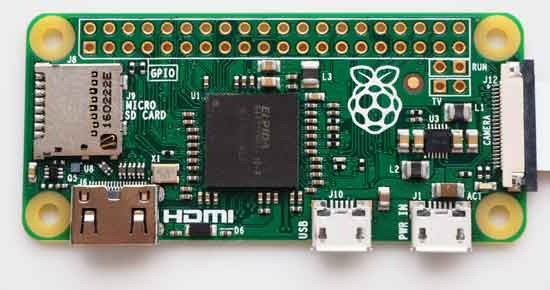
Like the Raspberry Pi 1 B, the Raspberry Pi Zero mounts the Broadcom BCM2835 SoC, an ARM1176JZF-S processor at 1Ghz, and has 512Mb of SDRAM.
Given the small size, it lacks the Ethernet port and DSI connector, and only has one Micro USB port. It does, however, keep the GPIO, SPI, I2C, and UART electronic functions.
Raspberry Pi Zero W
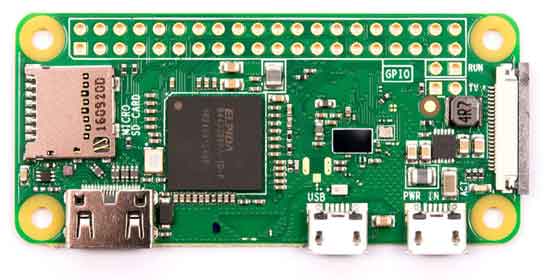
An update of the original Raspberry Pi Zero that adds Bluetooth 4.1 and WiFi 802.11n, keeping the rest of the features.
Raspberry Pi Zero 2 W
Raspberry Pi Zero 2 W is the most interesting evolution of the Zero family. It keeps the tiny form factor, but incorporates a quad-core Cortex-A53 processor, conceptually very similar to the jump we saw in Raspberry Pi 3.
This makes it much more usable than Zero W for real Linux tasks, small services, automations, cameras, IoT, or projects where size matters a lot.
It still has important limitations: less RAM, fewer connectors, no integrated Ethernet, and less thermal headroom. But if we need a small Raspberry Pi with WiFi, Zero 2 W is a very nice board.
Raspberry Pi 400, 500, and 500+
Raspberry Pi 400, 500, and 500+ are Raspberry Pi computers integrated inside a keyboard. The idea is very simple: connect mouse, display, and power, and you already have a small Linux computer ready to work.
Raspberry Pi 400 was based on the Raspberry Pi 4 generation. Raspberry Pi 500 and 500+ are based on Raspberry Pi 5, with more memory and better performance. In particular, Raspberry Pi 500+ aims more at desktop use, with a mechanical keyboard, 16 GB of RAM, and integrated NVMe storage.
The beauty of this family is that they are very convenient for education, light desktop use, and learning. The downside is that they are less flexible for electronics projects or physical assemblies, because they do not have the classic bare-board format.
Compute Module
Compute Modules are Raspberry Pi versions intended for integration. Instead of coming on a board with all the usual connectors, they come as a module and require a base board (carrier board).
This makes it possible to design products or custom systems, choosing exactly which connectors, power, storage, or interfaces we need.
Compute Module 4 is based on Raspberry Pi 4, and Compute Module 5 is based on Raspberry Pi 5. They are fantastic for product work and integration, but they are not the best option for getting started unless you are very clear that you want to design hardware around them.
Raspberry Pi Pico
Raspberry Pi Pico, Pico W, Pico 2, and Pico 2 W are microcontroller boards. In other words, they do not run Raspberry Pi OS and they do not work like a Linux computer.
They are boards designed to control hardware directly, with very low power consumption and immediate boot. In that sense they are more similar to Arduino, ESP32, or STM32 than to Raspberry Pi 5.
Even though they carry the Raspberry Pi name, Pico plays in a different category. For this Raspberry Pi / Linux course, we are more interested in boards that are capable of running Linux.
Raspberry Pi Models Comparison
Here is a summary table with some of the most representative models. It does not aim to include every variant, but it does give a quick view of the evolution.
| Model | CPU | Typical RAM | Connectivity | Main use |
|---|---|---|---|---|
| Raspberry Pi 1 B+ | 1-core ARM11 | 512 MB | Ethernet, USB 2.0 | Historical, basic learning |
| Raspberry Pi 2 B | 4-core Cortex-A7 | 1 GB | Ethernet, USB 2.0 | Historical, light Linux |
| Raspberry Pi 3 B / B+ | 4-core Cortex-A53 | 1 GB | WiFi, Bluetooth, Ethernet | First very popular model with integrated connectivity |
| Raspberry Pi 4 B | 4-core Cortex-A72 | 1-8 GB | WiFi, Bluetooth, Gigabit Ethernet, USB 3.0 | Home server, light desktop, Docker |
| Raspberry Pi 5 | 4-core Cortex-A76 | 1-16 GB | WiFi, Bluetooth, Gigabit Ethernet, USB 3.0, PCIe | Current main model |
| Raspberry Pi Zero W | 1-core ARM11 | 512 MB | WiFi, Bluetooth | Simple IoT, low power |
| Raspberry Pi Zero 2 W | 4-core Cortex-A53 | 512 MB | WiFi, Bluetooth | More capable IoT, compact projects |
| Raspberry Pi 400 | 4-core Cortex-A72 | 4 GB | Integrated keyboard, WiFi, Bluetooth, Ethernet | Education and light desktop |
| Raspberry Pi 500 / 500+ | 4-core Cortex-A76 | 8-16 GB | Integrated keyboard, WiFi, Bluetooth, Ethernet | Desktop and education with Pi 5 base |
| Compute Module 4 / 5 | Similar to Pi 4 / Pi 5 | Depends on variant | Depends on the carrier board | Integration and product |
| Raspberry Pi Pico / Pico 2 | RP2040 / RP2350 | Microcontroller memory | GPIO, embedded interfaces | Electronics without Linux |
As you can see, the Raspberry Pi family has grown a lot since the first models. For the purpose of this course, the important idea is this: Raspberry Pi is a comfortable way to learn Linux using a small, inexpensive, very hackable machine.