
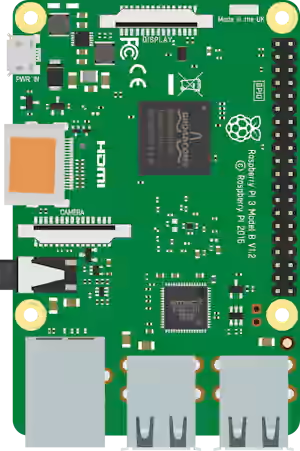
One of the most notable features of the Raspberry Pi is its expansion port, which allows us to interact with the physical world through its GPIO (General Purpose Input/Output) pins.
The Raspberry Pi has a total of 40 pins, although not all are available for general use. Furthermore, some of them have specific functions, such as power, ground, or communication.
The Pinout is a diagram that explains the arrangement of the pins and their specific function. It allows us to know how we can connect sensors, actuators, displays, and other electronic devices.
The pinout follows the same standard across Raspberry Pi models. It is valid for Raspberry Pi 2, 3, 4, and Zero.
So let’s take a detailed look at the Raspberry Pi diagram and pinout. In the following tutorials, we will explain the different functionalities 👇.
Legend and filtering
(click the buttons to show or hide pins)
- POWER
- GPIO
- PWM
- UART
- SPI
- I2C
- COMM
Power Pins
- 3V3 (Pins 1 and 17): Provide 3.3V power. Useful for sensors and low-power devices.
- 5V (Pins 2 and 4): Provide 5V power. Ideal for devices that require more power.
Raspberry Pi pins operate at 3.3V. They are not 5V tolerant, so level converters are necessary if connecting 5V devices.
GPIO Pin Configuration
To use the GPIO pins, they must be configured as inputs or outputs. This can be done using programming languages like Python with the RPi.GPIO library.
- GPIO (Pins 3, 5, 7, 8, 10, 11, 12, 13, 15, 16, 18, 19, 21, 22, 23, 24, 26, 27, 28, 29, 31, 32, 33, 35, 36, 37, 38, 40): General-purpose pins that can be configured as inputs or outputs.
- PWM (Pin 12): GPIO18 supports PWM output for motor or LED control.
If you want to know more, check out this post
Communication Interfaces
UART (Serial)
The Raspberry Pi has an integrated UART port that allows serial communication with other devices. GPIO14 (TXD) and GPIO15 (RXD) pins are used to transmit and receive data.
If you want to know more, check out this post
I2C
The I2C protocol is used to communicate with sensors and devices that support this interface. GPIO2 (SDA) and GPIO3 (SCL) pins are used for I2C.
If you want to know more, check out this post
SPI
The SPI protocol is useful for devices that require fast, synchronized communication. GPIO10 (MOSI), GPIO9 (MISO), GPIO11 (SCLK), and GPIO8 (CE0) pins are used for SPI.
If you want to know more, check out this post