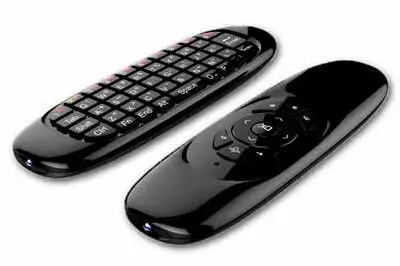
Today we are going to review the Fly Mouse C120 wireless controller, an excellent wireless controller for your computer, Android TV Box, or Raspberry Pi that combines mouse and keyboard functions in a single device.
In my living room TV, I have an Android TV Box connected. It’s a simple way to turn your TV into a multimedia entertainment center, which puts any SmartTV to shame. You can watch movies from a hard drive, play games, browse the internet. You can even install Google Assistant and control your home with your voice.
Although these Android players come with a remote control, the truth is their functionality is very limited. If you want to really take advantage of it, you have to connect a keyboard and a mouse. But it’s not very practical to have a keyboard and mouse lying around the living room!
For this reason, one considers buying a multimedia remote or a mini-keyboard, of which there are many models. Larger, smaller, keyboard only, or with integrated touchpad, etc… In general, they are not very comfortable, and it’s also not something you want to see on your living room table all the time.
This is where Fly Mice (or Air Mice) come into play. These devices allow us to move a computer’s cursor but, unlike a normal mouse, we don’t need to place them on a surface.
Fly Mice use accelerometers to capture hand movements and move the cursor accordingly. The feeling is similar to interacting with the screen by pointing.
Of course, there are also many models of Fly Mice. Among the many options available, one of my favorites is the Fly Mouse C120.
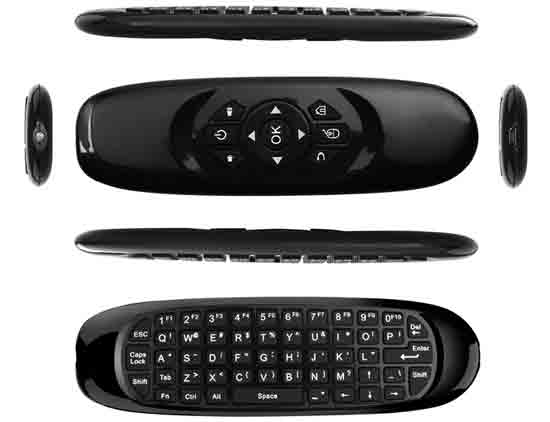
In addition to being a Fly Mouse, the C120 incorporates a (nearly) full QWERTY keyboard on one side. So we have both devices (keyboard and mouse) in a single controller that fits perfectly in the living room, without drawing much more attention than a remote control.
Let’s look at the features of the Fly Mouse C120.
Fly Mouse C120 Specifications
The Fly Mouse C120 is a controller that simultaneously fulfills the functions of a keyboard, mouse, and multimedia controller. A true all-in-one compatible with Android, Windows, Linux, and MAC.
The remote’s dimensions are 15 x 4.3 x 1 cm and it weighs 55 grams. Its dimensions, light weight, and curved shapes make it very comfortable to hold in your hand.
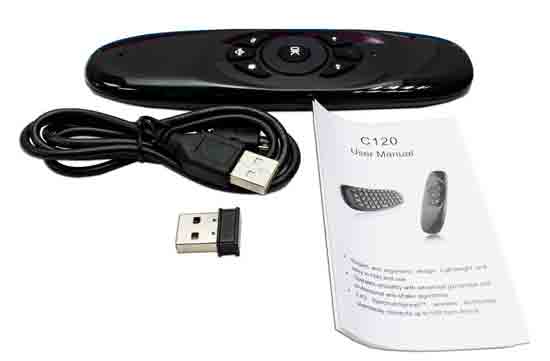
The C120 operates wirelessly at 2.4GHz and has a range of up to 10 meters. The USB receiver has a Nano format, so it can be connected without taking up space on any device.
It has a rechargeable 200mAh 3.7V lithium battery. For charging, it incorporates a mini-USB port, so we can charge it from any USB device (for example, a phone charger, or even from the Android TV itself). The remote’s LEDs indicate the charging status.
Finally, it incorporates a low-power standby mode, which the C120 enters automatically if not used for about 30 seconds, allowing the battery to last for months.
Testing the Fly Mouse C120
The feeling is surprisingly good once you get used to using it. At first, it’s a bit tricky because the natural tendency is to point at the screen, and the feeling is a bit strange.
Instead, you have to get used to the fact that the cursor movement depends on the gyroscopes, so it’s actually the rotation of your wrist that directs the cursor movement, not where you point the remote.
Once you get the hang of it, the feeling is very natural. The sensitivity is good and its use is comfortable. It can point with great precision (almost pixel-level) without vibrations or jumps.
A consequence of using gyroscopes is that sometimes the movement “gets out of sync.” For example, even if you hold your hand “straight” (what “for you” is straight in your current position), the cursor remains offset from the center of the screen.
In this case, we move the cursor to the center, press the mouse deactivation key, reposition our hand, and reactivate the mouse. It’s a quick process that you end up doing without realizing it. In any case, we will only have to do it when picking up the remote and, on occasion, during use.
Regarding size and shape, the Fly Mouse C120 is a success. It is slightly smaller than a normal remote control, so it doesn’t look out of place on a living room table. It has the right size for the hand, and its curved shape is ergonomic and comfortable.
Regarding the keyboard, its behavior is correct. The mouse deactivates when you flip the mouse over and leave the keyboard facing up. This simple functionality makes using the keyboard very comfortable. In any case, it’s not a keyboard designed for prolonged typing, but for writing short texts.
The key layout is not fully QWERTY, so we will have to look at the remote frequently while typing. Of course, it does not have the Ñ key. In general, typing any special character (accents, ·, $, %, &) is a small hell.
We could almost say that the biggest problem with the keyboard is not the remote, but the operating system. Both Android and Windows don’t “know” they have a keyboard connected, so when typing in a text field, the on-screen keyboard appears, reducing usable space. It’s annoying, but it also happens with any other type of mini-keyboard.
In general, the feeling of the keyboard is correct. At least, as correct as it can be on a keyboard of this size. The key feel is pleasant and their size is sufficient.
Regarding the price, it’s one of the most attractive features of the keyboard. We can find it for around €8 from international sellers on AliExpress or eBay. Before buying one, make sure the keyboard layout is suitable for your country.
In summary, the Fly Mouse C120 is a highly recommended controller in terms of quality/price that surprises with the good feeling achieved by the Fly Mouse, combined with a (nearly) QWERTY keyboard in a single device. It’s a good option for remotely controlling an Android TV Box or a Raspberry Pi, giving professional presentations, or even using in training and education.