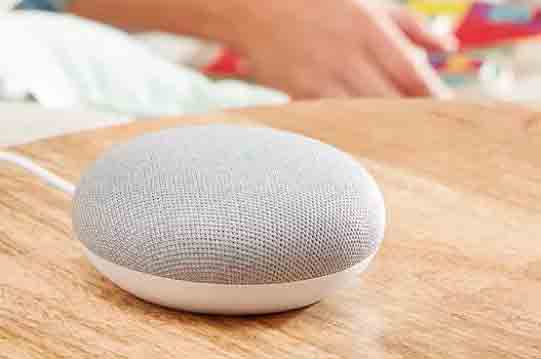
In an era where voice assistants and smart speakers are proliferating, two competitors are fighting to lead the race. Amazon’s Alexa range, and Google’s Google Home range.
The Google Home Mini is the little one in Google’s family of smart speakers. A range that is completed by the Google Home and Google Home Max (the latter not available in Spain). A strong bet by Google to gain an advantage in the field of personal home assistants.
Google Home devices use Google Assistant as software to interpret commands and vocalize responses. An application you can also try on your Android phone.
A few months ago I had the opportunity to get a Google Home Mini from the USA thanks to a friend. At that time it only spoke English and the number of actions you could perform with it was very limited.
In June 2018, the Google Home Mini finally went on sale in Spain for a price of 59€. Although you can probably still get one cheaper through import.
A few days before it went on sale in Spain, the Google Home Mini (and its IFTTT integration) received an update to speak Spanish. Almost a year after Google Assistant spoke Spanish on mobile.
After a few months of use, and being available in Spain, it’s time to do a review of the Google Home Mini. A device, although we will now see its real utility, at least we assure you that it is interesting and fun.
Design
The design of the Google Home is one of its strong points. It is simple, elegant, and fits discreetly into a living room. Although, of course, aesthetic appreciation is very subjective and some people might not find it so.
As they say, “there are colors for every taste.” And, precisely, the Google Home Mini is available in a wide variety of colors, although the white and gray model is the most common.
As its name suggests, the Google Home Mini is a small device that fits in the palm of your hand. It has dimensions of 98mm in diameter and 42mm in height, with a weight of 173 grams.
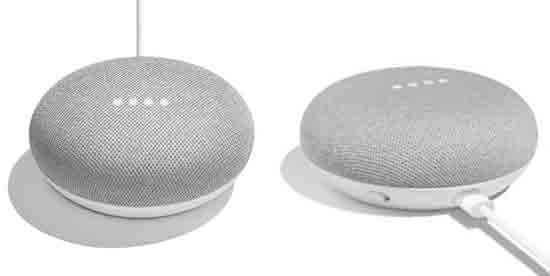
The body of the Google Home Mini is round, with a plastic casing and a textile top. The feel of the top is pleasant. Underneath it are 4 RGB LEDs, although, except at startup, they will shine white.
By touching the top of the Google Home Mini we can turn the volume up or down. Initially it should have incorporated a pressure sensor that would allow for much richer interaction. Unfortunately, a defective batch forced Google to remove this function from the software. A real shame.
Wireless Speaker
As a wireless speaker, the Google Home Mini is not going to win any hi-fi contests. With its small size, it mounts a single 40 mm transducer and its low power is noticeable when playing music.
The sound quality and power of the Google Home Mini is far from the Google Home, and a long way from the Google Home Max, which is a true multimedia speaker in its own right.
Despite its low power, the Google Home Mini works remarkably well for vocal sounds where it achieves clear and distinguishable audio. Something logical since that is its main function. It’s when playing music that its shortcomings come to light.
In terms of connectivity, Google knows perfectly well how to excel at this. We can send audio from many applications to the Google Home Mini via Wi-Fi using Miracast technology. On the other hand, we can connect via Bluetooth and use it as a wireless speaker if our mobile device allows it.
Voice Recognition
Making it clear that the Google Home is not going to stand out for its capabilities as a speaker, the main interest in this small smart speaker is its voice recognition capability.
Like the rest of the family, Google relies on its Google Assistant application for voice recognition and synthesis functions, and it is perfectly integrated into the Google Home Mini.
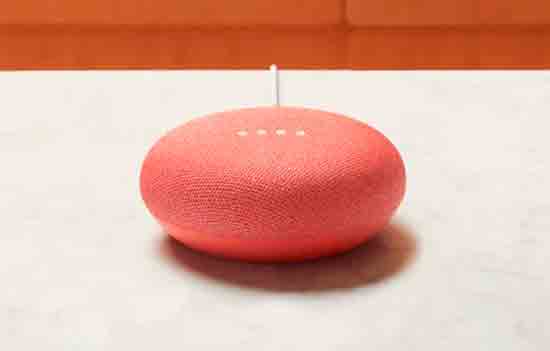
It has two long-range microphones, which achieve correct voice recognition from anywhere in a room, even if we are several meters away.
To communicate with the Google Home Mini we must start by saying the activation phrase “Ok Google” or “Hey Google”. After this, the device’s lights turn on and we can ask it questions or give it the instructions we want.
Recognition can be affected by ambient noise, especially if it is near the television. In fact, sometimes it turns on by itself without us saying the activation phrase (it turns off after a few seconds when it cannot recognize a command).
For its part, the voice syntax is correct, and both the content and the tone of voice of the responses are friendly and very natural. It is perfectly imaginable to be able to have a fluid conversation in the not-too-distant future.
After the latest updates, Voice Match has been incorporated, so the Google Home Mini can recognize the voice of the person speaking to it. We can configure up to 6 user profiles, and Google Home will give personalized responses for each user, such as their calendar appointments.
Compared to its competitor Alexa, voice recognition and syntax are slightly better on Google Home. However, we have the clear disadvantage of not being able to deactivate the activation phrase, something they should fix in the future.
What can it do?
We can do a large number of actions on the Google Home Mini. For now they are quite simple, although it is expected that they will add more in the future.
Thus, we can ask it for the time or weather, ask it what a word means, ask it to translate into another language, or add reminders or read our Google Calendar appointments.
We can also set alarms at a specific time or after a certain period. For example, we can say “remind me to turn off the oven in 30 minutes”.
Google Home also helps us with the shopping list. We can say “add buy milk to the shopping list” and Google Home will add it to the list, which we can check from our phone.
It can also read us the news from sources such as El País, El Confidencial, Cadena Ser, Cope, Onda Cero, esRadio, among others. They are progressively adding more news sources.
Of course, it can also play music for us. By saying “play me some music,” Google Home will play music from the service we have configured (usually Google Music or Spotify).
When Google Home doesn’t understand something, it will respond that it doesn’t understand the command. Something that, for the moment, happens too often because the catalog of available commands is limited.
On the other hand, these functions are the same as we can have on the mobile with Google Assistant. In fact, fewer, because on mobile Google Assistant uses the screen to provide responses and understands a greater number of questions.
Configuration from the mobile
The configuration of the Google Home Mini is really simple thanks to the Google Home application. This is something to be grateful for compared to other commercial solutions, which have a much worse procedure.
We simply have to install the Google Home application on our mobile device, add the Google Home Mini, and we will have all the options to configure our device.
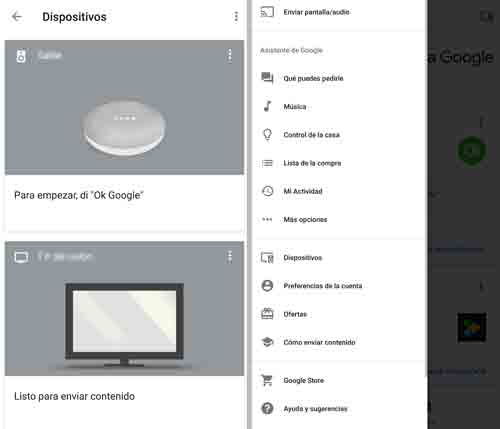
The idea behind the Google Home application is to centralize the control of all our devices, including phones, smart speakers, and other IoT and Smart Home devices, so that they are accessible in a single application.
However, the layout and organization of the App is somewhat chaotic. Furthermore, it is something that has progressively worsened with recent updates, to the point of sometimes making it unintuitive.
For example, you can spend a lot of time looking for an option because you have to click on the menus in the exact order, otherwise you end up arriving at the same screen over and over again. Let’s hope they fix these defects in the future.
Integration Capabilities
As we said, Google Home’s intention is to centralize all our devices and cloud services in a single application integrated with its voice assistant.
Google Home and Google Assistant are cloud applications, and their natural environment is integration with cloud applications. Thus, we can connect the Google Home Mini with a large number of Web services.
For example, we can connect it with Spotify, and we can ask Google Home to play a song for us, but only with a premium account. With the free account we can only ask it to play “music” randomly.
Another notable service in the integration with Google Home is Netflix. Thus, we can ask it to play a series simply by saying the name of the series.
On the other hand, if we have a Chromecast 2 or Android TV device, Google Home integrates perfectly. We can play audio or video from YouTube, Netflix, Spotify, etc. on our ChromeCast device simply by asking Google Assistant.
The popular Kodi player, very common in home multimedia systems, does not yet accept control from Google Assistant. But they are working on it and it should be available by the end of 2018.

In addition to these services, Google Assistant allows adding our own integrations through IFTTT. For example, we can send an email, save a file in Dropbox, send an MQTT message, an HTTP request, or any workflow we want.
All controlled by voice. The possibilities are almost endless and the configuration is very simple thanks to relying on the IFTTT platform.
IoT and Smart Home
One of the most interesting points of Google Home is its ability to integrate with IoT and SmartHome as part of a home automation system. Thus, we can turn lights on and off, activate or deactivate devices, we even have gateways to control any device with an infrared or RF remote control that you have at home (the air conditioner, the robot vacuum).
Google Home is compatible with many commercial devices such as Nest, Philips Hue, TP-Link and Wemo, which are usually prohibitively expensive. Fortunately, it is also compatible with many Chinese manufacturers, such as the popular Sonoff, which distributes home automation products at “reasonable” prices.
Here the fact that Google Home works with IFTTT, instead of being an advantage, is a limitation. Although IFTTT integrates a large number of devices, it leaves our hands almost tied as programmers, something that makes it lose interest compared to Alexa.
We take this opportunity to make a small reflection on privacy and security when automating your home. Because you won’t want a thief to be able to deactivate the alarm by shouting from the door “ok google, turn off the alarm” or that, if one day you lose internet, you can’t turn on the lights in any room.
But the truth is that with common sense and the aforementioned precautions, automating your home is a lot of fun. It may not be totally practical and only for the novelty. But, in any case, it’s a lot of fun.
Conclusion
The million-dollar question: Is it worth buying a Google Home Mini? Well, it totally depends on your profile, what you want to use it for and your expectations.
In terms of real utility, in day-to-day life, it depends on the devices you have and the services you have contracted. If you have an Android TV or Chromecast, or other home automation devices, the utility increases quite a bit. Likewise, if you have Premium accounts for Netflix or Spotify.
Perhaps the biggest “problem” with the Google Home Mini is that all the functions you can have by installing Google Assistant on your phone. Therefore, buying the speaker that integrates it might not make much sense.
On the other hand, there is the problem of depending on IFTTT. If you are a programmer, you will probably enjoy Alexa more, which is less limited, although it is not yet available in Spanish. Furthermore, if the interest is as a developer, you can try both Google Assistant and Alexa on a computer like a Raspberry Pi without needing to buy a speaker at all.

So, is it worth it or not? In my opinion, it is a bet on the future, although today it has limited utility in daily life. It has potential but still has a long way to go, although Google has shown its interest in continuing to update and incorporate functions into its Google Home range.
But if you want to be among the first to try it, or if you are a lover of these geeky things, it’s a good way to get ahead of what’s to come. For about 50€ (less if you import it), it’s a cheap option to get into the world of smart speakers.
Whether voice assistants are a passing fad, or something that is here to stay (or even both), is something we will still have to see. But if you grew up watching science fiction series where they communicate with the computer simply by talking, perhaps the Google Home is the first step in that direction and a way to get ahead to try it.