

We continue with the series of posts dedicated to the ESP8266 and ESP32. This time, we will see how to integrate the popular AXIOS library to perform AJAX requests from a web client to a REST API served from the ESP8266.
We will refer to the ESP8266, but the same code is compatible with the ESP32, adjusting the library names. At the end, you have the code for both the ESP8266 and the ESP32.
Several posts ago, we saw how to serve a REST API from the ESP8266. On the other hand, in the last two posts we made a small “detour” to see the VueJS and Vuetify frameworks.
Of course, the goal of the upcoming posts is to integrate all these components to serve a VueJS/Vuetify application that communicates with a REST API served from the ESP8266. So in this post, we will see how to perform this communication through the REST API.
To do this, we will look at another component, the AXIOS library, a popular Javascript library for making requests. AXIOS will allow us to make AJAX requests on the client side in a “cleaner” way.
To see its use, we will base ourselves on the post where we served our example REST API, properly formatted, and we will adapt it to illustrate communication with the client using AXIOS. Logically, the change compared to that post mainly affects the client, so the entire backend part will not have changes.
That is, the main program of the ESP8266 remains.
#include <ESP8266WiFi.h>
#include <ESPAsyncWebServer.h>
#include <FS.h>
#include <ArduinoJson.h>

#include "config.h"  // Replace with your network data
#include "API.hpp"
#include "Server.hpp"
#include "ESP8266_Utils.hpp"

void setup(void)
{
  Serial.begin(115200);
  SPIFFS.begin();

  ConnectWiFi_STA();

  InitServer();
}

void loop(void)
{
}
As well as the server definition in the file ‘Server.hpp’.
AsyncWebServer server(80);

void notFound(AsyncWebServerRequest *request) {
  request->send(404, "text/plain", "Not found");
}

void InitServer()
{
  server.serveStatic("/", SPIFFS, "/").setDefaultFile("index.html");

  server.on("/item", HTTP_GET, getRequest);
  server.on("/item", HTTP_POST, [](AsyncWebServerRequest * request){}, NULL, postRequest);
  server.on("/item", HTTP_PUT, [](AsyncWebServerRequest * request){}, NULL, putRequest);
  server.on("/item", HTTP_PATCH, [](AsyncWebServerRequest * request){}, NULL, patchRequest);
  server.on("/item", HTTP_DELETE, deleteRequest);

  server.onNotFound(notFound);

  server.begin();
    Serial.println("HTTP server started");
}
And the served REST API that we have defined in the file ‘API.hpp’
#include "ESP8266_Utils_APIREST.hpp"

const char* PARAM_FILTER = "filter";

void getAll(AsyncWebServerRequest *request)
{
  String message = "Get All";
  Serial.println(message);
  request->send(200, "text/plain", message);
}

void getFiltered(AsyncWebServerRequest *request)
{
  String message = "Get filtered by " + request->getParam(PARAM_FILTER)->value();
  Serial.println(message);
  request->send(200, "text/plain", message);
}

void getById(AsyncWebServerRequest *request)
{
  int id = GetIdFromURL(request, "/item/");

  String message = String("Get by Id ") + id;
  Serial.println(message);
  request->send(200, "text/plain", message);
}

void getRequest(AsyncWebServerRequest *request) {

  if (request->hasParam(PARAM_FILTER)) {
    getFiltered(request);
  }
  else if(request->url().indexOf("/item/") != -1)
  {
    getById(request);
  }
  else {
    getAll(request);
  }
}

void postRequest(AsyncWebServerRequest * request, uint8_t *data, size_t len, size_t index, size_t total)
{
  String bodyContent = GetBodyContent(data, len);

  StaticJsonDocument<200> doc;
  DeserializationError error = deserializeJson(doc, bodyContent);
  if (error) { request->send(400); return;}

  String string_data = doc["data"];
  String message = "Create " + string_data;
  Serial.println(message);
  request->send(200, "text/plain", message);
}

void patchRequest(AsyncWebServerRequest * request, uint8_t *data, size_t len, size_t index, size_t total)
{
  int id = GetIdFromURL(request, "/item/");
  String bodyContent = GetBodyContent(data, len);

  StaticJsonDocument<200> doc;
  DeserializationError error = deserializeJson(doc, bodyContent);
  if (error) { request->send(400); return;}

  String string_data = doc["data"];
  String message = String("Update ") + id + " with " + string_data;
  Serial.println(message);
  request->send(200, "text/plain", message);
}

void putRequest(AsyncWebServerRequest * request, uint8_t *data, size_t len, size_t index, size_t total)
{
  int id = GetIdFromURL(request, "/item/");
  String bodyContent = GetBodyContent(data, len);

  StaticJsonDocument<200> doc;
  DeserializationError error = deserializeJson(doc, bodyContent);
  if (error) { request->send(400); return;}

  String string_data = doc["data"];
  String message = String("Replace ") + id + " with " + string_data;
  Serial.println(message);
  request->send(200, "text/plain", message);
}

void deleteRequest(AsyncWebServerRequest *request) {
  int id = GetIdFromURL(request, "/item/");

  String message = String("Delete ") + id;
  Serial.println(message);
  request->send(200, "text/plain", message);
}
Now let’s move on to the client, where we will have significant changes.
The ‘index.html’ file changes to include the AXIOS library either from a CDN (commented) or from the ESP8266’s memory.
<!DOCTYPE html>
<html>
  <head>
    <title>ESP8266 Axios</title>
    <meta charset="utf-8">
      <meta name="viewport" content="width=device-width, initial-scale=1.0">
    </head>
    <body>
        <div>
            <div>
                <button onclick="getAllRequest()">Get All</button>
                <button onclick="getFilteredRequest()">Get Filtered</button>
                <button onclick="getByIdRequest()">Get by Id</button>
            </div>
            <div>
                <button onclick="postRequest()">Create</button>
            </div>
            <div>
                <button onclick="patchRequest()">Update</button>
            </div>
            <div>
                <button onclick="putRequest()">Replace</button>
            </div>
            <div>
                <button onclick="deleteRequest()">Delete</button>
            </div>
        </div>

        <!-- From CDN -->
        <!--<script src="https://cdn.jsdelivr.net/npm/[email protected]/dist/axios.min.js"></script>-->
        <script type="text/javascript" src="./vendor/axios.min.js"></script>

        <script src="./js/API.js"></script>
    </body>
</html>
On the other hand, we have externalized all the functions for calling our REST API in the file ‘API.js’, which contains the example functions for the respective calls made using the AXIOS library.
function getAllRequest()
{
  axios.get('item')
    .then(function (response) {
    console.log(response);
    })
    .catch(function (error) {
    console.log(error);
    })
    .then(function () {
    });
}

function getFilteredRequest()
{
  axios.get('item', {
    params: {
      filter : 'myFilter'
    }
    })
    .then(function (response) {
    console.log(response);
    })
    .catch(function (error) {
    console.log(error);
    })
    .then(function () {
    });
}

function getByIdRequest()
{
  id = 10;
  axios.get('item/' + id)
    .then(function (response) {
    console.log(response);
    })
    .catch(function (error) {
    console.log(error);
    })
    .then(function () {
    });
}

function postRequest()
{
  axios.post('item', {
    data: 'NewItem'
    })
    .then(function (response) {
    console.log(response);
    })
    .catch(function (error) {
    console.log(error);
    })
    .then(function () {
    });
}

function putRequest()
{
  id = 10;
  axios.put('item/' + id, {
    data: 'NewItem'
    })
    .then(function (response) {
    console.log(response);
    })
    .catch(function (error) {
    console.log(error);
    })
    .then(function () {
    });
}

function patchRequest()
{
  id = 10;
  axios.patch('item/' + id, {
    data: 'NewItem'
    })
    .then(function (response) {
    console.log(response);
    })
    .catch(function (error) {
    console.log(error);
    })
    .then(function () {
    });
}

function deleteRequest()
{
  id = 10;
  axios.delete('item/' + id)
    .then(function (response) {
    console.log(response);
    })
    .catch(function (error) {
    console.log(error);
    })
    .then(function () {
    });
}
Result
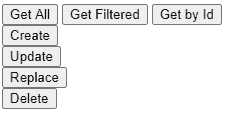
If we load everything onto the ESP8266 and access the served web page, we will see our simple (and yes, ugly again) interface to test that we connect correctly with the REST API.
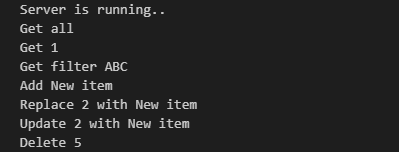
If we click on the different buttons, we can check that, indeed, the backend on the ESP8266 correctly receives the requests and displays the appropriate data in the command console.
As we can see, integrating AXIOS into the ESP8266 is very simple. This small library will greatly simplify our work in our projects, especially when working with REST APIs, making our code simpler and more maintainable.
Of course, it’s just an example to illustrate communication. In a real project, you would need to define the REST API, make the complete web interface, and perform the actions we want in the backend. But the example contains all the necessary code to perform CRUD requests (get/post/update/delete) in both backend and frontend.
In the next two posts, we will continue improving this example, especially the web interface part, adding the integration of the REST API and AXIOS to our solutions along with VueJS and Vuetify. See you soon!
Download the Code
All the code from this post is available for download on Github.

Version for ESP8266: https://github.com/luisllamasbinaburo/ESP8266-Examples
Version for ESP32: https://github.com/luisllamasbinaburo/ESP32-Examples
