

Axios and VueJS let us build a reactive frontend that consumes a REST API served from an ESP32 or ESP8266, separating the web interface from the device logic.
The idea is to combine two pieces that fit together very well: Axios to perform HTTP requests and VueJS to keep the interface in sync. The microcontroller acts as the backend, serving both the REST API and the web page executed in the browser.
With this we can build a web application that is much cleaner than a loose collection of buttons and ad hoc calls. Each part handles what it should handle, which helps keep the code from turning into a mess.
First of all, the backend in this example is the same one we used to serve a REST API with JSON. In other words, the code on the ESP32 does not need to change.
So as not to be tedious and make the post unnecessarily long, we will omit it. You have it in the previous examples of the series and in the code on Github.
What will change, of course, is the frontend that we are going to serve from the SPIFFS, which now becomes.
Where we see that the code of our page has been adorned with the tags typical of a VueJs App.
<!DOCTYPE html>
<html>
<head>
  <title>ESP32 Vue + Axios</title>
  <meta charset="utf-8">
  <meta http-equiv="x-ua-compatible" content="ie=edge">
  <meta name="description" content="">
  <meta name="viewport" content="width=device-width, initial-scale=1">
</head>

  <!-- Our simple example APP -->
  <div id="app">
  <div>
    <button v-on:click="getAll()">GetAll</button>
  </div>
  <div>
    <button v-on:click="get()">Get</button>
    <input v-model="getId" placeholder="getId">
  </div>
  <div>
    <button v-on:click="getFiltered()">Filter</button>
    <input v-model="filter" placeholder="filter">
  </div>
  <div>
    <button v-on:click="create()">Create</button>
  </div>
    <div>
      <my-component v-for="item in items" v-bind:my="item" v-bind:key="item.id"></my-component>
   </div>
  </div>

  <!-- From CDN -->
  <!--<script src="https://cdn.jsdelivr.net/npm/[email protected]/dist/vue.min.js"></script>-->
  <!--<script src="https://cdn.jsdelivr.net/npm/[email protected]/dist/axios.min.js"></script>-->

  <script type="text/javascript" src="./vendor/vue.min.js"></script>
  <script type="text/javascript" src="./vendor/axios.min.js"></script>

  <!-- Load the files that simulate our API and our App in Vue.JS -->
  <script type="text/javascript" src="./js/API.js"></script>
  <script type="text/javascript" src="./js/app.js"></script>
</body>
</html>
The VueJS application is defined in the ‘app.js’ file. It is very simple, and basically exposes a collection of ‘items’ objects, and the necessary methods to call our example API.
Vue.component('my-component', {
    props: ['my'],
    template: '<div>{{my.text}}<button v-on:click="get(my.id)">Get</button><button v-on:click="update(my.id)">Update</button><button v-on:click="replac(my.id)">Replace</button><button v-on:click="delet(my.id)">Delete</button></div>',
    methods: {
        get: function (id) {
            API_get(id);
        },

        update: function (id) {
            API_update(id, 'NewItem');
        },

        replac: function (id) {
            API_replace(id, 'NewItem');
        },

        delet: function (id) {
            API_delete(id);
        }
    }
})

var app = new Vue({
    el: '#app',
    data: {
        filter: "",
    getId: "",
        items: [
            { id: 0, text: 'Item1'},
            { id: 1, text: 'Item2' },
            { id: 2, text: 'Item3'}
        ]
    },

    methods: {
        getAll() {
            API_getAll();
        },

    get() {
            API_get(this.$data.getId);
        },

        getFiltered() {
            API_getFiltered(this.$data.filter);
        },

        create() {
            API_create('NewItem');
        },
    }
})
The API, which in turn is defined in the ‘API.js’ file. These functions use Axios to make the calls to our Rest API, as we saw in the previous post.
function API_get(id) {
    axios.get('item/' + id)
    .then(function (response) {
        console.log(response);
    })
    .catch(function (error) {
        console.log(error);
    })
    .then(function () {
    });
}

function API_getFiltered(filter) {
    axios.get('item', {
        params: {
            filter: filter
        }
    })
    .then(function (response) {
        console.log(response);
    })
    .catch(function (error) {
        console.log(error);
    })
    .then(function () {
    });
}

function API_getAll() {
    axios.get('item')
    .then(function (response) {
        console.log(response);
    })
    .catch(function (error) {
        console.log(error);
    })
    .then(function () {
    });
}

function API_create(data) {
    axios.post('item', {
        data: data
    })
    .then(function (response) {
        console.log(response);
    })
    .catch(function (error) {
        console.log(error);
    })
    .then(function () {
    });
}

function API_replace(id, data) {
    axios.put('item/ ' + id, {
        data: data
    })
    .then(function (response) {
        console.log(response);
    })
    .catch(function (error) {
        console.log(error);
    })
    .then(function () {
    });
}

function API_update(id, data) {
    axios.patch('item/ ' + id, {
        data: data
    })
    .then(function (response) {
        console.log(response);
    })
    .catch(function (error) {
        console.log(error);
    })
    .then(function () {
    });
}

function API_delete(id) {
    axios.delete('item/' + id)
    .then(function (response) {
        console.log(response);
    })
    .catch(function (error) {
        console.log(error);
    })
    .then(function () {
    });
}
Result
We upload our new page to the SPIFFS memory, and when loading it in the browser we see the same page as before.
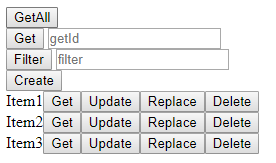
If we interact with the buttons, we check in the browser’s developer console that the actions are performed correctly.

As we can verify in the serial port terminal of the ESP8266 that, indeed, the actions and information are received correctly in the backend.

Even if the page is still visually simple, we have taken an important step in integrating more complex web applications served by the ESP32. We are no longer using plain JavaScript, but two very useful libraries such as Axios and VueJS.
With this, we already have a more maintainable foundation for building web interfaces that consume a REST API served from the device itself.
Download the code
All the code from this post is available for download on GitHub. 
