

We continue with the ESP8266 and ESP32 tutorials by looking at a server that returns information that changes dynamically with each request.
We will refer to the ESP8266, but the same code is compatible with the ESP32, adjusting the library names. At the end, you have the code for both the ESP8266 and the ESP32.
Previously, we saw how to set up a basic server with an ESP8266, and in the previous post, we saw how to distinguish between types of calls and receive arguments.
Until now, we were returning “more or less” static content, meaning it was always the same. But in many cases, we will want to return content that varies, such as the state of a variable, or an analog or digital input, a sensor reading.
In a real project, we will typically serve some static content (typically HTML) and this will be updated via some mechanism (Ajax, Websocket) by making requests to certain Endpoints. We will see all this in due time.
In this post, we are going to learn how to serve content that changes dynamically. For this, we start from the server program in the previous example.
Here we have only added a variable ‘ledStatus’ that represents any variable we might want to return.
#include <ESP8266WiFi.h>
#include <ESP8266WebServer.h>

bool ledStatus = false;  // Example variable

#include "config.h"  // Replace with your network data
#include "Server.hpp"
#include "ESP8266_Utils.hpp"

void setup(void)
{
   Serial.begin(115200);

   ConnectWiFi_STA();

   InitServer();
}

void loop()
{
   server.handleClient();
}
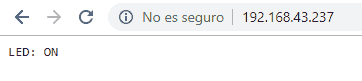
On the other hand, in the ‘Server.hpp’ file we have defined a single route from the root ’/’. In the response, we generate a String containing the text we want. In this example, we only return ‘LED: ON’ or ‘LED: OFF’, depending on the state of the variable.
ESP8266WebServer server(80);

void handleRoot() {
   String response = "LED: ";
   response.concat(ledStatus ? "OFF" : "ON");

   server.send(200, "text/plain", response);
}

void handleNotFound() {
  server.send(404, "text/plain", "Not found");
}

void InitServer()
{
   server.on("/", handleRoot);
   server.onNotFound(handleNotFound);
   server.begin();
   Serial.println("HTTP server started");
}
Result
If we run the code, we will see that, indeed, we are returning the dynamic content correctly. It’s that easy!
Of course, this is a very simple example. But it’s important that you learn it very well because, together with the previous post, it forms the basis for building our own API.
The main problem with this approach is that it puts a load on the processor because it has to generate the information on each request, and handling the response Strings can take up a lot of memory if the response is long.
In the next post, we will see how to improve this by serving content from Flash memory, and in the following one, we will see how to use the available file systems (SPIFFS and LittleFS) to serve static content. See you soon!
Download the Code
All the code from this post is available for download on Github.

Version for ESP8266: https://github.com/luisllamasbinaburo/ESP8266-Examples
Version for ESP32: https://github.com/luisllamasbinaburo/ESP32-Examples
