

SourceTree is a free client for Git that allows us to work with our code repositories easily.
In the world of development, it is common to work with a source code repository to provide version control and facilitate collaborative work.
Currently, the most widely used version control system is Git. It is integrated into most IDEs, and there are also many clients that allow us to manage our repositories.
Among all these clients, my favorite and undoubtedly one of the most popular is Atlassian’s SourceTree. In my opinion, it is the best designed and the one that works best.
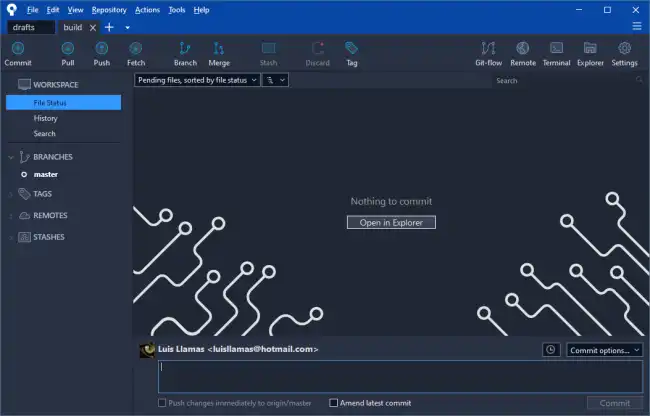
Undoubtedly, the biggest attraction of SourceTree is its powerful graphical interface. It is intuitive and easy to use, yet provides all the commands available in Git, even the most advanced ones.
To download and install SourceTree, we visit the project’s website https://www.sourcetreeapp.com/. It is free and available for Windows and Mac.
SourceTree allows access to different version control platforms, such as Git, Mercurial, and Subversion. To access them, we will need to configure our user accounts.
To do this, we go to “Options” and select the “Authentication” section. There we can add the access credentials for the different version control platforms being used.
Now we can clone a repository by selecting the “Clone/New” option from the “File” menu. We enter the URL of the remote repository, the local folder, and that’s it! It’s that simple.
Furthermore, SourceTree integrates with the file explorer, so to open a repository we simply right-click on the folder and choose “Open with SourceTree”.
Once we have our repository ready, whether local or cloned, we can now make changes to the code, stage files, create branches, make commits, and all the actions we could normally do in source control.
Personally, what I usually do is use the IDE’s source control (Visual Studio, Visual Studio Code, etc.) for “daily” tasks, like making commits, fetch, and syncs.
But, I have SourceTree installed for the more “complicated” actions, which are really very inconvenient to do from the IDE.
SourceTree gives you absolute control of your repository, even for the most complex actions, all in a visual environment that is easy and comfortable to use.
The only downside is that it is not Open Source. But, if this is not a problem for you, SourceTree is probably the best client available to manage your source control.
