

Insomnia is an open-source application that provides a graphical interface for making HTTP requests to APIs, managing environments, and visualizing responses.
Designed to offer an intuitive user experience and advanced features, Insomnia has become a popular choice among developers for working with HTTP and RESTful requests, compared to other alternatives like Postman.
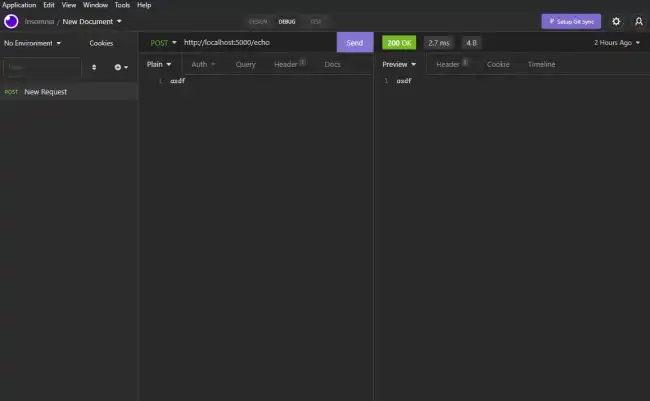
Among its standout features are:
- Intuitive Interface: A graphical user interface (GUI) that facilitates the creation and testing of HTTP requests.
- Support for Multiple Protocols: Compatible with HTTP, HTTPS, GraphQL, and WebSocket.
- Environment Management: Allows defining workspaces and variables to facilitate testing in different configurations.
- Documentation and Testing: Offers tools to document our APIs and perform automated tests.
- Export and Import: Facilitates exporting configurations and test data, and importing projects.
How to Install Insomnia
To start using Insomnia, we need to install it on our system. Insomnia is available for Windows, macOS, and Linux.
To do this, we go to the official Insomnia website and download the installer corresponding to our operating system. It’s that easy.
Installation on Linux
For Linux, we can download the .AppImage file from the official Insomnia website and make it executable:
chmod +x Insomnia.Core-.AppImage ./Insomnia.Core-.AppImage
It is also possible to install Insomnia using package managers like Snap:
sudo snap install insomnia
How to Use Insomnia
Once we have Insomnia installed, we can start using it to test our APIs.
Create a new workspace: A workspace is where requests and configurations are organized. A new one can be created from the main menu.
Add a Request: This is done by clicking the
+button and selecting the type of request (GET, POST, PUT, etc.) and filling in the necessary details such as the URL and parameters.Send the Request: Once the request is configured, simply click the send button to see the server’s response.
Response Visualization: Insomnia displays the server’s response in a readable format, including details like status code, headers, and response body.
