
ToastNotifications is an open-source library developed by Rafal Łopatka that allows showing customizable notifications in WPF applications (Windows Presentation Foundation).
Notifications in desktop applications are an essential feature for improving user interaction, informing them about important events, errors, or updates.
It offers a variety of notification types and is highly configurable, allowing developers to tailor notifications to the specific needs of their applications.
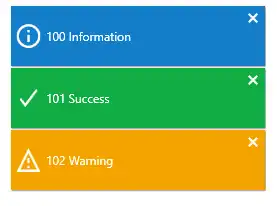
Main features,
- Various notification types: Information, warning, error, and success.
- Customization: Configuration of styles, durations, and animations.
- Easy integration: Simple to integrate into existing WPF projects.
- Support for multiple notifications: Ability to show several notifications simultaneously.
For more information and advanced examples, you can visit the official ToastNotifications repository on GitHub.
Installation
To start using ToastNotifications in your WPF project, you first need to install the library. You can do this via the NuGet Package Manager in Visual Studio or by using the NuGet console with the following command:
Install-Package ToastNotifications
Using ToastNotifications
Once the library is installed, you can start configuring it in your project.
XAML (MainWindow.xaml)
Make sure you have a basic window configured in your WPF project. You can use the following code as a starting point:
<Window x:Class="ToastNotificationsExample.MainWindow"
        xmlns="http://schemas.microsoft.com/winfx/2006/xaml/presentation"
        xmlns:x="http://schemas.microsoft.com/winfx/2006/xaml"
        Title="MainWindow" Height="350" Width="525">
    <Grid>
        <Button Content="Show Notification" HorizontalAlignment="Center" VerticalAlignment="Center" Click="ShowNotification_Click"/>
    </Grid>
</Window>
Code-behind (MainWindow.xaml.cs)
In the code-behind file, import the necessary libraries and set up the event handler for the button.
using System.Windows;
using ToastNotifications;
using ToastNotifications.Lifetime;
using ToastNotifications.Messages;
using ToastNotifications.Position;

namespace ToastNotificationsExample
{
    public partial class MainWindow : Window
    {
        private Notifier _notifier;

        public MainWindow()
        {
            InitializeComponent();

            _notifier = new Notifier(cfg =>
            {
                cfg.PositionProvider = new WindowPositionProvider(
                    parentWindow: Application.Current.MainWindow,
                    corner: Corner.BottomRight,
                    offsetX: 10,
                    offsetY: 10);

                cfg.LifetimeSupervisor = new TimeAndCountBasedLifetimeSupervisor(
                    notificationLifetime: TimeSpan.FromSeconds(3),
                    maximumNotificationCount: MaximumNotificationCount.FromCount(5));

                cfg.Dispatcher = Application.Current.Dispatcher;
            });
        }

        private void ShowNotification_Click(object sender, RoutedEventArgs e)
        {
            _notifier.ShowInformation("This is an information toast notification!");
        }
    }
}
Showing Notifications
With the initial configuration in place, you can show different types of notifications: information, success, warning, and error. Here’s how to do it:
private void ShowNotification_Click(object sender, RoutedEventArgs e)
{
    _notifier.ShowInformation("This is an information toast notification!");
    _notifier.ShowSuccess("This is a success toast notification!");
    _notifier.ShowWarning("This is a warning toast notification!");
    _notifier.ShowError("This is an error toast notification!");
}
Customization
ToastNotifications allows you to customize the layout and behavior of notifications. You can define custom templates and change the notification duration.
To create a custom template, you need to define a DataTemplate in your XAML file:
<Window.Resources>
    <DataTemplate x:Key="CustomNotificationTemplate">
        <Border Background="LightGray" Padding="10" CornerRadius="5">
            <TextBlock Text="{Binding Message}" Foreground="Black"/>
        </Border>
    </DataTemplate>
</Window.Resources>
Then, you can assign this template to your notifications:
_notifier = new Notifier(cfg =>
{
    cfg.PositionProvider = new WindowPositionProvider(
        parentWindow: Application.Current.MainWindow,
        corner: Corner.BottomRight,
        offsetX: 10,
        offsetY: 10);

    cfg.LifetimeSupervisor = new TimeAndCountBasedLifetimeSupervisor(
        notificationLifetime: TimeSpan.FromSeconds(3),
        maximumNotificationCount: MaximumNotificationCount.FromCount(5));

    cfg.Dispatcher = Application.Current.Dispatcher;

    cfg.DisplayOptions.Width = 250;
    cfg.DisplayOptions.NotificationTemplate = (DataTemplate)FindResource("CustomNotificationTemplate");
});
