

We have already seen what REFERENCES are, elements that contain a link to another element. If you haven’t seen it yet, you should take a look at this What is a reference.
Now we are going to see what implications references have in the field of computing and programming (in particular, in the management of our variables).
In fact, most languages divide their variables into two types:
- Variables of value type
- Variables of reference type
The concept of REFERENCE is very “at the core” of your computer. It plays a crucial role in memory management and the internal functioning of the computer.
These two types, value and reference, have different behaviors within a program, which affect many aspects (such as speed, mutability, dynamic memory).
So it’s important to understand it so you don’t mess up (and for general knowledge, which isn’t bad either). So let’s get to it 👇.
What are value types and reference types
Variables of value type are those in which the data is stored directly in the variable.
That is, your variable has a “little slot” to put its value.

In general, value types are limited to the simplest (primitive) types of each language. In particular, they are usually only:
- Integers and floating-point numbers
- Characters (not strings)
- Booleans
- Groupings of simple variables
This means that when we assign one variable to another, an independent copy of the data is made.
Variables of reference type are those in which the variables contain references to the data instead of the data itself.
That is, your variable contains a link to some data, which is “somewhere else”.
Actually, the REFERENCE does have a value. It’s just that the value is the way to get to the data (the address).

Reference types include:
- Collections (arrays, lists, dictionaries…)
- Objects
- Complex data structures
That is, basically everything is REFERENCES. Except numbers, characters… and little else.
Playground
Differences between value types and reference types
The main difference between a value type and a reference type is how they behave when copied.
Let’s see it with an example. We do the same experiment, with these steps:
- We create a variable
Aand assign it a value - We create another variable
Band set it equal toA - We modify
B - We see what happened to
A
In summary, we want to know if modifying B also modifies A.
Let’s start with a value type. For example, an integer.
int A = 10;  // we create a variable A, and set its value to 10
int B = A;   // we create a variable B, and set its value to A

int B = 20;  // we change B. Did A change?
What is the value of A at the end of the process? In this case, A is 10 and B is 20.
With value type: Modifying B -> DID NOT ❌ modify A
This is because A and B are value type, they are independent. Each has its own value.
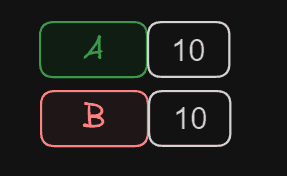
When copying the value of A to B, we copied its value, but they remain separate variables. Any subsequent change does not affect the other, because there is no link between them.
Now let’s do the same with a reference type. For example, let’s take an array (we’ll only work with position 0 of the array, enough to show what we want to see).
So we do the same experiment:
int[] A = {10, 0, 0};  // we create a variable A
int[] B = A;           // we create a variable B, and set its value to A

B[0] = 20;             // we change B. Did A change?
What is the value of A[0]? In this case, A[0] is 20.
With reference type: Modifying B -> YES ✔️ modified A
This happened because we are working with reference type. When creating variable A, it was a reference to an array. When creating the new variable B, we set it equal to A. Therefore, we had two references, pointing to the same Array.
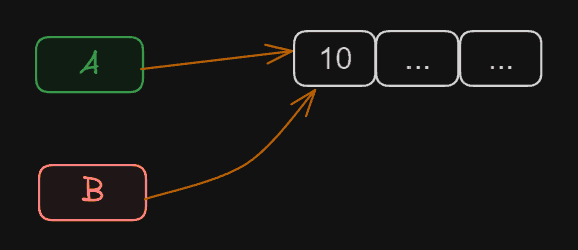
Therefore, if we modify anything in B, we are modifying it in A. Because both variables point to the same data.
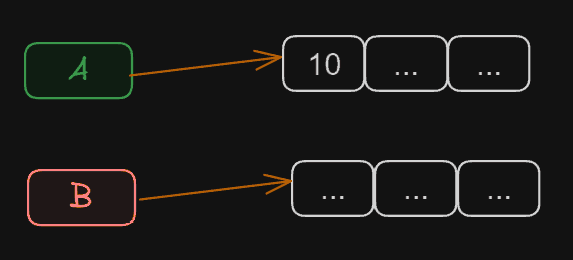
If we wanted to make them independent again, we would have to assign a different Array to B.
int[] A = {10, 0, 0};   // we create a variable A
int[] B = A;            // A and B point to the same data

int[] B = {10, 0, 0};   // now B points to another Array
B[0] = 20;              // if we change B, it no longer affects A
Internal Functioning Advanced
The first thing you need to know is that memory is organized into cells. Each of these cells is identified with a number.

When we create a variable like A or B, the program takes this as an alias for memory addresses. Internally, the computer doesn’t see your aliases A or B. It translates them to, for example, 0x17 and 0x21 (or whatever they happen to be). And it only works with that.
When working with variables of value type, into these memory slots it will put the value of your variable. In our example, 10. But they are two independent slots. If I put 20 in one, the other is not affected.
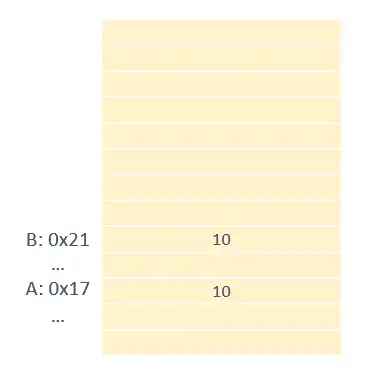
When you have variables of reference type, you also have two slots for your variables. But, instead of having the value, this time they have the memory address where the “real” data is.
In our example, let’s say we have an ARRAY. The computer has created this array at position 0x30. Our variables A and B have this position as their value.
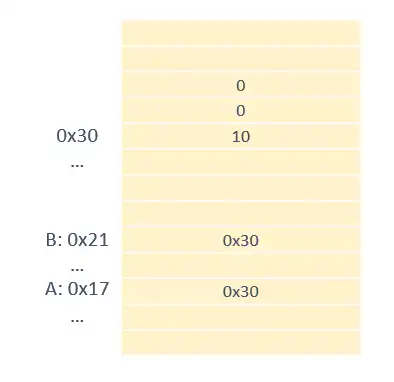
So, both A and B are modifying the same data, which is actually at memory position 0x30.
On the other hand, your programming language knows how to handle both types. When accessing:
- value type: It knows the value is available at whatever address
- reference type: It knows it’s a memory address, and that it has to “jump” to the data
That operation of “jumping” that it has to do with reference types to get to the real data is called indirection.
In principle, this is the reason why accessing a reference type variable is a bit slower than value types. But it is so common and so optimized that the difference is usually minimal or even non-existent. But it’s there.
On the contrary, reference types are much faster to copy or move. This is because you don’t actually copy the data, you only copy the memory address. Which, in general, occupies a few bytes. While the real data can be… well, as big as your computer’s memory allows.
