

Types in TypeScript are the basic tool for defining the characteristics and behavior of variables and objects in the code.
Types allow us to specify what kind of values a variable can hold, what kind of arguments a function can receive, and what kind of value a function will return (among others).
The type system in TypeScript is a bit “special” compared to other languages. Some of the features that make it special are:
- Static: Typing is checked at compile time, allowing errors to be detected before running the code.
- Optional: Although TypeScript is a strongly typed language, typing is optional and can be progressively added to a project.
- Structural: TypeScript uses structural typing, where two types are compatible if they have the same shape or structure.
Type Categories in TypeScript
Types in TypeScript can be divided into several main categories:
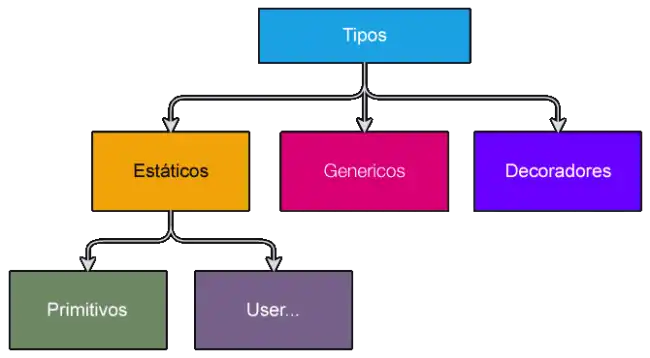
Static Types: These are the types checked at compile time. They include:
- Primitive Types: The basic types found in almost all programming languages.
- User Defined Types: Types that the user defines to meet specific application needs.
Generic Types: Allow the definition of components that can work with different types without specifying the exact type beforehand. Generics provide a way to create reusable functions and classes.
Decorators: They are a special kind of declaration that can be applied to classes, methods, properties, and parameters. Decorators allow adding metadata and modifying the behavior of classes and their members.
Static Types
Primitive Types
The common primitive types in TypeScript:
| Type | Description |
|---|---|
number | Represents both integer and floating-point numbers |
bigint | Represents large integers |
string | Represents text strings |
boolean | Represents logical values: true or false |
symbol | Represents a unique and mutable value |
Here are other primitive types that have special use:
| Type | Description |
|---|---|
any | Represents a type compatible with all others |
void | Represents the absence of a return value |
undefined | Represents a variable that has been declared but not initialized |
null | Represents the absence of a value |
never | Represents the type of value that never occurs |
User Defined Types
User defined types include:
| Type | Description |
|---|---|
literal | Represents an element that accepts a series of specific values |
enum | Represents a set of named constants |
class | Represents a template for creating objects with defined properties and methods |
array | Represents a list of values |
tuple | Represents a collection with a fixed number of elements |
function | Represents a function reference |
Type compositions:
| Type | Description |
|---|---|
union | Represents a value that can be one of several specified types |
intersection | Represents a value that must satisfy all specified types |
Generic Types
Generic types allow writing functions and classes that can work with any type of data. For example:
function identity<T>(arg: T): T {
    return arg;
}
In this example, T is a generic type determined at runtime.
Decorators
Decorators are used to add metadata to classes and their members. For example, a class decorator:
function logClass(target: Function) {
    console.log(`Class: ${target.name}`);
}

@logClass
class MyClass {
    // Implementation of the class
}
Type Hierarchy in TypeScript
The type hierarchy in TypeScript is organized so that each type is derived from or is compatible with other types in the system.
Here’s a little diagram with a simplified description of this hierarchy:
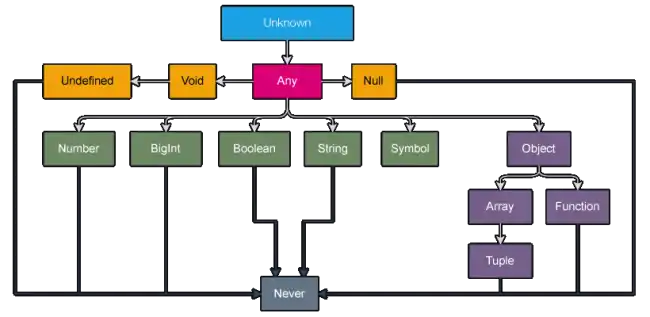
You don’t need to memorize this. But having it more or less in mind can help you understand some aspects, especially regarding type conversion and compatible units.
