
Upscayl is a free and open-source application that allows you to enhance the resolution of your low-quality images using advanced artificial intelligence models.
To do this, Upscayl uses interpolation and AI-based image processing techniques to increase their resolution. This is achieved through deep neural networks trained on large datasets of high and low-resolution images.
It’s not the only application of its kind. In fact, the documentation itself mentions Gigapixel, a very popular proprietary program from Topaz Labs. Well, Upscayl is something similar, but the Open Source version ❤️.
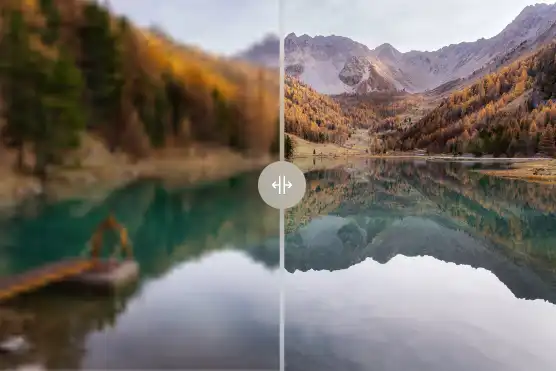
With Upscayl we can enlarge our images up to 4x. Greater enlargements are possible by running the program multiple times, but the authors indicate it can yield “weird” results on certain images.
For scaling, Upscayl has 5 models trained on images. For me, the one that gave the best results was “remix equilibrates”. But, more or less, all of them give good results. Try for yourselves which one works best.
For the program to work, we will need a graphics card compatible with Vulkan. Most new-generation cards should have compatibility.
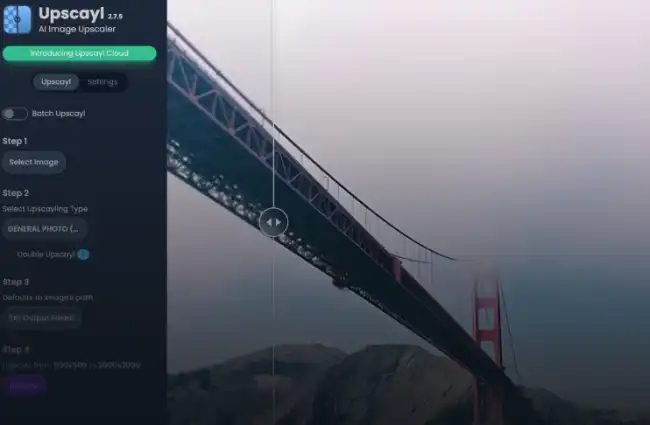
The user interface is quite pleasant. No great frills, but it’s clear and comfortable to use. It has the options you need, well organized, and it’s nice. There’s not much more to ask for.
When scaling the image, we have the option to compare the new image and the original using either a “magnifying glass” or a “slider”. (Note for the developers, it would be nice to be able to just see the final image. I’ll leave that as a suggestion for improvement)
Upscayl has a batch processing functionality, which allows us to run the process on a series of images we have in a folder. A wonderful feature, honestly.
Upscayl is primarily designed for Linux environments, but it is also compatible with macOS and Windows. Furthermore, it is available as an installable or portable application.
More information on the project page Upscayl and in its repository on Upscayl · GitHub.
