

New entry about the ESP8266 and ESP32 where we are going to see how to apply Material Design aesthetics to our VueJS applications served to the client thanks to Vuetify.
We will refer to the ESP8266, but the same code is compatible with the ESP32, adjusting the library names. At the end, you have the code for both the ESP8266 and the ESP32.
Two entries ago, we saw how to create a Web interface for the ESP8266, using Vanilla Javascript. In the previous entry, we saw how to use VueJS on the ESP8266, as a framework to replace the logic of our App with a declarative formulation.
Unfortunately along the way, our page became as ugly as ever again. And we agreed that, in this entry, we would focus on seeing how to achieve the same Material Design aesthetics in our VueJS application.
This is where Vuetify comes into play, a framework that we saw before, which provides a lot of components for creating VueJS applications with a pleasant, modern interface that doesn’t make you want to tear your eyes out when you see it.
Like the previous one, this introductory entry to the framework is going to be very simple. We will only focus on presenting it, making a small “hello world” App, and verifying that it works correctly.
Our main program remains simple, and identical to the previous entry.
#include <ESP8266WiFi.h>
#include <ESPAsyncWebServer.h>
#include <FS.h>

#include "config.h"  // Replace with your network data
#include "Server.hpp"
#include "ESP8266_Utils.hpp"

void setup(void)
{
  Serial.begin(115200);
  SPIFFS.begin();

  ConnectWiFi_STA();

  InitServer();
}

void loop(void)
{
}
As well as the server declaration in the “Server.hpp” file,
AsyncWebServer server(80);

void InitServer()
{
  server.serveStatic("/", SPIFFS, "/").setDefaultFile("index.html");

  server.onNotFound([](AsyncWebServerRequest *request) {
    request->send(400, "text/plain", "Not found");
  });

  server.begin();
    Serial.println("HTTP server started");
}
What will change is the client side,
Our ‘index.html’ file is longer than the previous one. But that’s the “price” of having better aesthetics… more lines of code.
<!DOCTYPE html>
<html>
<head>
<title>ESP8266 Vuetify</title>
<meta charset="utf-8">
<meta name="viewport" content="width=device-width, initial-scale=1.0">
<!-- From CDN -->
<!--<link href='https://fonts.googleapis.com/css?family=Roboto:300,400,500,700|Material+Icons' rel="stylesheet">-->
<!--<link href="https://cdn.jsdelivr.net/npm/[email protected]/dist/vuetify.min.css" rel="stylesheet">-->
<link href="./vendor/google-fonts.css" rel="stylesheet">
<link href="./vendor/vuetify.min.css" rel="stylesheet">
</head>
<body>
<div id="app">
<v-app id="inspire">
<v-container style="max-width: 500px">
<v-text-field
v-model="task"
label="What are you working on?"
solo
@keydown.enter="create"
>
<v-fade-transition slot="append">
<v-icon
v-if="task"
@click="create"
>
add_circle
</v-icon>
</v-fade-transition>
</v-text-field>
<h2 class="display-1 success--text pl-3">
Tasks:
<v-fade-transition leave-absolute>
<span :key="`tasks-${tasks.length}`">
{{ tasks.length }}
</span>
</v-fade-transition>
</h2>
<v-divider class="mt-3"></v-divider>
<v-layout
my-1
align-center
>
<strong class="mx-3 info--text text--darken-3">
Remaining: {{ remainingTasks }}
</strong>
<v-divider vertical></v-divider>
<strong class="mx-3 black--text">
Completed: {{ completedTasks }}
</strong>
<v-spacer></v-spacer>
<v-progress-circular
:value="progress"
class="mr-2"
></v-progress-circular>
</v-layout>
<v-divider class="mb-3"></v-divider>
<v-card v-if="tasks.length > 0">
<v-slide-y-transition
class="py-0"
group
tag="v-list"
>
<template v-for="(task, i) in tasks">
<v-divider
v-if="i !== 0"
:key="`${i}-divider`"
></v-divider>
<v-list-tile :key="`${i}-${task.text}`">
<v-list-tile-action>
<v-checkbox
v-model="task.done"
color="info darken-3"
>
<div
slot="label"
:class="task.done && 'grey--text' || 'text--primary'"
class="ml-3"
v-text="task.text"
></div>
</v-checkbox>
</v-list-tile-action>
<v-spacer></v-spacer>
<v-scroll-x-transition>
<v-icon
v-if="task.done"
color="success"
>
check
</v-icon>
</v-scroll-x-transition>
</v-list-tile>
</template>
</v-slide-y-transition>
</v-card>
</v-container>
</v-app>
</div>
<!-- From CDN -->
<!--<script src="https://cdn.jsdelivr.net/npm/[email protected]/dist/vue.min.js"></script>-->
<!--<script src="https://cdn.jsdelivr.net/npm/[email protected]/dist/vuetify.min.js"></script>-->
<script type="text/javascript" src="./vendor/vue.min.js"></script>
<script type="text/javascript" src="./vendor/vuetify.min.js"></script>
<script src="./js/app.js"></script>
</body>
</html>
On the other hand, the Vue application definition has also changed, to adapt to Vuetify’s requirements, becoming,
new Vue({
    el: '#app',
    data: () => ({
      tasks: [
        {
          done: false,
          text: 'Foobar'
        },
        {
          done: false,
          text: 'Fizzbuzz'
        }
      ],
      task: null
    }),

    computed: {
      completedTasks () {
        return this.tasks.filter(task => task.done).length
      },
      progress () {
        return this.completedTasks / this.tasks.length * 100
      },
      remainingTasks () {
        return this.tasks.length - this.completedTasks
      }
    },

    methods: {
      create () {
        this.tasks.push({
          done: false,
          text: this.task
        })

        this.task = null
      }
    }
  })
Result
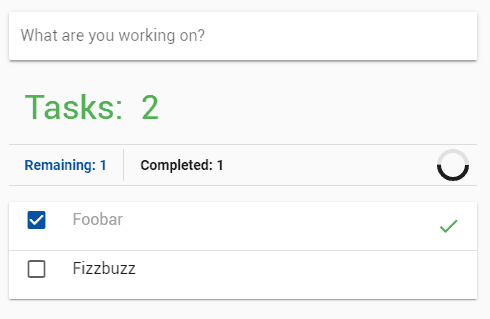
We upload everything to the ESP8266 and load the page in the browser. Good! This is something else! We once again have an interface with Material Design aesthetics, pleasant and nice, while maintaining the advantages that VueJS gives us.
We are now close to being able to completely remake our example web interface for the ESP8266 in VueJs. But first, in the next entry, we will make a “mini pause” to see another of the tools we will need, the AXIOS library for making AJAX requests. See you soon!
Download the Code
All the code from this entry is available for download on Github.

Version for ESP8266: https://github.com/luisllamasbinaburo/ESP8266-Examples
Version for ESP32: https://github.com/luisllamasbinaburo/ESP32-Examples
