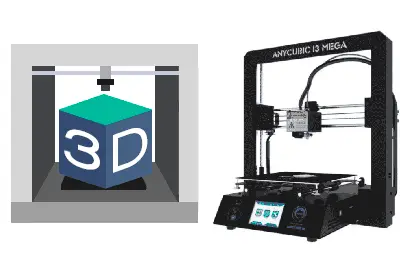
We continue with the 3D printing tutorials by looking at the different versions of the Anycubic i3 Mega. This will be one of the last posts dedicated to this printer (except for those about upgrades), before starting with the generic 3D printing tutorials.
Since its first appearance, different versions of the Anycubic i3 Mega have been manufactured. Essentially, all versions share characteristics and similarities. But, logically, each version has its own differences that make it distinct from the others.
Identifying the version is important because it conditions the updates we can make. In particular, parts downloaded from sites like Thingiverse may not be fully compatible with our printer. It also determines whether or not we can change the stepper motor drivers.
So, let’s do a quick review of the versions of the Anycubic i3 Mega 3D printer and the most relevant characteristics that differentiate each one.
Anycubic i3 Mega - V0
Officially called the Anycubic Modular i3 or Anycubic Omega I3. It is the precursor to the current Anycubic i3 Mega and, really, cannot be considered part of the “Mega” family.
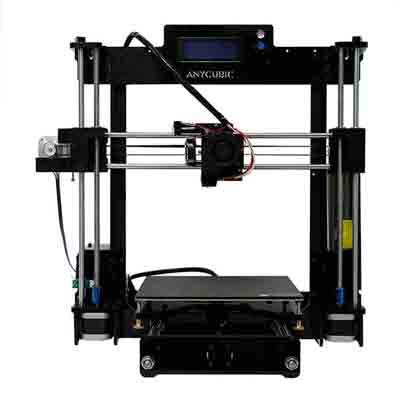
Very different in construction from the later Megas, the Modular i3 is characterized by an LCD2004 screen placed at the top of the frame. It ran Open Source software, something that later versions do not.
In general, it is a model that is not manufactured and, if you happen to find it, you should not buy it.
Anycubic i3 Mega - V1
The first version of the Anycubic i3 Mega in the form we know it. This version is very similar to the current one, both in construction and its black color, although we can recognize it because the stickers on the front are different.
The structure of the V1 version is practically the same as the later ones, with its characteristic base, bridge, and quick assembly system.
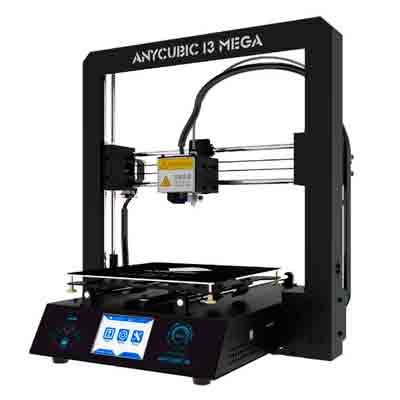
The V1 incorporated the TFT touch screen, the 8-bit Trigorilla control board with Mega 2560 chipset, ATMEGA 25601AU processor and A4988 drivers, and a filament break sensor. The software became proprietary, not Open Source.
A characteristic unique to this version is the inclusion of an inductive sensor for “assisted” (not fully automatic) calibration, which disappeared in later versions.
Another difference with the current ones is that it has a simple heated bed instead of the current Ultrabase, so sometimes we see this version referred to as “Anycubic i3 Mega without Ultrabase”.
This version is also no longer manufactured, but it was a very popular version. Therefore, many of the upgrades you find apply to this version. However, due to its geometric differences, not all are compatible with the current V3 and V4.
Anycubic i3 Mega - V2
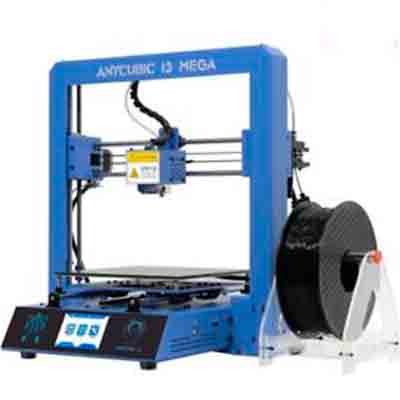
Practically identical to version 1, with the same features, but in a tacky blue color. It was not sold much (and we’re not surprised).
Anycubic i3 Mega - V3
It is the most widely sold version. If you buy it right now, this is the most likely version they will send you, even though V4 is already available (and we’ll see that it’s almost preferable).
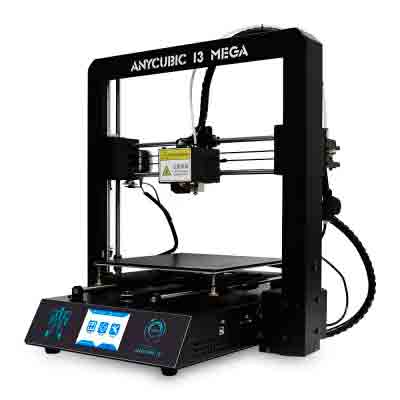
As differences compared to V1-V2 versions, the V3 incorporated the Ultrabase heated bed. As we know, the Ultrabase allows for good first layer adhesion, while also providing easy part removal.
On the other hand, it dispenses with the inductive sensor for calibration. Perhaps because it didn’t give such good results with the Ultrabase? In any case, I haven’t read wonders about its performance either, it was probably quite useless. And we have better options as we will see when looking at upgrades.
They also improved some details of the upper carriage that moves the print head and changed the upper connection clamp, which sometimes caused the cable to tangle or come loose, something that doesn’t happen in the V3.
As we said, the improvements to the carriage and the Ultrabase mean a change in geometry compared to the also very popular V1, so be careful with the upgrades you download because they might not fit your printer.
On the other hand, it maintains the electronics compared to V1-V2, in particular the 8-bit Trigorilla board (based on the Mega 2560) and replaceable A4988 drivers. The software, for its part, moved to version v1.1
Anycubic i3 Mega - V4
Externally it is identical to the V3 and its physical characteristics are similar or the same. It maintains the motors, the Ultrabase plate, and the same carriage for the print head. Therefore, it is impossible to distinguish it at a glance from the V3.
The main difference is that it now mounts a new 32-bit Trigorilla board with drivers integrated into the board itself. The software, for its part, remains proprietary and moves to version 1.4.
The new 32-bit electronics is a good upgrade and prepares it for the future of 3D printers, which, immediately and inevitably, is heading towards 32-bit (although we will still see 8-bit for a good while).
However, it has a major disadvantage in that it is not possible to replace the drivers because they are integrated into the board. Therefore, we cannot change them for drivers like the TMC2130, which is much quieter.
Conclusion
In summary, knowing which version of the Anycubic i3 Mega you have is very important when we are going to perform upgrades.
On one hand, when downloading part designs for upgrades from the Internet, check if they are for the V1 (version without Ultrabase) or V3-V4 (versions with Ultrabase) because the geometry is different and they may not be compatible.
On the other hand, if you buy it right now, they may send you the V3 or the V4 and you have no way to differentiate them unless you open the printer. The V4 has the advantage of having a better 32-bit board. But, if you plan to change the drivers for quieter ones (the best upgrade you can make) the V3 is preferable because in the V4 you will not be able to.
In the next post, we will leave the Anycubic i3 Mega behind and begin with the actual 3D printing tutorials with a basic printing manual, clarifying the complete process and some of the terms used in the field. See you soon!