

Props are custom attributes that can be passed to a child component from a parent component.
They are a form of communication between components (one of the most common), in this case exclusively “top-down”.
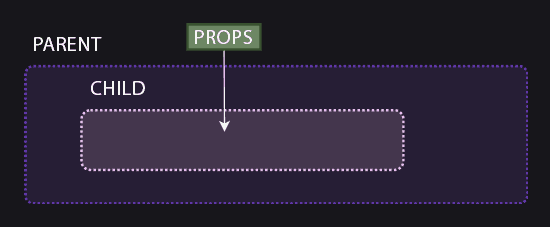
Props allow the child component to receive data and use it in its logic or template. This allows us to create more reusable components.
For example, imagine you have a “Card” component that displays information about a product. You could pass the product name and its price as props, and thus reuse it.
Props are read-only, meaning the child component cannot modify them directly. That is, they are not meant for the child component to send information to the parent.
How to define and use props
To define props in a child component, we use the defineProps function. This function returns an object with the props the component can receive.
<template>
  <div>
    <p>Message received: {{ message }}</p>
  </div>
</template>

<script setup>
// Define the props that the component can receive
const props = defineProps(['title'])
</script>
<template>
  <div>
    <ChildComponent message="Hello from the parent" />
  </div>
</template>

<script setup>
import ChildComponent from './ChildComponent.vue';
</script>
In this example:
- The parent component (
ParentComponent) passes themessageprop to the child component (ChildComponent). - The child component receives the prop and displays it in its template.
Advanced Props
Props with Types
It is very common to define the expected data type for each prop. This helps avoid errors and improves code maintainability.
<template>
  <div>
    <p>Name: {{ name }}</p>
    <p>Age: {{ age }}</p>
    <p>Is student?: {{ isStudent ? 'Yes' : 'No' }}</p>
  </div>
</template>

<script setup>
const props = defineProps({
  name: String,       // String type prop
  age: Number,        // Number type prop
  isStudent: Boolean, // Boolean type prop
});
</script>
<template>
  <div>
    <ChildComponent name="Juan" :age="25" :isStudent="true" />
  </div>
</template>

<script setup>
import ChildComponent from './ChildComponent.vue';
</script>
In this example:
- Props of type
String,Number, andBooleanare defined. - The parent component passes specific values for each prop.
Props with Default Values
It is also possible to define default values for props. In case the parent component does not provide them, the prop will have the default value.
<script setup>
const props = defineProps({
  name: {
    type: String,
    default: 'Guest', // Default value
  },
  age: {
    type: Number,
    default: 18, // Default value
  },
});
</script>
Required Props
It is possible to mark a prop as required, meaning the parent component must provide it.
const props = defineProps({
  name: {
    type: String,
    required: true, // Required prop
  },
});
Bidirectional Communication with v-model Advanced
Although props are unidirectional, you can achieve bidirectional communication using v-model.
<template>
  <input :value="modelValue" @input="$emit('update:modelValue', $event.target.value)" />
</template>

<script setup>
defineProps({
  modelValue: String, // Prop for v-model
});

defineEmits(['update:modelValue']); // Emit the event to update the value
</script>
<template>
  <div>
    <InputComponent v-model="inputValue" />
    <p>Current value: {{ inputValue }}</p>
  </div>
</template>

<script setup>
import { ref } from 'vue';
import InputComponent from './InputComponent.vue';

const inputValue = ref('');
</script>
In this example:
- The child component receives the value through the
modelValueprop. - The child component emits an event to update the value in the parent component.
