

We have been looking at messaging services in IoT for a few posts. In this post, we will delve into MQTT Topics, seeing what they are and how to use them correctly in our projects.
In the first post, we saw different communication protocols for IoT. In the previous one, we introduced MQTT, the popular M2M protocol especially suitable for IoT applications due to its simplicity and lightness.
We recall that MQTT is a messaging service with a publisher/subscriber pattern (pub-sub) that works over TCP/IP. That is, a central server, called a Broker in MQTT, receives messages, filters them, and distributes them to clients.
We also recall that in MQTT, transmitted messages consist of a header containing, among other things, the type of command sent. The other important part of the message is the content itself or Payload.
We had yet to see Topics, a fundamental component of the MQTT protocol. In this post, we will see what they are, how to use them, and how to correctly organize their structure in an IoT system.
What are Topics in MQTT?
As we said, MQTT Brokers apply filtering to messages received from publishers to discriminate which subscribed clients they are delivered to.
In MQTT, this filter is called a Topic, and it simply consists of a UTF-8 text string, with a maximum length of 65536 characters (though it’s usually much shorter). It is case-sensitive.
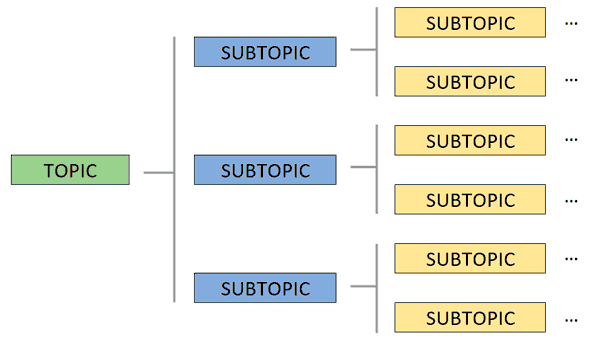
Topics are composed of one or more “levels” separated from each other by a forward slash ’/’. Each level must consist of one or more characters.
For example, valid Topic examples could be,
Casa/Cocina/Temperatura

Casa/Salon/Temperatura

Casa/Salon/Persiana
How Topics work in MQTT
The operation of Topics in MQTT is simple and transparent. On one hand, the Broker accepts all Topics. It is not necessary to create it explicitly before publishing or subscribing to the Broker.
For their part, clients can subscribe to one or more Topics. To do this, the client can establish multiple subscriptions and/or use Wildcards, as we will see in the next section.
Finally, clients publish messages specifying a single Topic. The Broker receives the message and, if it finds any subscription that matches the Topic filter, transmits the message to the subscribed clients.
Wildcards
When a client establishes a subscription, it can subscribe to a specific Topic, or use Wildcards to subscribe to multiple Topics. There are two Wildcards we can use:
Wildcards are only for subscription. Messages can only be published to a single Topic.
Recommendations when organizing Topics
The success of an IoT system depends greatly on the architecture we design for messaging. In the case of MQTT, it is essential to plan and organize the Topics we are going to use in the project. There are several tips we can follow.
The main one is to design the Topic system to be scalable and maintainable. We want to be able to add more devices to our network or new functionalities, and avoid realizing in the future that the system we chose is insufficient.
Otherwise, we may face the nightmare of having to reprogram all devices (something we probably cannot do), or having to fix it with “patches”.
Another tip is to keep Topics as small and clear as possible. Likewise, it is advisable to use as specific Topics as possible, avoiding sending messages to multiple devices and discriminating by the message content.
Thus, for example, if you have several sensors, use /Salon/Humedad/1/, /Salon/Humedad/2/, /Salon/Temperatura/1/ instead of using /Salon/ for all devices.
Finally, another small tip is to use only standard ASCII characters, avoiding special characters and even spaces. This will make interpreting Topics easier and improve interoperability between programming languages and devices.
Thus, for example, it is preferable to use /Salon/ instead of /Salón/ and /Humedad/ instead of /Sensor humedad/.
How to organize an API with MQTT Topics
Now that we have seen what Topics are, how they work, and some recommendations and tips, we can propose an example of how to correctly organize a system of Topics in MQTT so that it is scalable, versatile, and maintainable.
Of course, there is no single way, and each master has their own style. A trend, in my opinion appropriate, is to approach it similarly to a REST API. Thus, we will have levels in the Topic to identify each Endpoint, and the last level will correspond to the actions offered by the Endpoint.
For example, in the common case of wanting to control the home automation installations of a series of buildings, a possible Topic design for MQTT would be the following.
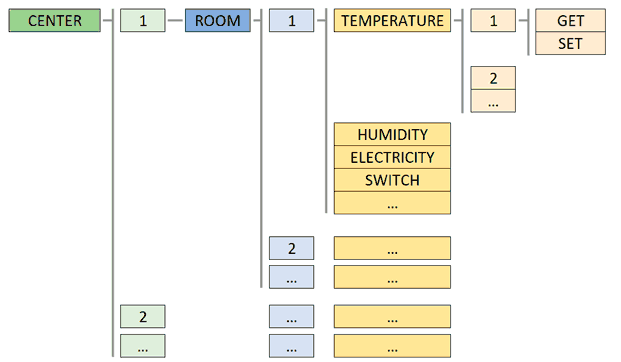
You will see that we have left specific roots for Building (center) and Room. Each of them follows an identifier, in this case numeric, although for simplicity you can replace it with text (CasaA, CasaB, Salon, Cocina).
By putting a root, we leave room to add new “families”, such as common infrastructure like lighting, which is not associated with any building.
Subsequently, we define the different “subfamilies” of devices (temperature, light, etc.). Finally, we end with the possible actions for each device. For example, a hypothetical temperature device could allow reading the temperature or setting it.
This is one of many possible structures, and you are free to modify it according to your needs. For example, it might be interesting to add a new “Floor” level. But the concept of spending some time planning the Topic system before distributing devices “wildly” is understood.
That’s all for this post dedicated to Topics in MQTT and their use. In the next post of this IoT section, we will see some of the main MQTT Brokers. See you soon!
