

A Circular Buffer or Ring Buffer is a data structure that uses a single fixed-size buffer as if its ends were connected, forming a circle.
To create the sensation of circularity, we use a “little trick”. Basically, we use memory, but when we reach the end of it, we jump to the beginning (and vice versa).

Where to use it? Imagine you have to process data that arrives non-stop (like audio, keystrokes, or sensor data).
Your computer’s memory is finite, but the data stream is potentially infinite. How do you manage it efficiently and without crashing your computer? This is where the Circular Buffer comes in.
Why use a Circular Buffer?
Why complicate our lives, and not simply use a dynamic list (List<T> or Vector) and keep deleting the first element? For performance.
Constant O(1) Complexity
Inserting and reading always costs the same. There’s no need to resize the array or move memory elements. Deleting the first element of a normal Array forces you to shift all other elements one position to the left (). In the Circular Buffer, we only move a pointer.
No Dynamic Allocation
Since it has a fixed size from the beginning, we are not constantly requesting and freeing memory from the Operating System. This is vital in embedded systems or high-speed systems.
Cache Friendly
Being a contiguous array in memory, it gets along very well with the processor’s cache.
How does it work? The rich theory of pointers
Physically, in RAM memory, it’s still a normal linear array. The “circularity” is a pure mathematical trick that we apply.
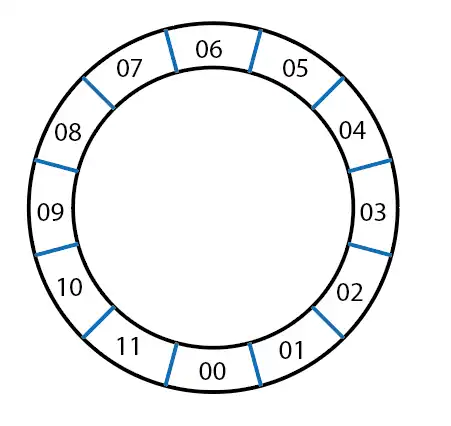
To manage this ring, we don’t move the data around (that would be very slow). What we move are two indices (or pointers):
- Head (Write): Indicates where we will write the next incoming data.
- Tail (Read): Indicates from where we will read the next data to process it.
Of all the available array, the “live” data are the ones between the tail and the head.
The lifecycle of the indices
Let’s see how all that mess (which isn’t that much) of indices works, which is the clever part behind the Circular Buffer.
Start: Head and Tail are at position 0. The buffer is empty.
Write: We add data and advance the Head. 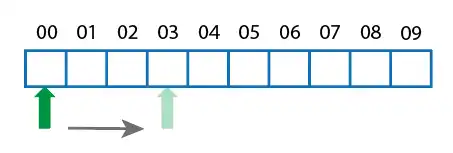
Read: We consume data and advance the Tail.
The Wrap: If the Head reaches the end of the array, it automatically jumps to position 0 (as long as there is space). 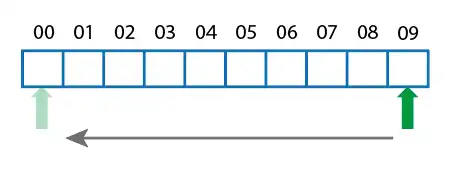
The Overflow Problem: Block or Overwrite?
The critical situation in a Circular Buffer occurs when the Head catches up to the Tail from behind. That is, we have filled the buffer.
Here we have two design philosophies, depending on what you use the buffer for:
“Don’t lose anything” Mode (E.g., Keyboard, communications):
If the buffer is full, we reject new data or block the write process until someone reads and frees up space. We cannot afford to lose a key the user has pressed.
”Always the newest” Mode (E.g., Real-time audio, sensors):
If the buffer is full, the Head overwrites what’s at the Tail and pushes the Tail forward.
I’d rather have the sensor data from 1 millisecond ago than one from 10 minutes ago that I couldn’t process.
Implementation of a circular buffer in different languages
Although the concept is universal, the implementation varies by language. Next, we will see examples in several popular languages.
In Python, we can implement a circular buffer using a list and two indices.
class CircularBuffer:
    def __init__(self, size):
        self.size = size
        self.buffer = [None] * size
        self.read_ptr = 0
        self.write_ptr = 0

    def insert(self, dato):
        self.buffer[self.write_ptr] = dato
        self.write_ptr = (self.write_ptr + 1) % self.size
        if self.write_ptr == self.read_ptr:
            self.read_ptr = (self.read_ptr + 1) % self.size

    def extract(self):
        if self.read_ptr == self.write_ptr:
            return None  # Buffer vacío
        dato = self.buffer[self.read_ptr]
        self.read_ptr = (self.read_ptr + 1) % self.size
        return dato

# Ejemplo de uso
buffer = CircularBuffer(5)
buffer.insert(1)
buffer.insert(2)
print(buffer.extract())  # Salida: 1
print(buffer.extract())  # Salida: 2
In C++, we can implement a circular buffer using an array and two indices.
#include <iostream>
#include <vector>

class CircularBuffer {
public:
    CircularBuffer(int size) : size(size), buffer(size), read_ptr(0), write_ptr(0) {}

    void insert(int dato) {
        buffer[write_ptr] = dato;
        write_ptr = (write_ptr + 1) % size;
        if (write_ptr == read_ptr) {
            read_ptr = (read_ptr + 1) % size;
        }
    }

    int extract() {
        if (read_ptr == write_ptr) {
            return -1;  // Buffer vacío
        }
        int dato = buffer[read_ptr];
        read_ptr = (read_ptr + 1) % size;
        return dato;
    }

private:
    int size;
    std::vector<int> buffer;
    int read_ptr;
    int write_ptr;
};

int main() {
    CircularBuffer buffer(5);
    buffer.insert(1);
    buffer.insert(2);
    std::cout << buffer.extract() << std::endl;  // Salida: 1
    std::cout << buffer.extract() << std::endl;  // Salida: 2
    return 0;
}
In Java, we can implement a circular buffer using an array and two indices.
public class CircularBuffer {
    private int size;
    private int[] buffer;
    private int readPtr;
    private int writePtr;

    public CircularBuffer(int size) {
        this.size = size;
        this.buffer = new int[size];
        this.readPtr = 0;
        this.writePtr = 0;
    }

    public void insert(int dato) {
        buffer[writePtr] = dato;
        writePtr = (writePtr + 1) % size;
        if (writePtr == readPtr) {
            readPtr = (readPtr + 1) % size;
        }
    }

    public int extract() {
        if (readPtr == writePtr) {
            return -1;  // Buffer vacío
        }
        int dato = buffer[readPtr];
        readPtr = (readPtr + 1) % size;
        return dato;
    }

    public static void main(String[] args) {
        CircularBuffer buffer = new CircularBuffer(5);
        buffer.insert(1);
        buffer.insert(2);
        System.out.println(buffer.extract());  // Salida: 1
        System.out.println(buffer.extract());  // Salida: 2
    }
}
In JavaScript, we can implement a circular buffer using an array and two indices.
class CircularBuffer {
    constructor(size) {
        this.size = size;
        this.buffer = new Array(size);
        this.readPtr = 0;
        this.writePtr = 0;
    }

    insert(dato) {
        this.buffer[this.writePtr] = dato;
        this.writePtr = (this.writePtr + 1) % this.size;
        if (this.writePtr === this.readPtr) {
            this.readPtr = (this.readPtr + 1) % this.size;
        }
    }

    extract() {
        if (this.readPtr === this.writePtr) {
            return null;  // Buffer vacío
        }
        const dato = this.buffer[this.readPtr];
        this.readPtr = (this.readPtr + 1) % this.size;
        return dato;
    }
}

// Ejemplo de uso
const buffer = new CircularBuffer(5);
buffer.insert(1);
buffer.insert(2);
console.log(buffer.extract());  // Salida: 1
console.log(buffer.extract());  // Salida: 2
