

LISTS, or dynamic arrays, are data structures similar to ARRAYS, but with variable size. Unlike arrays, in a list we can add or remove elements as needed.
That is, we have the same operations we would have in a fixed-size array. But they incorporate the additional functionality of,
- Adding elements
- Removing elements
LISTS offer a simple way to store data, allowing us to add, remove, and access elements. This makes them ideal for handling data collections where the structure can change over time.
Properties
| Property | List |
|---|---|
| Frequency of use | 🔺🔺 |
| Is mutable | ✔️ |
| Is ordered | ✔️ |
| Is indexable | ✔️ |
| Allows duplicates | ✔️ |
When to use a list
The main use of LISTS is to work with them. It’s your favorite collection for working with collections.
A LIST has all the functionalities of an ARRAY plus the ability to add and remove objects. Therefore, they are much more powerful and versatile.
When not to use them? In general, it’s advisable to avoid them for passing or returning collections between functions. For that, it’s better to use a fixed-length ARRAY.
List examples in different languages
Syntax and declaration of a list
The syntax for declaring a list can vary depending on the programming language being used. Let’s see some examples in different languages,
List<int> numbers = new List<int>();
#include <vector>

std::vector<int> numbers;
let numbers = [];
names = []
In the previous examples, we create empty lists that can store elements of a specific type, such as integers in the case of C# and C++, and of variable type in the case of JavaScript and Python.
Access and manipulation of lists
Once we have declared a list, we can access and manipulate its elements similarly to how we would with an array.
Adding elements to a list
numbers.Add(10); // Adds the element 10 to the list
numbers.Add(20); // Adds the element 20 to the list
numbers.push(10); // Adds the element 10 to the list
numbers.push(20); // Adds the element 20 to the list
numbers.push(10); // Adds the element 10 to the list
numbers.push(20); // Adds the element 20 to the list
names.append(10)  # Adds the element 10 to the list
names.append(20)  # Adds the element 20 to the list
Removing an element from a list
numbers.Remove(10); // Removes the first occurrence of the element 10
numbers.RemoveAt(2); // Removes the element at position 2
numbers.erase(numbers.begin() + 2); // Removes the element at position 2
numbers.splice(2, 1); // Removes 1 element starting from position 2
names.remove(10)  # Removes the first occurrence of the element "10"
del names[2]  # Removes the element at position 2
Efficiency of lists intermediate
LISTS share efficiency parameters with their siblings, ARRAYS. Because, internally, they are usually an array.
| Operation | List |
|---|---|
| Sequential access | 🟢 |
| Random access | 🟢 |
| Add at beginning | 🔴 |
| Remove at beginning | 🔴 |
| Add at end | 🟡 |
| Remove at end | 🟢 |
| Random insertion | 🔴 |
| Random removal | 🔴 |
| Search | 🔴 |
However, we now have the ability to add and remove elements. Removing an element at the end of the collection is O(1), as we only have to reduce the element counter.
Adding an element at the end can be O(1), if the list has available capacity. If it happens to be full, the list will have to expand, which is an O(n) operation.
Finally, adding or removing an element at the beginning or in the middle of the collection is O(n), because the list has to shift all elements to place / remove the new element.
If you want to know more, check out this entry
Internal operation
Internally, a LIST is usually implemented as an object around an ARRAY. This object contains:
- The data array
- The list’s capacity
- The number of elements
When creating a LIST, the internal array is initialized to a certain size, which is the list’s capacity.
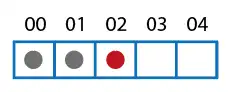
As we add elements, the list keeps track of the array positions we are using.
If at any point the number of elements equals the list’s capacity:
- A new, larger array is generated (typically double the size)
- The elements from the previous array are copied
- Upon completion, the previous array is destroyed
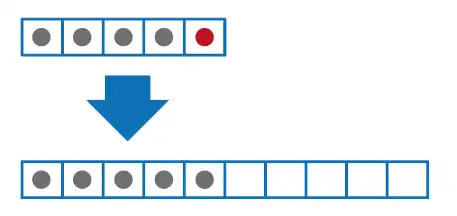
This is done transparently for the programmer, so we don’t have to worry about memory management.
